The TCP/IP model is a four-layer communication model that breaks down network communication into manageable pieces. This layered approach standardizes how devices exchange data without locking you into specific vendors. As a result, organizations save time and money while maintaining reliable, interoperable communication.
4 layers of the TCP/IP Model
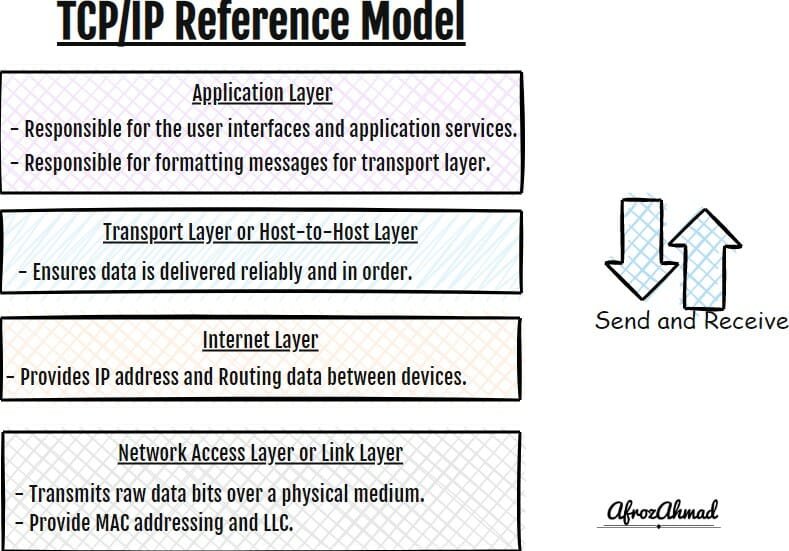
Network Access Layer (Layer 1): Link/physical access to the medium; framing and MAC addressing. Typical protocols/tech: Ethernet, Wi‑Fi, PPP; PDU: Frame (bits on the wire).
Internet Layer (Layer 2): Logical addressing and routing; best‑effort delivery between networks. Typical protocols: IPv4/IPv6 and ICMP/ICMPv6; PDU: Packet/Datagram.
Transport Layer (Layer 3): End‑to‑end transport for applications. Typical protocols: TCP (reliable stream), UDP (datagram), and QUIC (modern transport over UDP used by HTTP/3); PDU: Segment (TCP) / Datagram (UDP).
Application Layer (Layer 4): Application services and protocols used by end users and apps. Examples: HTTP/HTTPS, HTTP/3, DNS, SMTP, FTP; PDU: Data/Message.
Jump straight to details of 4 layers of TCP/IP layers
Keep on reading to get an in-depth knowledge of the 4 layers of the TCP/IP model.
I would suggest you read about the OSI model, OSI model cheat sheet Infographic, IP subnetting, VLANs, and VLAN tagged vs. untagged topics to grasp the basic understanding of networking.
What is TCP IP full form?
TCP/IP stands for Transmission Control Protocol/Internet Protocol. TCP/IP reflects two foundational protocols in the suite. IP delivers packets between hosts across networks, while TCP provides a reliable, ordered byte stream between applications on top of IP. You can learn more about Routing in our dedicated guide.
What is a TCP IP model?
The TCP/IP model is a conceptual model used to describe the functions of a networking system and how data travels from one device to another over a network.
It is a hierarchical model that divides these functions into four abstraction layers—Application, Transport, Internet, and Network Access—to describe the structure of communication networks.
The TCP/IP model is often compared to the OSI model, which is a similar conceptual model for networking. The OSI model has 7 layers compared to the 4 layers of the TCP/IP model.
History of TCP IP model
Listed below are some key points that aided in the advancement of the TCP/IP model:
- TCP/IP was designed in the 1970s (with the first TCP specification published in 1974), refined through late‑1970s experiments, and broadly adopted in the early 1980s.
- Notable early demos included a 1976 two‑network test between SRI’s Packet Radio Van and the ARPANET, followed by the 1977 three‑network TCP/IP demonstration linking ARPANET, PRNET, and SATNET (which involved UCL).
- In March 1982, the U.S. Department of Defense (DoD) declared TCP/IP as the standard for all military computer networking, accelerating adoption.
- ARPANET completed its transition to TCP/IP on January 1, 1983 (often called the “Flag Day”).
- Companies like IBM, DEC, and others later adopted TCP/IP as their standard communication protocol.
- Berkeley’s 4.2BSD (1983) shipped with a TCP/IP stack that helped popularize Internet protocols; later BSD releases expanded adoption.
- Over time, the TCP/IP model became the global standard for computer networking and Internet communication.
What are the advantages and disadvantages of TCP IP?
Advantages of TCP/IP Model
There are many advantages of the TCP/IP model.
- It is a very flexible and scalable model and can be used in small, medium, and large networks.
- TCP/IP is also a very reliable model. It is designed to be robust and to handle a large amount of data without losing information.
- It uses a modular approach, making it easy to add new features and services.
- It uses a layered approach, which makes it easier to understand and troubleshoot.
- It supports many routing protocols.
Disadvantages of TCP/IP model
Some of the disadvantages of the TCP/IP model include:-
- The TCP/IP model effectively gets a message from point A to point B. However, this model is not always the best choice for teaching or documentation; sometimes the OSI model is used to explain concepts in more granular detail.
- Each layer of TCP/IP has its own set of protocols that govern how data is transmitted and received, which can be difficult to understand and manage for newcomers.
- The TCP/IP model is a logical model that doesn’t necessarily correspond to a network’s physical structure, which can create confusion.
- It can sometimes be difficult to troubleshoot problems at each layer because of the interactions between various protocols.
What are the 4 layers of the TCP IP model?
The TCP/IP reference model has four layers:
- Network Access Layer or Link Layer
- Internet Layer
- Transport Layer or Host to Host Layer
- Application Layer
Each layer is responsible for different aspects of communication. For example, the Network Access Layer is responsible for link access and framing, while the Internet Layer handles routing and IP addressing. The Transport Layer provides end‑to‑end transport for applications, and the Application Layer provides services such as email and web browsing.
Network Access Layer or Link Layer
The Network Access layer is the first and lowest layer of the TCP/IP model, and it combines the functionalities of the Physical and Data Link layers as described in the OSI model.
The Network Access layer of the TCP/IP model uses switches, bridges, and network interfaces to connect devices and pass frames within the same network segment. Modern media include Ethernet (Cat5e/6/6A/7/8), fiber (single‑mode/multimode), and Wi‑Fi; legacy technologies such as Token Ring and RS‑232 may still appear in historical contexts. The primary data units here are bits on the wire and frames. Common link technologies include Ethernet, Wi‑Fi, and PPP.
This layer defines how data is transmitted over the local medium and how logical addresses are resolved to link addresses. IPv4 uses 32‑bit addresses and ARP to map IP to link‑layer (e.g., MAC) addresses. IPv6 uses 128‑bit addresses and Neighbor Discovery for link‑layer resolution. Hosts on this layer are identified by MAC addresses when operating on Ethernet‑like links.
What are the functions of the Network Access layer?
These are the functions of the Network Access Layer:-
- Access to the physical network medium, like cables and wireless.
- Providing MAC addressing and mapping of logical IP addresses to physical MAC addresses (ARP for IPv4, Neighbor Discovery for IPv6).
- Error notification on the local link.
- Sequencing and delivery of frames on the local segment.
- Local flow control on the link where applicable.
Internet Layer
The Internet layer is the second layer of the TCP/IP model, and it is equivalent to the Network layer in the OSI model. Its primary function is to provide IP addressing and routing. IP offers a best‑effort packet delivery service. Error reporting is handled by ICMP, while congestion control is handled by transport protocols (e.g., TCP). QoS uses IP header markings such as DSCP, which network devices can enforce. For IPv4, the header includes a Time‑to‑Live (TTL) field; for IPv6, the analogous field is Hop Limit. Routers are used on this layer, and the data unit is a packet (datagram).
What are the functions of the Internet layer?
These are the functions of the Internet Layer:-
- Source‑to‑destination delivery of packets across multiple networks, including routing through intermediate routers.
- Providing an IP addressing scheme (IPv4 and IPv6) that uniquely identifies each host.
- Fragmentation and reassembly of IPv4 datagrams when required by MTU constraints.
- Managing hop count via IPv4 TTL or IPv6 Hop Limit fields.
- Carrying source and destination addresses used to forward packets between IP networks.
- Supporting diagnostics via ICMP/ICMPv6; QoS markings via DSCP can be applied and enforced by network devices.
Transport Layer or Host to Host Layer
The Transport layer is the third layer of the TCP/IP model and aligns with the Transport layer of the OSI model. It ensures data is delivered between applications in sequence, error‑checked, and without loss or duplication when a reliable service is used.
Security devices operate across layers: packet filtering and stateful inspection commonly act at the network/transport layers, while application proxies and next‑generation firewalls operate at the application layer. The primary data units here are the Segment (TCP) and Datagram (UDP). Protocols include TCP, UDP, and modern QUIC (a transport running over UDP). HTTP/3 uses QUIC by design.
TCP is a reliable, connection‑oriented protocol that ensures data is delivered correctly and in order. UDP is a connectionless protocol that does not guarantee delivery or ordering. QUIC provides stream multiplexing, integrated security, and improved latency characteristics for many web applications.
This layer provides reliable, in‑order delivery (when applicable) and multiplexes/demultiplexes data streams between applications using port numbers.
What are the functions of the Transport Layer?
- Segmentation of messages from the Application layer into transport units (numbered for sequencing) before passing them to the Internet layer.
- Ensuring correct, in‑sequence delivery to the destination application via error detection, retransmission (for reliable transports), and reordering.
- Providing end‑to‑end communication services for applications.
- Providing reliability features such as flow control and congestion control (e.g., in TCP and QUIC).
Application Layer
The Application layer is the fourth layer of the TCP/IP model, and it combines the functionalities of the Session, Presentation, and Application layers of the OSI model. It provides the interface between the application and the network.
It is responsible for presenting data to the user and enabling application services. Applications such as Web browsers and FTP/Email clients are used on this layer. Its data unit is typically referred to as Data/Message, and common Application layer protocols include HTTP, HTTPS (including HTTP/3), DNS, SMTP, and FTP.
What are the functions of the Application layer?
- Providing user interfaces and application services.
- User interfaces can include command‑line, menu‑driven, and graphical user interfaces.
- Application services include e‑mail, file transfer, remote login, and the Web.
- Formatting messages so that underlying transport services can carry them and ensuring messages are properly received and interpreted by the receiving application.
- Ensuring that data is delivered to the correct application process (via ports and application protocols).
Common protocols associated with each layer of the TCP/IP model
The TCP/IP model is a four-layer model that consists of the Application, Transport, Internet, and Network Access layers.
- The Application layer protocol suite includes HTTP/HTTPS (including HTTP/3), FTP, SMTP, and DNS.
- Standard protocols associated with the Transport layer include TCP, UDP, and QUIC.
- The Internet layer includes IPv4/IPv6 and ICMP/ICMPv6; QoS markings such as DSCP are carried in the IP header.
- The Network Access layer includes protocols and technologies like Ethernet, Wi‑Fi, PPP, and address resolution mechanisms such as ARP (IPv4) and Neighbor Discovery (IPv6).
How Data Flows Through the TCP/IP Model
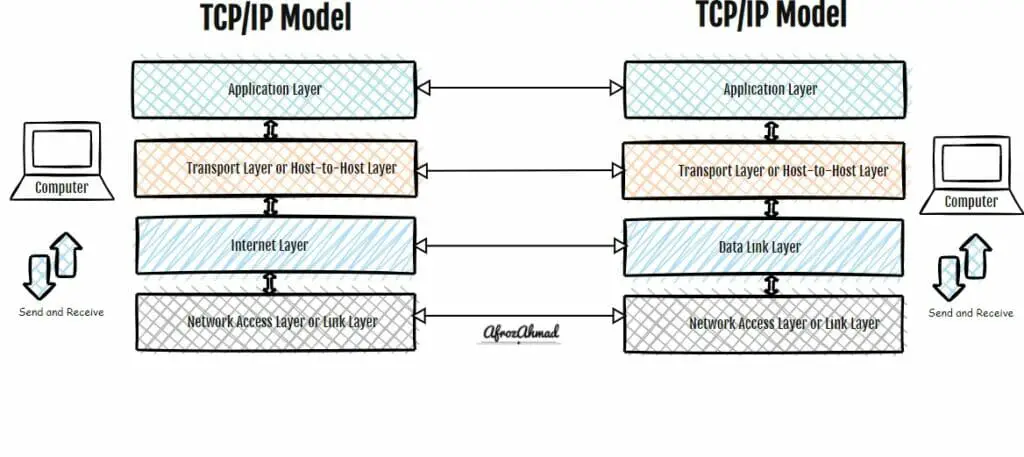
Similar to the OSI model, in the TCP/IP model, data flows through the layers in a serial fashion. Each layer takes the data it receives from the layer above it, adds its own headers (and trailers where applicable), and passes the resulting data down to the next layer.
For example, when a web browser talks to a web server, data flows from top to bottom through the Application layer, the Transport layer, the Internet layer, and the Network Access layer. Each layer encapsulates the data with its own header before handing it off.
On the receiving side (the web server), data flows from the Network Access layer up through the Internet and Transport layers to the Application layer, where it is presented to the application.
How can the TCP/IP model be used to troubleshoot networking issues?
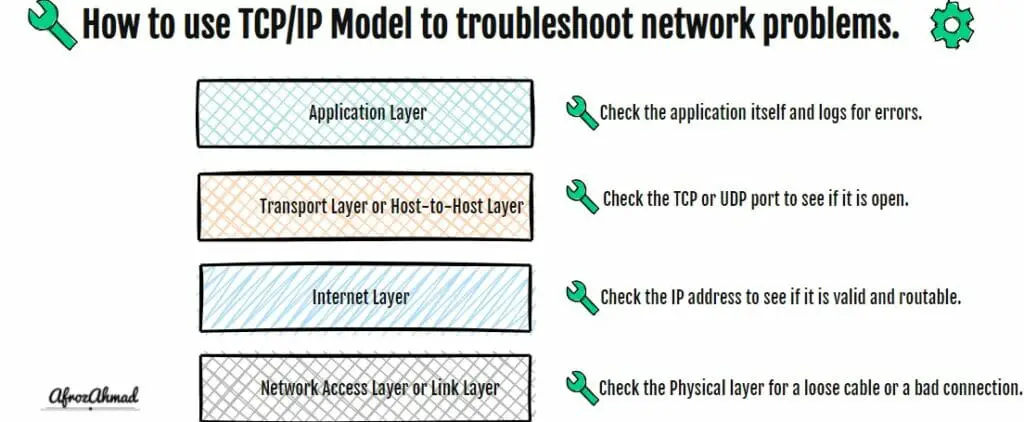
The TCP/IP model can be used to troubleshoot networking issues by identifying the problem at each layer and then resolving it. For example:-
- If there is a problem with the network interface or signal, check the Network Access layer for a loose cable, bad connector, Wi‑Fi interference, or switch/port issues.
- If the problem is at the Internet layer, verify addressing and routing (IPv4/IPv6 configuration, default gateway, subnet, and reachability).
- If the problem is at the Transport layer, verify TCP/UDP ports and state (listening services, firewalls, or policies affecting flows).
- If the problem is at the Application layer, check the application/service itself for errors or misconfiguration.
See also: TCP/IP vs OSI Model
Conclusion
The TCP/IP model has proven to be a robust and flexible architecture that you can use in various network types. Therefore, it is crucial to understand the different layers of the TCP/IP model and how they interact with each other to troubleshoot problems and optimize network performance. We have touched on almost all aspects of the TCP/IP model in this article; let me know if you want me to add anything else.
You can refer to TCP/IP RFC 1180 as a historical tutorial. For core specifications and modern practices, consult the current host requirements and IP/ICMP/IPv6 standards.

- DOCSIS Explained: 3.0 vs 3.1 vs 4.0 and What Sets Your Real Speed - September 29, 2026
- Router Lights Explained: What the Colours Mean on Any Router - September 28, 2026
- eero Light Is White but There Is No Internet: What to Check - September 28, 2026