
TP-Link TL-SG108E and Netgear GS308E live in the same price range and chase the same question: TP-Link TL-SG108E vs Netgear GS308E — Best Budget Smart Switch? Both are smart managed switches with VLANs and QoS, but without the heavy command line and licensing overhead of enterprise gear. For home labs, small offices, and serious home networks, this single choice shapes how far the network can grow and how stressful it is to fix when something breaks.
Both models share 8 Gigabit ports, silent fanless metal cases, and simple web interfaces. On paper they look almost identical, yet real-world differences emerge in feature implementation and management philosophy. While both include port mirroring for diagnostics, TP-Link exposes more granular control and supports static link aggregation (LAG) on the TL‑SG108E. Netgear counters with support for more VLANs and a reputation for stability in set-and-forget deployments, but note that the GS308E does not support link aggregation/port trunking.
I have spent more than 18 years designing and fixing networks, from home setups to carrier and ISP cores. I like gear that teaches good habits, exposes how packets really move, and still fits a tight budget. By the end of this guide you should know which switch suits a home lab, which fits a “set it once” small office, when the TP-Link feature set matters, and when the safer bet is the Netgear badge on the front.
Key Takeaways
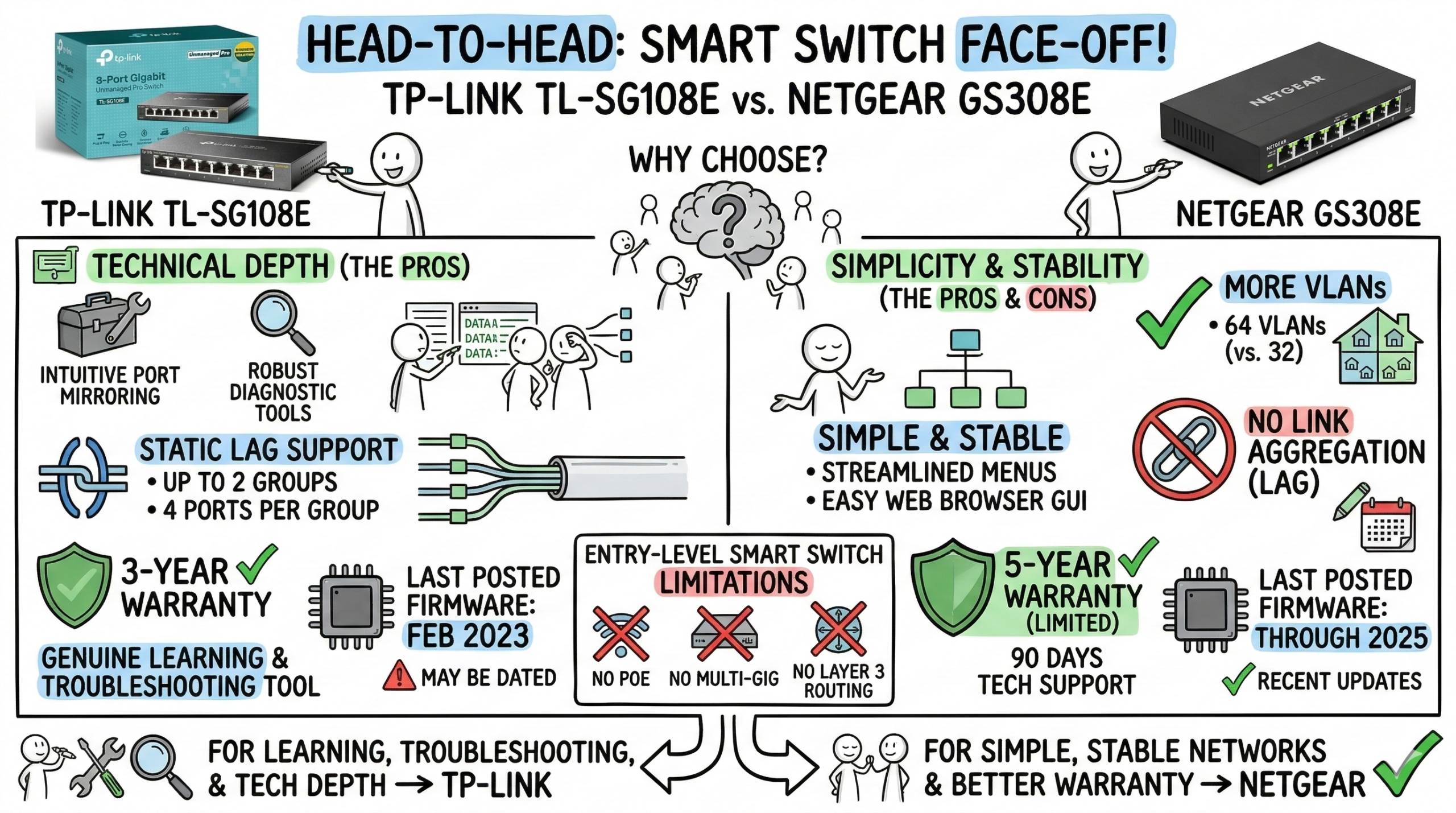
- TP-Link TL-SG108E gives more technical depth for roughly the same money, with intuitive port mirroring controls and robust diagnostic tools plus static LAG support (up to 2 groups, 4 ports per group). That visibility turns a basic 8‑port managed switch into a genuine learning and troubleshooting tool. For students, home labs, and IT pros who regularly capture traffic, the management interface’s transparency often matters more than incremental spec differences.
- Netgear GS308E works best where networks stay simple and stable. It brings VLANs, QoS, and IGMP snooping, supports more VLANs (64 vs. 32), and keeps menus streamlined. It is managed via a web browser GUI (with an optional PC utility for discovery), but does not support link aggregation, so plan single-uplink topologies accordingly.
- Warranties (U.S.): GS308E carries a 5‑year limited hardware warranty (with 90‑days free technical support), while TL‑SG108E typically carries a 3‑year warranty. If you value longer coverage, the Netgear is the steadier pick.
- Firmware status: TL‑SG108E’s most recent posted firmware for common hardware revisions is from February 2023, while GS308E shows releases through 2025. Check your exact hardware version and update before deployment.
- Both switches lack PoE, multi‑gig, and Layer 3 routing, so they remain entry‑level smart switches. If the plan includes Wi‑Fi 6/6E/7 access points needing PoE, 10GbE storage, or centralized management, higher‑class hardware is the right move. For everyone else, the choice comes down to one question: Will deep troubleshooting and learning ever matter?
| TP-Link 8-Port Gigabit Easy Smart Switch (TL-SG108E) | 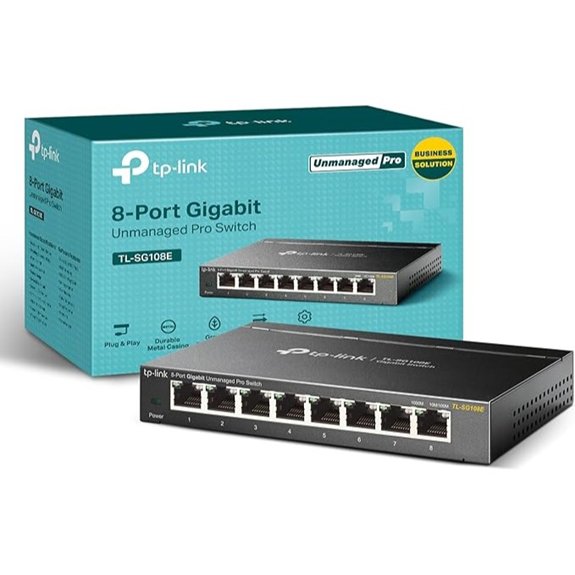 | Best for Power Users | Port count: 8 Gigabit Ethernet ports | Management level: Easy Smart (basic managed via web/utility) | Mounting options: Desktop or wall mount | VIEW LATEST PRICE | Read Our Analysis |
| NETGEAR 8-Port Gigabit Ethernet Plus Switch (GS308E) | 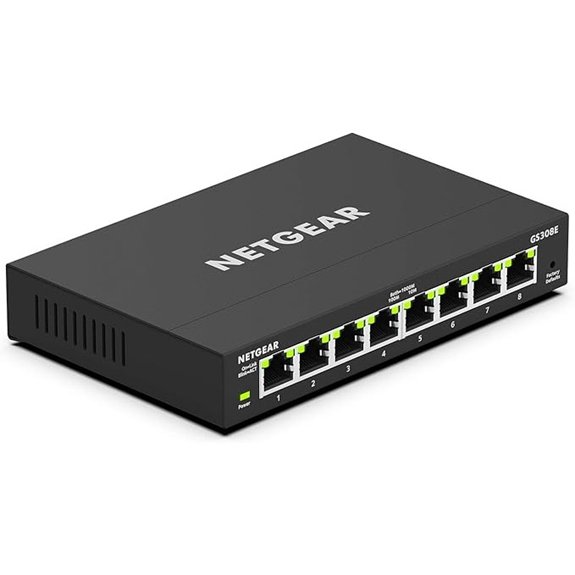 | Simple, Reliable Pick | Port count: 8 Gigabit Ethernet ports | Management level: Plus Switch (web GUI with optional PC utility) | Mounting options: Desktop or wall mount | VIEW LATEST PRICE | Read Our Analysis |
More Details on Our Top Picks
TP-Link 8-Port Gigabit Easy Smart Switch (TL-SG108E)
If you’re looking for an affordable way to clean up a small home or office network without diving into full-on enterprise gear, the TP-Link 8-Port Gigabit Easy Smart Switch (TL-SG108E) is a strong starting point. You get eight Gigabit ports, so you can plug in PCs, printers, access points, or even a NAS and keep everything wired and fast.
You manage it through a simple web interface or free software, where you can set up VLANs, basic QoS, link aggregation, and IGMP snooping. The metal case feels sturdy, it’s desktop or wall‑mountable, and the 3‑year warranty adds peace of mind.
- Port count:8 Gigabit Ethernet ports
- Management level:Easy Smart (basic managed via web/utility)
- Mounting options:Desktop or wall mount
- Warranty:3-year warranty
- Network monitoring:Port mirroring, cable diagnostics, loop prevention
- QoS / traffic control:QoS support for traffic optimization
- Additional Feature:VLAN support (32 VLANs)
- Additional Feature:Static link aggregation (up to 2 groups, 4 ports/group)
- Additional Feature:Sturdy all-metal housing
NETGEAR 8-Port Gigabit Ethernet Plus Switch (GS308E)
NETGEAR’s 8-Port Gigabit Ethernet Plus Switch (GS308E) is a smart pick when you want more control than a basic “plug-and-play” switch, but you’re not ready to plunge into full-blown enterprise gear. You get eight Gigabit Ethernet ports, so it’s easy to wire up PCs, consoles, smart TVs, and access points without juggling cables.
The Plus platform gives you simple managed features in a web browser, with an optional PC utility for discovery. It’s fanless and silent, great for bedrooms or offices, and you can place it on a desk or wall-mount it. Energy savings and a 5‑year limited hardware warranty (U.S.; 90‑days free technical support from purchase) round things out.
- Port count:8 Gigabit Ethernet ports
- Management level:Plus Switch (web GUI with optional PC utility)
- Mounting options:Desktop or wall mount
- Warranty:5-year limited hardware warranty; 90-days free technical support
- Network monitoring:Monitoring via Plus management interface (basic managed monitoring)
- QoS / traffic control:Basic QoS/traffic configuration via Plus software
- Additional Feature:Energy-efficient IEEE802.3az
- Additional Feature:Silent fanless operation
- Additional Feature:Home/office hub splitter
What Makes Smart Managed Switches Essential in 2026
Smart managed switches sit between unmanaged plug‑and‑play boxes and full enterprise switches. They add the core tools that shape traffic—VLANs, QoS, basic diagnostics—yet keep management inside a simple web page. That balance makes them ideal budget choices for homes and small businesses.
Modern home networks often host:
- Laptops and desktops
- Phones and tablets
- Smart TVs and game consoles
- IP cameras and IoT gear
Placing everything in one flat network adds noise and risk. A VLAN‑capable switch lets you:
- Separate cameras from work laptops
- Keep guest devices away from shared storage
- Reserve a small management segment for routers, switches, and controllers
For students working on CCNA or CCIE, and for career changers, a small 8‑port managed switch behaves like trimmed‑down enterprise equipment. It teaches VLAN tags, trunk ports, link aggregation, and QoS in a real, hands‑on way without paying for chassis hardware.
Even as 2.5G and 10G links spread, eight Gigabit ports still cover many use cases. Most internet links stay under 1 Gbps, and many desktops, printers, and IoT devices do not need more. An 8‑port Gigabit smart switch is often the right first step: it adds control and security now and can sit behind a faster core later if the network grows.
TP-Link TL-SG108E vs Netgear GS308E: Core Specifications Breakdown
Both switches share a long list of hardware traits, which is why they appear together in almost every budget managed switch comparison. Each unit offers eight Gigabit ports, fanless cooling, and solid metal construction. The real differences start to show once you look at VLAN capacity and link aggregation support.
Here is a quick side‑by‑side view.
| Feature | TP-Link TL-SG108E | Netgear GS308E |
|---|---|---|
| Switch Type | 8‑port Gigabit smart managed | 8‑port Gigabit smart managed |
| Port Speed | 10/100/1000 Mbps auto‑negotiation | 10/100/1000 Mbps auto‑negotiation |
| Auto MDI/MDIX | Yes on all ports | Yes on all ports |
| Chassis | Metal, desktop, fanless | Metal, desktop, fanless |
| Power Consumption (Typical) | Low single‑digit watts | Low single‑digit watts |
| Energy Efficient Ethernet | IEEE 802.3az support | IEEE 802.3az support |
| Management | Web GUI, no full CLI | Web GUI (optional Plus/Discovery utility) |
| VLAN Support | Up to 32 VLANs (2‑4094) | Up to 64 VLANs (2‑4094) |
| Link Aggregation | Static LAG (up to 2 groups, 4 ports/group) | Not supported |
| Port Mirroring | Yes | Yes |
| PoE Support | No | No |
| Warranty In US | Limited (typically 3‑year) | 5‑year limited hardware warranty; 90‑days free tech support |
Both vendors provide firmware through their support sites, and updates upload through the web interface. TL‑SG108E (V6/V6.6) shows a latest posted firmware 1.0.0 Build 20230218 (published February 20, 2023), while GS308E firmware releases are available through 2025 for recent hardware revisions. For readers purchasing in 2026, verify the hardware version on the device label and check the official support pages before purchase to confirm active maintenance.
Port Configuration And Physical Design
Each switch offers eight RJ45 ports that auto‑negotiate 10/100/1000 Mbps and support auto MDI/MDIX, so you never need to worry about crossover cables. That helps when the device is moved between roles or tossed in a drawer and reused years later.
The metal housing on both units matters for long‑term use: it resists flex and heat better than plastic and works with the fanless design to move heat away from components. Silence is a big win in home offices or living rooms where a small switch may sit near desks or TV stands.
Both TL‑SG108E and GS308E typically ship with rubber feet and mounting holes. You can drop them on a desk or screw them under a shelf for cleaner cable runs. With eight ports clustered along one edge, good labels and Velcro wraps keep an 8‑port switch neat.
Management Interface And Access
Out of the box, both models behave like unmanaged switches until you open the web interface. A device on the same subnet can reach the switch at its default IP (either fixed from the manual or handed out by DHCP). Once you find that address, the web GUI handles every feature. On the GS308E, management is intended to be browser‑based, with Netgear’s optional PC utility primarily used for discovery.
Neither switch offers a full command line or deep SNMP features, which is normal for this price class. All core actions happen in the browser:
- Defining VLANs
- Assigning ports as access or trunk
- Building link aggregation groups
- Adjusting QoS
- Saving and restoring backups
For security, the first step should always be changing the default password. Many admins also place the management IP in a small management VLAN reachable only from trusted hosts. Firmware updates should be done from a wired PC, with stable power, so the process is not interrupted.
TP‑Link provides multiple support channels: 24/7 live chat for home products and business phone support for Easy Smart/SMB from 6 AM–6 PM PST, Monday–Friday. Netgear offers community forums and ticket‑based support for this product tier. For mission‑critical small office deployments, TP‑Link’s defined availability windows provide clearer escalation paths, though both vendors maintain active community support.
Feature-By-Feature Comparison: What Really Matters
On the surface, both switches tick the same boxes: VLANs, QoS, IGMP snooping, link-layer diagnostics, and simple management. That is enough to call either one a smart switch for home lab or small business use.
The difference appears when you look at how these features feel in daily use. VLAN handling and QoS are similar between brands, but TP‑Link holds a clear edge in diagnostic transparency and supports static LAG, which pushes the TL‑SG108E closer to a mini lab switch. The GS308E keeps to basic control with simpler menus and supports more VLANs for complex segmentation, but omits link aggregation.
VLAN Support: Network Segmentation Explained
Both switches support:
- Port‑based VLANs
- 802.1Q tagged VLANs
In practice, this lets you:
- Place ports into isolated groups (for cameras, IoT, work PCs, guests)
- Carry multiple VLANs over a trunk toward a router or firewall
- Reserve a management‑only VLAN for infrastructure gear
Typical layouts might use:
- VLAN 10 – Office PCs and printers
- VLAN 20 – IP phones and VoIP gear
- VLAN 30 – IoT and cameras
- VLAN 40 – Guest Wi‑Fi
- VLAN 99 – Management
TP‑Link has faced criticism in the past for a “VLAN 1 leak” issue on some Easy Smart models, where frames from other VLANs could appear on VLAN 1. Newer firmware and hardware revisions addressed this class of bug, but it is still wise to keep firmware current and test isolation with simple ping and packet capture checks.
As the old admin joke goes, “It’s always DNS — unless it’s VLANs.”
For better security, avoid using VLAN 1 for user traffic, disable unused ports, and keep management on its own VLAN wherever possible.
Quality Of Service (QoS): Prioritizing Critical Traffic
Each switch offers basic QoS built around:
- 802.1p priority values
- Per‑port priority settings
Traffic marked with a higher priority enters higher queues inside the switch. That helps VoIP, video calls, and gaming during busy periods.
QoS options usually include:
- Port‑based priority (mark a VoIP phone port as “high”)
- Class‑based priority that honors 802.1p or DSCP marks from upstream gear
The setup screens are intentionally simple: choose a mode, set priorities for ports or classes, then save. Total bandwidth per port still tops out at 1 Gbps; QoS does not raise capacity, it just decides who waits when links are busy.
Port Mirroring: Diagnostic Capability Comparison
Both switches include port mirroring (SPAN) capabilities, a critical differentiator from unmanaged switches. The TP‑Link TL‑SG108E offers straightforward port mirroring configuration through its web interface, allowing you to mirror one or multiple source ports to a designated monitor port. A laptop on that monitor port can run Wireshark or another analyzer and see every frame that flows through those sources.
The Netgear GS308E also supports port mirroring for network diagnostics, enabling traffic analysis without additional hardware taps. Implementation is functional and browser‑based; the optional PC utility is helpful for initial discovery but is not required for daily management.
For lab environments where packet capture is frequent, verify the specific firmware version supports your required mirroring topology. For casual home users, either switch provides sufficient diagnostic capability. For students, engineers, and security‑minded users who capture regularly, TP‑Link’s more transparent interface saves time.
Port mirroring is the line between guessing at network issues and proving what truly happens on the wire.
As an instructor writing on the Afroz Ahmad blog, this is the feature that often makes me recommend the TL‑SG108E to readers who want to watch ARP behavior, DHCP, and TCP behavior in real time.
Real-World Use Cases: Which Switch Fits Your Network
Specs help, but the right choice depends on where the switch lives day to day. A home lab, a small clinic, and a coffee shop all stress the network in different ways.
In broad terms:
- TL‑SG108E fits people who log in regularly, test ideas, and capture traffic.
- GS308E fits people who configure VLANs once, check them once a year, and want as few dials as possible.
Best Scenarios For TP-Link TL-SG108E
The TP‑Link TL‑SG108E is an excellent fit for:
Home labs and students
- Running ESXi, Proxmox, or Hyper‑V with separate VLANs for management, storage, and guests
- Practicing CCNA / CCIE topics such as trunks, LAGs, and QoS
- Learning packet analysis with port mirroring and Wireshark
IT pros in small offices
- Tracing VoIP call drops or random disconnects by mirroring a phone or router port
- Capturing traces to prove whether issues stem from the network, app, or endpoint
Security‑aware home users
- Isolating cameras and smart speakers on their own VLAN
- Periodically sampling that traffic using port mirroring to see what those devices send
For readers who follow Afroz Ahmad tutorials and want maximum learning value from a small switch, TL‑SG108E offers a strong feature set per dollar.
Best Scenarios For Netgear GS308E
The Netgear GS308E shines when the goal is “configure and forget.” It suits:
Small businesses and clinics
- Simple separation between office PCs, guest Wi‑Fi, and payment terminals
- Owners who value a familiar brand and a very clean web GUI over advanced tools
Rental properties and retail spaces
- Installers can pre‑configure VLANs for cameras, Wi‑Fi, and point‑of‑sale once
- The switch can stay locked away with little ongoing attention
Basic home segmentation
- Users who only need VLANs for IoT isolation or a small NAS
- Environments where no one plans to run packet captures
If you want a quiet, compact 8‑port managed switch that adds basic control without extra complexity, the GS308E is a reasonable option.
Addressing The Elephant In The Room: TP-Link’s VLAN Security History
Any honest comparison has to touch on TP‑Link’s past VLAN concerns. Some earlier Easy Smart models, including certain revisions near the TL‑SG108E line, showed “VLAN 1 leak” behavior. Under specific setups, traffic from other VLANs could appear on VLAN 1, weakening isolation.
By early 2026, TP‑Link has:
- Acknowledged bugs of this type on affected models
- Released updated firmware to fix them
- Revised hardware in later runs
That history does not mean every TL‑SG108E has a problem, but it does increase the importance of firmware maintenance compared with the Netgear unit.
If I buy or recommend a TL‑SG108E, I follow this routine:
- Check the hardware version on the label
- Read release notes for the latest firmware on TP‑Link’s site
- Update the switch before any production use
- Test VLAN separation with pings and packet captures on the trunk
Other vendors—including big enterprise names—have shipped VLAN bugs as well. No vendor is perfect; the real difference lies in how fast they patch and how careful administrators stay.
For readers of my Afroz Ahmad content, I always stress that VLANs improve security but never replace firewalls, strong passwords, and good patch habits.
Beyond The Basics: Alternative Switches Worth Considering
Sometimes neither the TL‑SG108E nor GS308E quite fits. You might need PoE for cameras, 10GbE for storage, or deeper monitoring. In those cases, it helps to know where other gear slots in.
Notable alternatives include:
- D‑Link DGS‑1100‑08 – Another 8‑port Gigabit smart switch with VLANs, QoS, and a web interface. A solid choice if you prefer not to buy TP‑Link or Netgear.
- MikroTik CRS305‑1G‑4S+IN – A compact 10GbE switch with four SFP+ cages. Great as a backbone for servers and NAS, while a cheaper 8‑port switch feeds slower clients.
- Ubiquiti UniFi Switch 8 150W – An 8‑port PoE switch with central UniFi Controller management, helpful for camera and access‑point heavy setups. Availability note: this model is frequently listed as Sold Out on the Ubiquiti Store; consider current UniFi PoE alternatives if stock is limited.
- TP‑Link SG2210XMP‑M2 or Zyxel XMG1915‑10EP – Good options when multi‑gig links are needed for Wi‑Fi 6 or Wi‑Fi 7 routers and high‑speed clients.
When To Choose A Different Switch Entirely
You should look beyond the TL‑SG108E and GS308E if:
10GbE is part of the plan
- Storage servers or editing workstations need 10GbE at the core.
- The 8‑port switches can still sit at the edge, but not in the center of that design.
PoE is mandatory
- Access points, IP cameras, or VoIP phones need power from the switch.
- A real PoE switch keeps wiring clean and makes remote power cycling easier than juggling injectors.
Layer 3 routing or cloud control is required
- Designs that need static routing or dynamic protocols call for higher‑end switches from vendors like Cisco, Juniper, Aruba, or MikroTik.
- If you want a single cloud dashboard for many switches, cloud‑managed families beat any standalone 8‑port box.
Both TL‑SG108E and GS308E are solid budget smart switches for 2026. They bring VLANs, QoS, IGMP snooping, and link aggregation in compact, silent metal cases. For many home offices and small businesses, either will feel like a large step up from a basic unmanaged switch.
For most power users, I give a slight edge to the TP‑Link TL‑SG108E. Its diagnostic transparency and static LAG turn it into a low‑cost lab tool and a real asset when odd issues appear. For readers of the Afroz Ahmad blog who want to study packet behavior or prepare for CCNA and CCIE, that management clarity carries serious weight.
The Netgear GS308E still has a clear role. When a network only needs simple VLAN separation and basic QoS, its cleaner interface, higher VLAN limit (64 vs. 32), 5‑year warranty, and long‑standing brand reputation make life easier. Many owners will configure it once, save a backup, and then not touch it again for months.
Whichever switch you choose, get into the habit of:
- Checking for firmware updates a few times a year
- Setting strong admin passwords
- Using a simple VLAN plan that isolates IoT and guest gear
Those small steps raise security and reliability far more than any logo on the case.
FAQs
Question 1: Does The TP-Link TL-SG108E Support Layer 3 Routing?
No. The TL‑SG108E and GS308E both operate as Layer 2 switches only. They can create and carry multiple VLANs, but they cannot route between those VLANs. Inter‑VLAN routing must happen on a router or a true Layer 3 switch that understands tagged subinterfaces.
Question 2: Can I Use These Switches To Power PoE Devices Like IP Cameras Or Access Points?
No. Neither switch provides Power over Ethernet (PoE) on any port. They pass data only and cannot power cameras, access points, or VoIP phones. To add PoE you can:
- Use separate PoE injectors per device, or
- Move to a PoE‑capable switch such as a UniFi 8 150W or a similar model from another vendor.
Question 3: How Do I Update The Firmware On These Switches?
Both switches update through the web GUI:
- Download the latest firmware image from the TP‑Link or Netgear support site for your exact hardware version.
- Log in to the switch and open the firmware or maintenance page.
- Upload the file and start the upgrade.
- Wait for the switch to reboot; do not cut power during the process.
Use a current browser for the GS308E web GUI; if discovery is needed, use NETGEAR’s Discovery/Plus utility to locate the device. Always perform firmware updates over a wired connection directly to the switch, never through Wi‑Fi, and back up your configuration first.
Question 4: Can I Stack Multiple Switches Together For More Ports?
These switches do not support true stacking with one shared control plane. However, you can link them with normal Ethernet uplinks. For more bandwidth between two compatible devices, the TL‑SG108E supports static LAG with another LAG‑capable peer. GS308E does not support link aggregation; use a single uplink or select a switch that supports aggregation if you need higher inter‑switch throughput.
Question 5: Is The TP-Link TL-SG108E’s VLAN 1 Leaking Issue Fixed In 2026?
Past reports of VLAN 1 leaks mostly affected older firmware and early hardware revisions. TP‑Link released updates to address this behavior on affected models. In 2026, you should:
Once those checks pass, you can trust the design far more than any version straight out of the box.
Confirm that you run the latest firmware available for your hardware version
Test VLAN isolation with pings and, if possible, a packet capture on the trunk

- Best Routers for AT&T Fiber Internet (Tested for IP Passthrough) - March 26, 2026
- Best PoE Switches for Home Lab and Small Business (2026) - March 25, 2026
- Best Routers for T-Mobile Home Internet in 2026 (Tested Behind the Gateway) - March 19, 2026