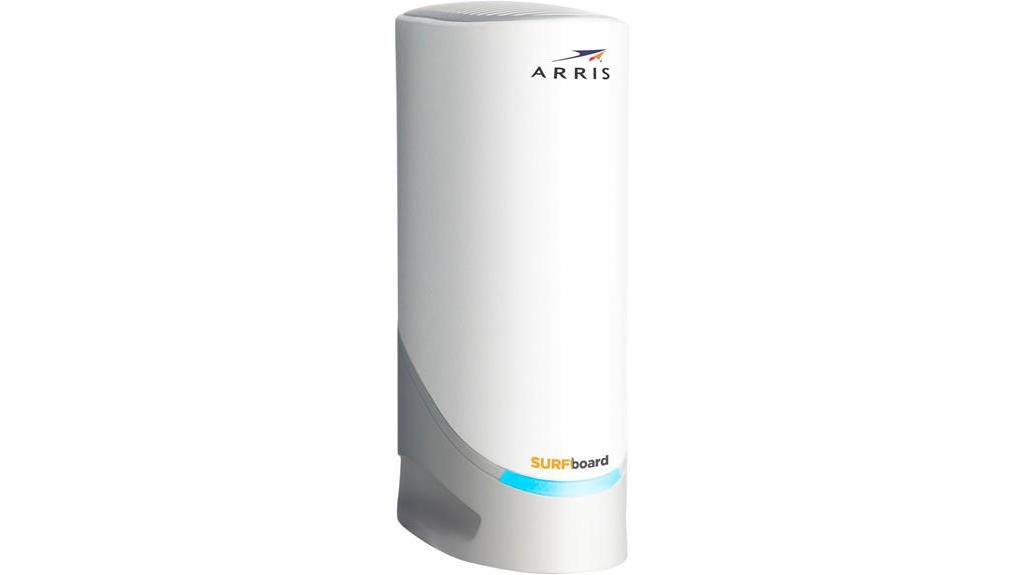
Arris S33 modem stands out with its multi-gigabit speed capabilities. Equipped with DOCSIS 3.1 technology, the S33 supports speeds up to 2.5 Gbps and is compatible with major U.S. ISPs, promising to elevate your home network experience. Note that it is a standalone cable modem (no Wi‑Fi) and does not support link aggregation.
In this Arris S33 Review, we delve into its features, from dual Ethernet ports to potential savings on rental fees, giving you a comprehensive look at whether this modem can truly transform your digital life. We also clarify where performance depends on your router or ISP—especially latency, Wi‑Fi, and upload speeds.
Quick Verdict
Arris S33 Review – Features Table
| Product Type | Best For | Number of Ports | Coverage | Speed | Technology | Setup | Security | Price |
|---|---|---|---|---|---|---|---|---|
| Arris Surfboard S33 | DOCSIS 3.1 cable plans up to 2.5 Gbps (no Wi‑Fi) | 2 (1x 2.5 Gbps, 1x 1 Gbps) | N/A | Up to 2.5 Gbps | DOCSIS 3.1 (OFDM/OFDMA) | User-friendly via SURFboard Central + ISP activation | Standard cable modem features; latency benefits depend on ISP/router | Check Latest Price |
Key Notes:
Key Takeaways
- The ARRIS Surfboard S33 earns strong customer ratings across major retailers.
- It is authorized for use with major U.S. cable internet providers (e.g., Comcast Xfinity, Cox, Spectrum) for standard tiers; Xfinity Next‑Gen upload tiers may require different approved models.
- The modem supports internet speed plans up to 2.5 Gbps via its 2.5GbE port.
- Owning the ARRIS S33 can save anywhere from $0/year (Spectrum includes a modem) to roughly $180–$300+/year vs. renting a gateway from providers that charge monthly equipment fees.

Technology
Speed: DOCSIS 3.1 adds OFDM/OFDMA and Active Queue Management to improve efficiency and reduce latency over cable links. Low Latency DOCSIS may further help when supported by your ISP and firmware.
Setup and Use: The SURFboard Central App facilitates easy setup and activation, though some users encounter ISP-specific hurdles.
Design and Build: Compact and robust, fitting easily into most home networking setups.
Connectivity: 2.5GbE + 1GbE ports for multi-gig throughput to a capable router; no built-in Wi‑Fi and no link aggregation.
The ratings below are explained in the sections that follow.”,”score”:8,”scoreset”:true,”enablecriterias”:true,”enableproscons”:true,”scoreManual”:8,”mainColor”:”var(–theme-palette-color-2, #1559ed)”,”criterias”:[{“title”:”Speed and Performance”,”value”:9},{“title”:”Compatibility with ISPs”,”value”:7},{“title”:”Ease of Installation”,”value”:8},{“title”:”Cost-Effectiveness (Value for Money)”,”value”:9},{“title”:”Design and Build Quality”,”value”:8},{“title”:”Future Proofing”,”value”:8},{“title”:”Connectivity Options”,”value”:7},{“title”:”Customer Support and Warranty”,”value”:8},{“title”:”User Reviews and Reliability”,”value”:8},{“title”:”Overall User Experience”,”value”:8}],”prosTitle”:”Pros”,”positives”:[{“title”:”DOCSIS 3.1 Technology: Efficient multi-gig performance with OFDM/OFDMA and AQM.”},{“title”:”Multi-Gig Networking: 2.5GbE port supports plans up to 2.5 Gbps when paired with a compatible router.”},{“title”:”Compatibility: Works with major U.S. cable providers for standard tiers.”},{“title”:”Simple Setup: Easy activation through the SURFboard Central App and ISP portals.”},{“title”:”Cost Savings: Avoids monthly gateway rental fees with many providers.”},{“title”:”Compact Design: Small footprint integrates easily in most setups.”}],”consTitle”:”Cons”,”negatives”:[{“title”:”No Built-in Wi‑Fi: Requires separate router or mesh system.”},{“title”:”No Link Aggregation: You can’t combine both Ethernet ports for higher single-WAN speeds; a second public IP is needed to use both.”},{“title”:”Xfinity Next‑Gen Uploads: Not on the Next‑Gen upload modem list in many areas.”},{“title”:”Activation Hurdles: Some users report ISP-specific activation friction.”}],”scorelabel”:”Worth Your Money”} /–>
Arris S33 Review Ratings and Reasons (Will Help you decide to purchase or not)
I gave ARRIS Surfboard S33 an overall rating of 8/10 based on a comprehensive evaluation of its key features and user experiences. It balances high performance and value with noted caveats: eligibility for certain ISP upload upgrades, the necessity for a separate Wi‑Fi router, and the lack of link aggregation.
Here’s a breakdown of the ratings:
- Speed and Performance (9/10): DOCSIS 3.1 provides exceptionally fast speeds using OFDM/OFDMA and AQM, supporting high-bandwidth activities efficiently when paired with a capable router.
- Compatibility with ISPs (7/10): Generally compatible with major U.S. cable providers for standard tiers. However, Xfinity’s Next‑Gen upload tiers may require different approved models.
- Ease of Installation (8/10): Setup is straightforward via the SURFboard Central App or ISP portal, though some users encounter ISP-specific challenges.
- Cost-Effectiveness (9/10): Strong long-term value by avoiding gateway rental fees where charged.
- Design and Build Quality (8/10): Compact and solid; like most modems it can run warm under load.
- Future Proofing (8/10): Future‑resilient for DOCSIS 3.1 multi‑gig cable plans (up to 2.5 Gbps). Not DOCSIS 4.0‑capable.
- Connectivity Options (7/10): 2.5GbE + 1GbE are versatile, but there’s no link aggregation.
- Customer Support and Warranty (8/10): Two-year warranty with typical modem support options.
- User Reviews and Reliability (8/10): Strong overall satisfaction with occasional activation/compatibility issues reported.
- Overall User Experience (8/10): Excellent speeds and value with clear expectations around router requirements and ISP nuances.
In summary, the ARRIS Surfboard S33 scores highly in speed, value, and multi‑gig readiness for DOCSIS 3.1 plans. Prospective buyers should note the Next‑Gen upload caveat on Xfinity, the absence of link aggregation, and the need for a separate Wi‑Fi router.
Product Overview
Boasting DOCSIS 3.1 technology, the ARRIS Surfboard S33 modem delivers up to 2.5 Gbps to a compatible router or multi‑gig switch, meeting the demands of 4K streaming, large downloads, and busy homes with many devices. As a modem, it does not broadcast Wi‑Fi and does not perform application-level prioritization.
Its installation process is straightforward: simply plug in the device, use the SURFboard Central App, and follow the on-screen instructions for activation with your ISP.
Compared with other modems, the S33 stands out by offering both 1 Gbps and 2.5 Gbps ports for flexible pairing with today’s routers and emerging multi‑gig internet plans.
Its compact form factor and significant speed advantage over DOCSIS 3.0 modems make it an attractive choice for users seeking to maximize their internet plan potential without the burden of rental fees.
Key Specifications
Building on its powerful performance and easy setup, the ARRIS Surfboard S33 modem’s key specifications further demonstrate its capability to enhance your home network. Here are some of the standout specs:
- DOCSIS 3.1 technology, offering speeds up to 2.5 Gbps
- Dual Ethernet ports (1 Gbps and 2.5 Gbps) for versatile connectivity
- Compatibility with major U.S. cable providers, including Xfinity, Cox, and Spectrum
Also note: there is no built‑in Wi‑Fi and no link aggregation. Only one WAN path is active; some ISPs may allow both ports if you purchase two public IPs. The S33 is designed for DOCSIS 3.1 and is not DOCSIS 4.0‑capable.
Analyzing the pros and cons, the S33 model boasts significant improvements in speed and latency handling versus DOCSIS 3.0, making it a worthy upgrade. The 2.5 Gbps port prepares your setup for higher speed tiers on supported networks.
However, some users have reported challenges during activation with certain ISPs, and Xfinity’s Next‑Gen upload tiers may require different approved hardware.
Compatibility And Setup
Often, the true test of a modem’s capabilities lies not only in its technical prowess but also in its compatibility with various ISPs and the simplicity of its setup process. The ARRIS Surfboard S33 works with most cable internet plans from leading U.S. providers. This includes:
- Xfinity – Works with standard tiers (e.g., Fast/Gigabit) in many markets; not on the current Next‑Gen Upload modem list.
- Spectrum – Compatible with Internet, Internet Ultra, and Internet Gig plans. For a full breakdown of which modems are on Spectrum’s current approved list, see our best modems for Spectrum guide.
- Cox – Supports Gigabit service tiers; check the Cox approved list for your address.
- Astound Broadband (formerly RCN) – Compatible on supported cable tiers.
- Optimum (formerly Suddenlink) – Works on compatible cable plans; fiber plans use different equipment.
- WOW – Handles up to Gig speeds where offered.
- Breezeline – Compatible on approved cable tiers.
- Mediacom – Compatible on cable plans (MetroNet is a separate fiber ISP).
Essentially, if you have a cable internet plan between 100 Mbps and 2.5 Gbps from a major provider, the S33 will likely work. For plans below 100 Mbps, a DOCSIS 3.0 modem can suffice. For Xfinity customers seeking Next‑Gen upload speeds (e.g., 100–200 Mbps uploads), verify approved modem models before purchase.
Setup and Configuration
If you’re using the Arris S33 on an Xfinity connection, the setup process is fairly simple. Just connect the coaxial cable and Ethernet, then activate it through Xfinity’s website or app.
You can also use the SURFboard Central app to complete the initial configuration. Download it on your phone, sign in as instructed by your provider, and follow the on-screen steps.
The app helps you view status and basic information. Alternatively, you can use the web interface by pointing your browser to http://192.168.100.1. There you can view status, signal levels, and event logs and change the admin password. Wireless and local network settings are managed on your router.
Performance and Speed
Harnessing DOCSIS 3.1, the ARRIS Surfboard S33 offers substantial performance headroom, enabling up to 2.5 Gbps to a compatible router. DOCSIS 3.1 introduces OFDM/OFDMA channels and Active Queue Management (AQM) to improve efficiency and reduce latency on cable links. Low Latency DOCSIS (when supported by an ISP and firmware) can further reduce queueing delay.
Analyzing its performance:
- Throughput to a 2.5GbE router or PC can saturate multi‑gig plans up to the device’s 2.5 Gbps ceiling.
- Latency under load improves versus DOCSIS 3.0 thanks to AQM; additional reductions depend on your ISP and router QoS.
- The modem itself does not perform application-level prioritization; QoS and gaming optimization come from your router or ISP.
Objectively, the S33 is a powerful option for users seeking to elevate wired performance and stability on DOCSIS 3.1 networks.
OFDMA and Low-Latency Performance
DOCSIS 3.1 adds OFDM/OFDMA for more efficient spectrum use and Active Queue Management to curb bufferbloat. When your ISP and firmware support Low Latency DOCSIS, queueing delay can be reduced further. The S33 does not assign channels to specific clients or prioritize gaming packets; those behaviors are handled by your router and/or ISP policies.
In practical terms, you’ll see the best latency and stability when the S33 is paired with a quality router that supports smart QoS/SQM and when your ISP’s network fully leverages DOCSIS 3.1 features.
Design, Build and Connectivity
The ARRIS Surfboard S33 modem combines a durable design with advanced technology, suitable for daily use. Its compact size of 4.74 x 1.8 x 5.14 inches and light weight of 14.4 ounces allows for space-saving in any work area.
Attention to detail in the S33’s construction ensures both peak performance and a seamless fit in home settings. Compared to older models, the S33 features a modern look with rounded edges.
The front panel has a large indicator LED signaling power and connection status. The modem’s rear has ventilation holes to manage heat, especially during heavy use.
Port options include:
- 1 Coaxial connector
- 1 2.5Gbps multi-gig port
- 1 Gigabit Ethernet port
The omission of a USB port is notable. There is no link aggregation support; you cannot combine ports for higher single‑WAN throughput. Some ISPs may allow both ports to be active if you purchase two public IP addresses.
Hardware and Chipset
ARRIS does not publish chipset or RAM details for the S33 in official materials. Internal component specifics are not documented.
Whatever the internals, the S33 delivers excellent throughput for gigabit plans, making it a strong value in the DOCSIS 3.1 category.
Amazon Customer Feedback Analysis
While the ARRIS Surfboard S33’s design ensures it fits neatly into your home environment, the true measure of its success lies in user experiences. Feedback commonly praises speed and reliability, with some reports of activation friction depending on the ISP.
- High customer satisfaction with performance and stability.
- Less frequent activation issues, often tied to specific ISP processes.
Taken together, the S33 generally meets expectations for a modern multi‑gig DOCSIS 3.1 modem.
Cost Efficiency
Owning the ARRIS Surfboard S33 can offer substantial savings versus renting equipment. Depending on your provider, yearly savings range from $0 (Spectrum includes a modem) to roughly $180–$300+ compared with renting an all‑in‑one gateway from providers that charge monthly equipment fees.
These savings come without sacrificing performance for most standard and multi‑gig cable tiers up to 2.5 Gbps.
Moreover, the device’s two-year warranty provides additional value, safeguarding your investment against potential malfunctions.
Warranty and Support Details
Your ARRIS Surfboard S33 modem comes with a two-year manufacturer’s warranty, ensuring support and service for any potential issues during that period. This warranty is particularly important for addressing hardware failures and replacing defective modems without additional costs. If you encounter issues, customer support can guide you through troubleshooting steps.
Here are key points regarding the warranty and support:
- Two-Year Warranty: Protection against hardware malfunctions and defects.
- Customer Support: Assistance for troubleshooting modem issues and technical inquiries.
- Modem Replacement: Streamlined process for replacing defective modems under warranty conditions.
Address concerns promptly within the warranty period to take full advantage of available support.
Final Thoughts
Having covered the warranty and support aspects of the ARRIS Surfboard S33 modem, let’s now consider the overall value and performance this device brings to the table.
See also: Arris Modem Lights Meaning
The pros and cons of the ARRIS Surfboard S33 modem are vital for an informed decision. Its DOCSIS 3.1 technology ensures speed and efficiency, outperforming DOCSIS 3.0 models. The S33 offers savings on rental fees and supports multi‑gig networking up to 2.5 Gbps; just remember it has no built‑in Wi‑Fi and no link aggregation.
When comparing it with other DOCSIS 3.1 cable modems, the S33’s dual Ethernet ports stand out. However, Xfinity customers targeting Next‑Gen upload tiers may need a different approved model. If you specifically want Xfinity Next‑Gen uploads or different port configurations, consider alternatives such as newer Surfboard models or competing DOCSIS 3.1 options that meet those requirements.
Objectively, the ARRIS S33 is a top contender for standard and multi‑gig DOCSIS 3.1 cable plans, offering robust features for its price point.
Conclusion
In conclusion, the ARRIS Surfboard S33 stands out as a top-tier modem choice for DOCSIS 3.1 multi‑gig plans. Its capabilities offer fast, reliable performance when paired with a quality router.
You’ll appreciate its ease of setup and broad compatibility with major ISPs. Despite a premium cost, the savings on rental fees and enhanced online experience justify the investment for many households. Be mindful of Xfinity’s Next‑Gen upload requirements and the absence of link aggregation when deciding. If you’re on Spectrum specifically, our best modems for Spectrum guide covers exactly which models are on Spectrum’s current approved list and how to activate your own modem.
Customer feedback confirms its value, and with solid support, it’s a smart buy for serious internet users seeking future‑resilient DOCSIS 3.1 connectivity.
Frequently Asked Questions
What internet providers can you use the S33 modem with?
It’s compatible with most top cable internet providers in the US. Notable examples include Xfinity, Cox, Spectrum, Astound Broadband (formerly RCN), Optimum (formerly Suddenlink), WOW, Breezeline, and Mediacom. Always check your provider’s current approved list.
Does the S33 have a built-in router?
No, the ARRIS S33 is a standalone cable modem without Wi‑Fi capabilities. You’ll need to pair it with a compatible router or mesh system.
Is the S33 good for gaming and streaming?
Yes. The S33’s DOCSIS 3.1 features help with throughput and latency handling on the cable link. Actual gaming/streaming performance depends on your router’s QoS and your ISP’s network conditions.
Does the S33 support Xfinity’s Next‑Gen upload speeds?
In many markets, the S33 is not on Xfinity’s Next‑Gen Upload modem list. Standard tiers generally work, but users seeking higher upload tiers should verify approved models with Xfinity before buying.
Can the S33 use both Ethernet ports at once?
There is no link aggregation. Only one WAN path is active. Some ISPs allow use of both ports if you purchase two public IP addresses.

- pfSense 10G Home Lab Setup: Complete Hardware Guide (2026) - April 1, 2026
- Best Budget Home Lab Setup Under $300 (2026): Complete Starter Stack - March 30, 2026
- Best Modems for Spectrum: Top DOCSIS 3.1 Picks That Actually Work - March 28, 2026