
Affiliate disclosure: As an Amazon Associate, I earn from qualifying purchases.
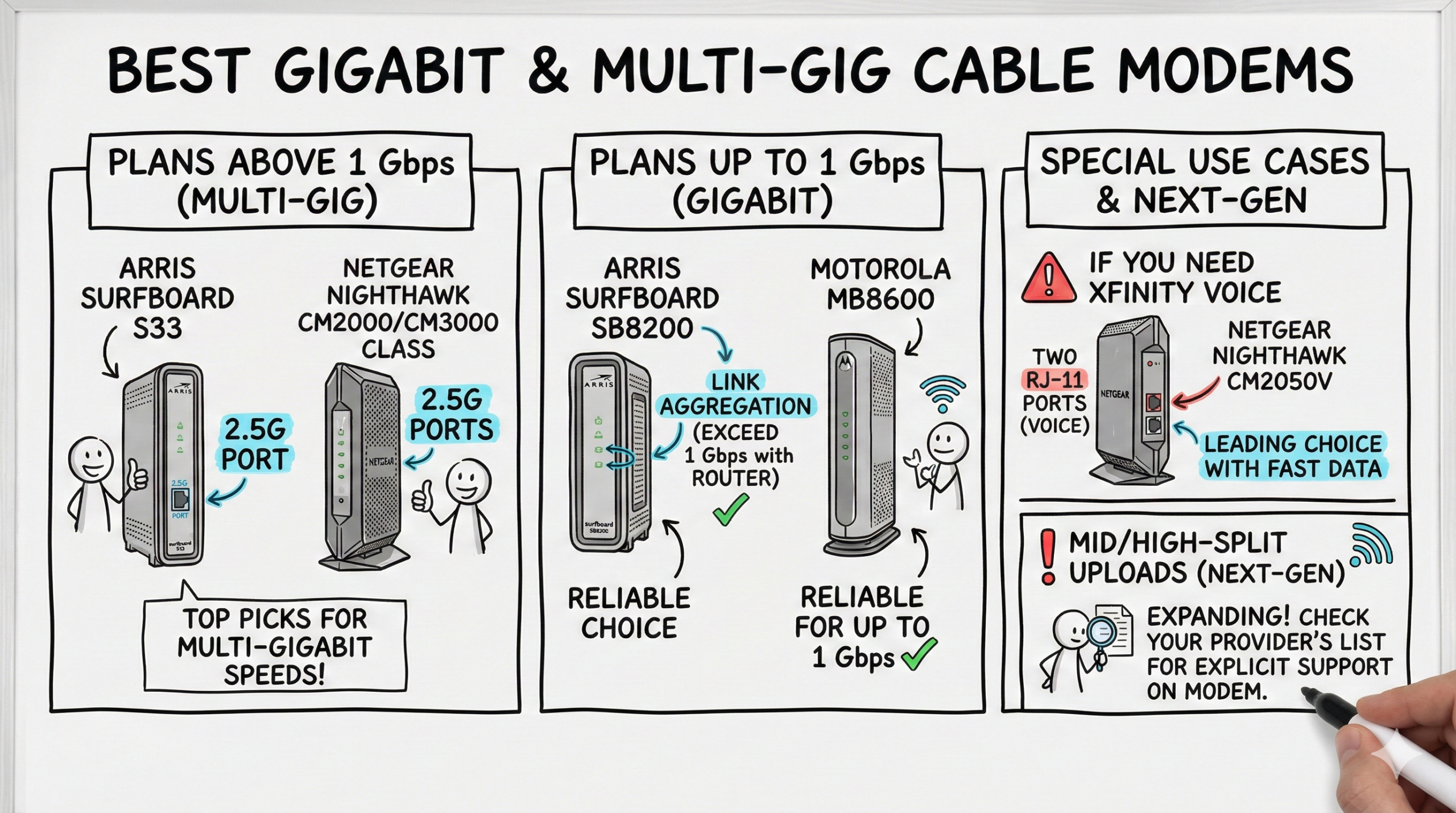
Quick answer: The NETGEAR CM3000 is the strongest all-around choice for a multi-gig cable plan when your provider supports it. Choose the ARRIS SURFboard S34 when next-generation upstream support is the priority, the Hitron CODA56 for a simpler value-focused 2.5GbE option, or the ARRIS SB8200 for an ordinary plan up to 1 Gbps. Xfinity Voice customers need a voice-capable model such as the NETGEAR CM2050V. Check your provider’s current approved-device list for your exact speed tier and location before buying.
How these picks were selected: I compared current manufacturer documentation, provider-certification information, DOCSIS version, Ethernet handoff, next-generation upload support, voice capability and the extra equipment each modem requires. These rankings are based on documented capabilities and use-case fit. They are not presented as a new hands-on test, and advertised maximum rates are not a promise of the speed your provider will deliver.
Best cable modems for gigabit internet: quick comparison
| Modem | Best for | Ethernet handoff | Voice? | Important limitation |
|---|---|---|---|---|
| NETGEAR CM3000 | Best overall for multi-gig cable | 1× 2.5GbE + 2× 1GbE | No | Provider and regional upload support vary |
| ARRIS SURFboard S34 | Best ARRIS option for next-gen upstream | 1× 2.5GbE + 1× 1GbE | No | Confirm the exact provider tier |
| Hitron CODA56 | Best straightforward 2.5GbE value | 1× 2.5GbE | No | Fewer local-management extras |
| ARRIS SURFboard S33 | Best established multi-gig alternative | 1× 2.5GbE + 1× 1GbE | No | S34 is the newer upstream-focused model |
| ARRIS SURFboard SB8200 | Best for plans up to 1 Gbps | 2× 1GbE | No | No 2.5GbE port |
| NETGEAR CM2050V | Best for Xfinity Internet + Voice | 1× 2.5GbE | Yes, two phone ports | Xfinity Voice only |
Check these four things before buying a cable modem
- Provider approval comes first: a DOCSIS 3.1 label does not guarantee activation. Find the exact model on your provider’s current approved-device list for your plan.
- Match the Ethernet port to the plan: a 2.5GbE port matters when the internet plan can exceed the practical limit of a single Gigabit Ethernet link. Your router also needs a multi-gig WAN port to use that headroom.
- Upload capability is provider-specific: mid-split, high-split and other next-generation upstream upgrades depend on the modem, provider, firmware and local network. Do not infer upload speed from the download rating.
- Phone service changes the choice: most retail cable modems have no telephone ports. If cable voice is part of the account, use the provider’s approved voice-capable equipment.
Every product below is a standalone cable modem. It does not provide Wi-Fi and it does not replace a router. If that distinction is unclear, start with this explanation of modems versus routers. Cable modems also do not work with fiber, DSL or fixed-wireless service.
1. NETGEAR CM3000 — best overall for multi-gig cable
The CM3000 has the most flexible wired handoff in this group. NETGEAR documents one 2.5GbE port plus two Gigabit Ethernet ports, with link aggregation available for compatible routers. It is a mid/high-split DOCSIS 3.1 modem intended for faster current and future cable upload configurations, although the provider, region and plan still determine what is actually enabled.
Buy it if: you have a supported multi-gig cable tier, a router with a 2.5GbE WAN port, and want a modem designed for newer upstream configurations. Skip it if: your plan is 1 Gbps or slower, you use bundled cable voice, or your ISP has not approved this exact model. NETGEAR lists Xfinity, Spectrum and Cox among supported U.S. cable providers; confirm your exact tier in the current NETGEAR compatibility table and review the official CM3000 specifications.
2. ARRIS SURFboard S34 — best for next-generation upstream support
The S34 is the current upstream-focused model in the SURFboard standalone-modem lineup. ARRIS documents DOCSIS 3.1, one 2.5GbE port, one Gigabit Ethernet port and support for plans up to 2.5 Gbps. The manufacturer positions it for next-generation upstream service and lists Cox, Spectrum, Xfinity and other major U.S. cable providers.
Buy it if: you want a current ARRIS modem for a provider-approved multi-gig or upgraded-upload tier. Skip it if: your plan and router cannot use more than Gigabit Ethernet, or your provider supports the S33 or SB8200 but not the S34 on your exact tier. See the official SURFboard S34 specifications. ARRIS explicitly says compatibility can vary by model and provider, so recheck before activation.
3. Hitron CODA56 — best straightforward 2.5GbE value
The CODA56 concentrates on the features most buyers need: DOCSIS 3.1, one 2.5GbE port and no built-in Wi-Fi or voice hardware. Hitron lists certification for Xfinity, Xfinity Business, Spectrum, Cox Gigablast and several additional cable providers. That makes it a sensible value candidate when it appears on the provider’s current list and you do not need the CM3000’s extra Ethernet options.
Buy it if: you want a simple modem-only path to a 2.5GbE router and the exact model is approved for your plan. Skip it if: you need phone ports, link aggregation or a more feature-rich local status interface. Hitron says internet-plan support can reach 2.5 Gbps, but real download and upload rates remain provider- and location-dependent. See the official Hitron CODA56 specifications and certification list.
4. ARRIS SURFboard S33 — best established multi-gig alternative
The S33 remains a compact DOCSIS 3.1 option with one 2.5GbE port and one Gigabit Ethernet port. ARRIS lists it for cable plans up to 2.5 Gbps and for major U.S. cable providers. It is an easier choice to justify when the S33 appears on the provider’s exact approval list but a newer upstream-focused model does not.
Buy it if: you want a familiar multi-gig SURFboard model and your provider approves it for the speed tier you use today. Skip it if: a modestly different purchase gets you an approved S34 or another modem with the upload support your local network is rolling out. See the official SURFboard S33 specifications and our more detailed ARRIS S33 feature review.
5. ARRIS SURFboard SB8200 — best for plans up to 1 Gbps
The SB8200 is the practical choice for buyers who want DOCSIS 3.1 but do not need a 2.5GbE handoff. ARRIS rates it for cable internet plans up to 1 Gbps and provides two Gigabit Ethernet ports. Buying this model for an ordinary gigabit-or-slower plan can make more sense than paying for multi-gig hardware the rest of the network cannot use.
Buy it if: your provider approves it for a plan at or below 1 Gbps and a single Gigabit Ethernet connection meets your needs. Skip it if: the plan can exceed 1 Gbps, your router has a 2.5GbE WAN port you want to use, or next-generation upload eligibility requires another model. See the official SURFboard SB8200 specifications.
6. NETGEAR CM2050V — best for Xfinity Internet and Voice
The CM2050V is the exception in this roundup because it includes two telephone ports for Xfinity Voice. NETGEAR documents DOCSIS 3.1, one 2.5GbE port and support for Xfinity Internet-and-Voice service. It is not a general-purpose voice modem for other cable providers, and it still needs a separate Wi-Fi router.
Buy it if: Xfinity Voice is active on the account and Xfinity approves this exact model for the internet tier. Skip it if: you do not subscribe to Xfinity Voice or use another ISP. Do not buy a non-voice modem and assume an adapter will replace provider-managed cable voice. See the official NETGEAR CM2050V specifications.
Which modem speed tier do you actually need?
- Plans below 1 Gbps: a provider-approved DOCSIS 3.1 modem with Gigabit Ethernet is normally enough. The SB8200 is the deliberately simpler pick here.
- Plans around 1 Gbps: check whether the provider overprovisions the plan above the practical limit of one Gigabit Ethernet port. If so, a 2.5GbE modem and router can preserve that extra headroom.
- Plans above 1 Gbps: use a modem with a 2.5GbE handoff and a router with a matching multi-gig WAN port. The client device and LAN may also need multi-gig Ethernet or sufficiently capable Wi-Fi.
- Faster-upload tiers: verify the modem on the provider’s current next-generation or enhanced-speed list. DOCSIS 3.1 alone is not enough evidence.
A new modem will not repair congestion, weak Wi-Fi, a slow router or a damaged coax line. Replace it when the model is no longer approved, cannot support the paid tier, repeatedly fails diagnostics or is genuinely reaching the end of its useful life. This guide to modem lifespan and replacement signs explains the difference.
Cable-modem activation checklist
- Confirm the exact model number on the provider’s approved list for your service tier and voice requirements.
- Record the modem’s HFC MAC address and serial number before installation.
- Disconnect power from the old modem and router, move the coax cable, and connect the new modem directly to power.
- Activate through the provider’s app, website or support channel, then wait for provisioning to finish.
- Connect the router only after the modem is online, then restart the router so it receives a fresh WAN address.
- Run wired download, upload and latency tests. If results are low, verify the provisioned tier and coax signal before blaming Wi-Fi.
Final recommendation
Start with the ISP list, not the shopping page. If your provider approves it and you have a multi-gig router, the NETGEAR CM3000 is the most capable all-around pick here. The ARRIS S34 is the strongest current SURFboard alternative for next-generation upstream plans, while the Hitron CODA56 offers a simpler 2.5GbE path. Choose the SB8200 when the plan is 1 Gbps or slower, and use the CM2050V only when Xfinity Voice makes telephone ports mandatory.
Frequently asked questions
Do these cable modems include Wi-Fi?
No. All six are standalone cable modems and require a separate router or mesh system for Wi-Fi. That separation makes future router upgrades easier, but it means two devices, two power outlets and separate troubleshooting.
Can one cable modem work with every cable provider?
No. Compatibility depends on the provider, exact model, firmware, speed tier, region and whether voice service is attached. Recheck the provider list immediately before purchase even if the manufacturer names that provider.
Will a 2.5GbE modem make Wi-Fi faster?
Not by itself. It only removes a potential modem-to-router bottleneck. The internet plan, router WAN port, router performance, Wi-Fi standard, client device, channel conditions and distance still determine the result.
Is buying a modem always cheaper than renting?
Only when the provider charges a separate recurring modem fee and you keep compatible service long enough to recover the purchase cost. Some providers include a modem, and provider equipment can simplify support or required voice service. Compare the current fee, warranty and expected service period rather than assuming a universal saving.

- Best WiFi 7 Mesh Systems (2026) — Tested & Ranked for Multi-Gig Homes - April 28, 2026
- Best Routers for Verizon FiOS (2026) — WiFi 7 & Mesh Picks Tested - April 13, 2026
- Best 2.5GbE Switches for Home Lab (2026) — Tested & Verified - April 8, 2026