
The most common mistake Spectrum subscribers make isn’t choosing the wrong modem — it’s keeping Spectrum’s rental modem longer than they should. Spectrum’s included hardware is provisioned to work, not to perform. The moment you swap it out for a DOCSIS 3.1 modem with a 2.5GbE port, you eliminate a bottleneck that has been silently capping your download speeds below what you’re paying for. On a 1 Gbps plan, a standard 1GbE port physically cannot exceed ~940 Mbps. A 2.5GbE port removes that ceiling entirely.
There’s one critical thing Spectrum customers need to understand before buying: not every modem works on every plan. Spectrum maintains an approved modem list and regularly adds and removes models. A modem that was approved last year may have been dropped — and a modem that looks similar to an approved model might not actually be on the list. Always verify your exact model is currently authorized at Spectrum’s official compliant modems page before purchasing.
You do NOT need to buy your own modem if:
- You’re on Spectrum’s entry-tier plan at 300 Mbps and have no plans to upgrade — Spectrum’s rental modem handles that fine
- You’re renting month-to-month and plan to cancel service within 6 months — the math doesn’t work out
- You want voice service bundled through Spectrum — customer-owned standalone modems don’t support Spectrum Voice
- Your building is wired for coax shared service (some MDUs and apartments) — check with Spectrum first
Key Takeaways
- ARRIS SURFboard S33 — Best overall. DOCSIS 3.1, 2.5GbE + 1GbE ports, Broadcom chipset, 2-year warranty. The gold standard for Spectrum Gig customers.
- Motorola MB8611 — Best value 2.5GbE. Solid performer with Active Queue Management (AQM) for lower gaming and video call latency. USA-based support.
- NETGEAR Nighthawk CM2000 — Premium pick. DOCSIS 3.1, 2.5GbE, excellent compatibility record with Spectrum across multiple years.
- NETGEAR Nighthawk CM3000 — Best for faster uploads. Mid/high-split DOCSIS 3.1 delivers up to 1 Gbps upload where Spectrum’s high-split rollout is active. The pick if you upload large files or run cloud backups.
- ARRIS SURFboard SB8200 — Best budget DOCSIS 3.1. Two 1GbE ports, CableLabs certified, proven workhorse for Spectrum plans up to 1 Gbps.
- Hitron CODA56 — Best value multi-gig. 2.5GbE at a lower price than ARRIS or NETGEAR. Mid-split capable where supported. The smart upgrade-per-dollar pick.
Spectrum Modem Buying Guide: What Actually Matters
DOCSIS Version: 3.0 Is on Its Way Out
Think of DOCSIS (Data Over Cable Service Interface Specification) as the language your modem uses to talk to Spectrum’s network. DOCSIS 3.0 was the standard for the last decade. DOCSIS 3.1 is what Spectrum’s infrastructure is built around now, and it’s the only version that supports plans above 500 Mbps reliably. Spectrum has already removed many older DOCSIS 3.0 modems from their approved list, with more removals scheduled — including a wave planned for late 2026. If you’re buying a modem today, buy DOCSIS 3.1 only.
The 1GbE Bottleneck Problem
Here’s something Spectrum’s sales page won’t explain: if you’re paying for the 1 Gbps plan and your modem has a standard 1 Gigabit Ethernet port, you’re physically capped at around 940 Mbps under ideal conditions. That’s because 1GbE Ethernet tops out at 1,000 Mbps theoretical, and real-world overhead brings that down further. A modem with a 2.5GbE LAN port breaks that ceiling — your router sees 2,500 Mbps available bandwidth, which means your 1 Gbps plan can actually breathe. This is why the S33, MB8611, CM2000, CM3000, and CODA56 all feature 2.5GbE ports. The SB8200 has two 1GbE ports, which can be bonded if your router supports link aggregation.
Mid-Split and High-Split: Why Upload Speed Matters Now
Traditional cable internet was heavily asymmetric — 1 Gbps down, 35 Mbps up. That was fine when you mostly downloaded. Now households are doing video calls, uploading to cloud storage, running remote desktop sessions, and streaming from their own media servers. Spectrum is rolling out mid-split and high-split OFDMA upstream technology across its markets, which can push upload speeds to 100–200 Mbps or more where active. The catch: your modem has to support it. The NETGEAR CM3000 and Hitron CODA56 are specifically engineered for mid/high-split deployment. If Spectrum has upgraded your neighborhood, these modems unlock speeds that older DOCSIS 3.1 hardware simply cannot deliver. Check your Spectrum account portal to see if faster upload tiers are available at your address.
Chipset Matters: Avoid Intel Puma
Not all DOCSIS 3.1 modems are equal inside. The Intel Puma 6 and Puma 7 chipsets became notorious for causing latency spikes — sometimes 50–100ms of jitter during normal usage — which ruins gaming, video calls, and any real-time application. The modems in this guide all use Broadcom chipsets (ARRIS S33, ARRIS SB8200, NETGEAR CM2000, NETGEAR CM3000, Motorola MB8611) or Hitron’s own silicon (CODA56), which have clean latency profiles. For more on how latency affects your experience, see our QoS settings guide — the modem’s latency floor is something router QoS cannot fix after the fact.
The Math on Buying vs. Renting
Spectrum’s rental modem fee varies by market and plan tier but commonly runs $5–$15 per month. At $10/month, you’re spending $120 per year just to use their hardware. A mid-range DOCSIS 3.1 modem like the ARRIS S33 or Motorola MB8611 pays for itself in 12–18 months. After that, every month you own it is pure savings — and you carry the modem if you ever switch plans or move within Spectrum’s 41-state footprint. For a deeper look at how modems fit into your cable setup, see our best gigabit cable modems guide and our overview of routers vs. modems if you’re sorting out what each device actually does.
| ARRIS SURFboard S33 DOCSIS 3.1 Multi-Gig Cable Modem | 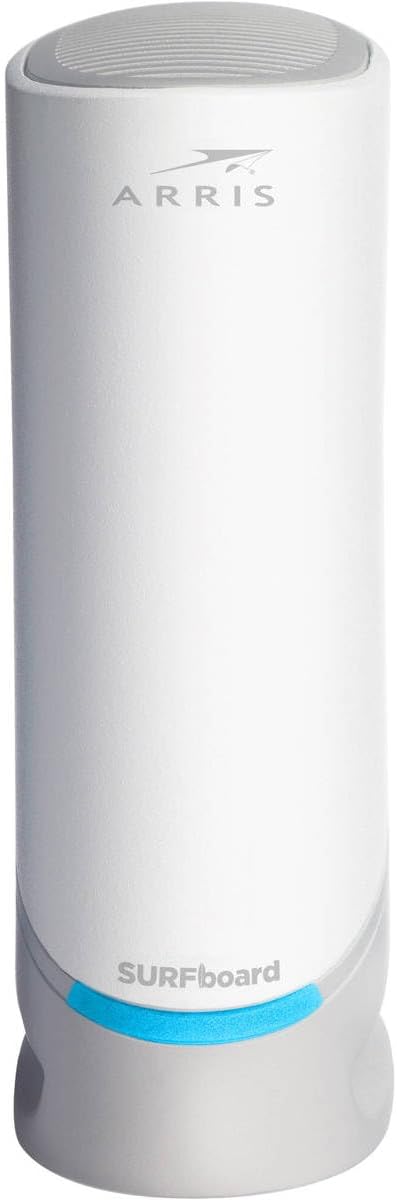 | Best Overall | Standard: DOCSIS 3.1, 2.5GbE + 1GbE ports | Max speed: 2.5 Gbps downstream | Warranty: 2 years, Broadcom chipset | VIEW LATEST PRICE | Read Our Analysis |
| Motorola MB8611 DOCSIS 3.1 Multi-Gig Cable Modem |  | Best Value 2.5GbE | Standard: DOCSIS 3.1, 2.5GbE port | Feature: AQM low-latency engine | Support: USA-based, 2-year warranty | VIEW LATEST PRICE | Read Our Analysis |
| NETGEAR Nighthawk CM2000 DOCSIS 3.1 Cable Modem |  | Premium Pick | Standard: DOCSIS 3.1, 32×8 channel bonding | Port: 1x 2.5GbE LAN | Plans: Up to 2.5 Gbps | VIEW LATEST PRICE | Read Our Analysis |
| NETGEAR Nighthawk CM3000 Mid/High-Split Cable Modem |  | Best for Fast Uploads | Standard: DOCSIS 3.1 mid/high-split | Upload: Up to 1 Gbps where supported | Ports: 1x 2.5GbE + 2x 1GbE | VIEW LATEST PRICE | Read Our Analysis |
| ARRIS SURFboard SB8200 DOCSIS 3.1 Cable Modem |  | Best Budget DOCSIS 3.1 | Standard: DOCSIS 3.1, two 1GbE ports | Max speed: Up to 2 Gbps (link agg) | Note: No 2.5GbE — pair with LAG router for full gig | VIEW LATEST PRICE | Read Our Analysis |
| Hitron CODA56 DOCSIS 3.1 Multi-Gigabit Cable Modem |  | Best Value Multi-Gig | Standard: DOCSIS 3.1, mid-split capable | Port: 1x 2.5GbE LAN | Note: Single Ethernet port only | VIEW LATEST PRICE | Read Our Analysis |
-
ARRIS SURFboard S33 DOCSIS 3.1 Multi-Gig Cable Modem — Best Overall for Spectrum
Rock-solid multi-gig performance for Spectrum GigVIEW LATEST PRICE✓ Pros- 2.5GbE + 1GbE dual ports — connect both a router and a wired PC simultaneously
- Broadcom chipset — clean latency, zero Puma jitter issues
- 2-year warranty, longest in its class
- Compact form factor, clean LED status indicators
✗ Cons- No mid/high-split upstream support — upload speeds stay at legacy tiers
- No built-in WiFi — requires a separate router
- Slightly pricier than the SB8200 or CODA56
The ARRIS SURFboard S33 has been the most recommended standalone cable modem for Spectrum Gig customers for several years, and it earns that reputation through straightforward reliability. It pairs DOCSIS 3.1 technology with a 2.5 Gigabit Ethernet port — the key upgrade over older hardware — plus an additional 1GbE port that lets you connect a second device or serve as a backup handoff depending on your service provider’s configuration. That dual-port design is genuinely useful: you can run your 2.5GbE-capable router on the primary port and still have a direct wired connection available.
The underlying Broadcom chipset is what separates the S33 from budget alternatives. While Intel Puma-based modems became notorious for latency spikes that ruined gaming and video calls, the S33 delivers flat, predictable latency. Real-world Spectrum Gig customers consistently report hitting 900–1,000+ Mbps on speed tests after switching to the S33, which aligns with what the hardware should deliver. Setup is three steps: connect the coax, power it on, and call Spectrum to provision the MAC address. The SURFboard Central app handles the rest. For pairing guidance, our best routers for Spectrum article covers which routers match the S33’s 2.5GbE output best.
💬 What Real Users SayUsers consistently describe speed jumps of 100+ Mbps immediately after switching from their previous modem to the S33. A common theme across reviews is that the compact form factor surprised people — it’s significantly smaller than most modems. IT professionals in the review base specifically call out the clean signal stability over time.
⚠️ Who Should Skip ThisSkip the S33 if you’re on Spectrum’s entry 300 Mbps plan and have no plans to upgrade — the S33’s capabilities will be completely wasted. Also skip it if you’re hoping for better upload speeds from Spectrum’s mid-split rollout; the S33 doesn’t support mid/high-split upstream. For that, look at the CM3000 or CODA56.
🎯 My TakeThe S33 is the right call for any Spectrum Gig subscriber who wants proven hardware, clean latency, and a 2-year warranty without overthinking it. The dual-port design gives you real flexibility, and the Broadcom chipset means you’re not rolling the dice on jitter issues. The one honest caveat: if Spectrum has rolled out high-split upstream to your area, the S33 won’t take advantage of it — for that, the CM3000 is the better investment.
- Standard: DOCSIS 3.1 (backward compatible with DOCSIS 3.0)
- LAN Ports: 1x 2.5 Gigabit Ethernet + 1x 1 Gigabit Ethernet
- Max Downstream: Up to 2.5 Gbps
- Channel Bonding: 32×8 DOCSIS 3.0 + 2×2 OFDM DOCSIS 3.1
- Chipset: Broadcom (no Puma latency issues)
- Warranty: 2 years limited
- WiFi: None — modem only, separate router required
- Voice: Not supported
- Compatible with: Spectrum (Internet Gig), Cox, Xfinity — not fiber/DSL
-
Motorola MB8611 DOCSIS 3.1 Multi-Gig Cable Modem — Best Value 2.5GbE for Spectrum
AQM latency engine makes it ideal for gaming householdsVIEW LATEST PRICE✓ Pros- Active Queue Management (AQM) built in — measurably lower latency for gaming and video calls
- 2.5GbE port handles Spectrum Gig without the 1GbE bottleneck
- USA-based customer support with 2-year warranty
- Backward compatible with DOCSIS 3.0 for seamless activation
✗ Cons- No mid/high-split upstream support — legacy upload speeds only
- Runs warm under sustained load — needs ventilation clearance
- Some early production units had connectivity drop issues (since resolved in current stock)
The Motorola MB8611 competes directly with the ARRIS S33 and often undercuts it on price while matching it on raw downstream performance. The headline differentiator is Active Queue Management (AQM) — a feature that actively manages packet queuing to reduce bufferbloat and latency spikes. In practical terms, this means your Spectrum connection stays responsive even when multiple household members are downloading simultaneously. That 40ms gaming session ping doesn’t spike to 200ms just because someone started a 4K Netflix stream. It’s the same principle that makes enterprise QoS work — the MB8611 just handles it at the modem level, before the data even reaches your router. For additional QoS tuning, our QoS settings guide explains how modem-level and router-level queue management work together.
The 2.5G Ethernet port delivers downstream speeds approaching 2,500 Mbps and upstream up to 800 Mbps when Spectrum’s plan supports it. It pairs cleanly with any WiFi router — no special configuration needed. Spectrum activation via the Spectrum app takes 5–10 minutes for most addresses. One point worth noting: Motorola’s support documentation correctly identifies the MB8611-10 variant as including a USA power plug, and that’s the version sold on Amazon. The warranty is handled directly through Motorola’s USA support team, which multiple reviewers cite as genuinely helpful.
💬 What Real Users SayUsers frequently highlight solid performance immediately after install and easy activation with Spectrum. The AQM feature isn’t something most buyers consciously tested, but reports of smooth multi-device usage with no noticeable slowdowns during peak household internet activity align directly with what AQM delivers in practice.
⚠️ Who Should Skip ThisSkip the MB8611 if your primary concern is upload speed — it doesn’t support mid/high-split upstream any more than the S33 does. Also note that it runs on the warmer side under sustained load; if you’re mounting it in a tight enclosed space, give it room to breathe or consider the ARRIS S33 which runs cooler.
🎯 My TakeThe MB8611 is the right call for Spectrum Gig households where gaming or real-time video conferencing is a priority. The AQM engine genuinely reduces bufferbloat in ways that router-level QoS alone can’t fully compensate for, and the 2.5GbE port ensures you’re not leaving Gig plan performance on the table. USA-based support and a 2-year warranty seal the deal at this price point.
- Standard: DOCSIS 3.1 (backward compatible with 32×8 DOCSIS 3.0)
- LAN Port: 1x 2.5 Gigabit Ethernet
- Max Downstream: Just below 2,500 Mbps
- Max Upstream: Up to 800 Mbps (plan dependent)
- Latency Feature: Active Queue Management (AQM) built-in
- Warranty: 2 years, USA-based Motorola support
- WiFi: None — modem only
- Compatible with: Spectrum, Xfinity, Cox — not fiber/DSL/voice
-
NETGEAR Nighthawk CM2000 DOCSIS 3.1 Cable Modem — Premium Pick for Spectrum
Years-proven Nighthawk reliability on Spectrum GigVIEW LATEST PRICE✓ Pros- DOCSIS 3.1 with 32×8 channel bonding and OFDM(A) 2×2 — full spec implementation
- 2.5GbE port delivers true multi-gig headroom for Spectrum’s fastest plans
- Long deployment track record — been on Spectrum’s approved list since 2020
- Backward compatible with DOCSIS 3.0 — works across all Spectrum speed tiers
✗ Cons- No mid/high-split upstream — same upload ceiling as S33 and MB8611
- LED status indicators have been reported to fail on some units over time
- Firmware update coordination between NETGEAR and ISPs can be inconsistent
The NETGEAR Nighthawk CM2000 brings NETGEAR’s established reputation for cable modem reliability to the DOCSIS 3.1 generation. It’s been a consistent presence on Spectrum’s approved list since July 2020 — a multi-year track record that matters when you’re evaluating whether a modem will keep working after Spectrum’s next compatibility list refresh. The CM2000 is built around DOCSIS 3.1 with 32×8 channel bonding and dual OFDM(A) channels, meaning it uses the full bandwidth allocation Spectrum’s CMTS infrastructure makes available.
The 2.5 Gigabit Ethernet port is the same spec as the ARRIS S33 and Motorola MB8611, so you get the same downstream headroom beyond the 1GbE bottleneck. NETGEAR markets this modem as backward compatible with all internet service speed tiers — confirmed in the product description: it handles the full range from entry-level Spectrum plans up to multi-gig provisioning. For anyone who pairs their modem with NETGEAR routers (the CM2000 works cleanly with Nighthawk routers and Orbi mesh systems via a 2.5GbE WAN connection), the ecosystem consistency is a tangible benefit. If you’re evaluating routers to pair with this modem, our best wired routers guide covers the top options with 2.5GbE WAN ports.
💬 What Real Users SayLong-term users describe the CM2000 as set-it-and-forget-it hardware. One cybersecurity professional noted it finally allowed their network to reach full 1 Gbps after their ISP-provided modem was consistently underperforming. Multi-year reliability is a consistent theme among positive reviews.
⚠️ Who Should Skip ThisIf firmware currency is a concern, note that NETGEAR and some ISPs have historically disagreed on who pushes firmware updates — a limitation that won’t matter for most users but is worth knowing. The CM3000 is the better choice if you want NETGEAR hardware and also need mid/high-split upstream support.
🎯 My TakeThe CM2000 is the right call if you’re already in the NETGEAR ecosystem and want a modem that pairs cleanly with your existing Nighthawk or Orbi hardware. Its multi-year track record on Spectrum’s approved list and full DOCSIS 3.1 spec implementation make it a trustworthy pick for Spectrum Gig. If you’re starting fresh with no existing NETGEAR gear, the ARRIS S33 at a comparable or lower price point is equally strong.
- Standard: DOCSIS 3.1, 32×8 channel bonding + OFDM(A) 2×2
- LAN Port: 1x 2.5 Gigabit Ethernet
- Max Speed: Up to 2.5 Gbps downstream
- Compatibility: All cable speed tiers (DOCSIS 3.0 backward compatible)
- Approved by Spectrum: Since July 2020 — confirmed current
- WiFi: None — standalone modem
- Voice: Not supported
- Region: USA only
-
NETGEAR Nighthawk CM3000 Mid/High-Split Cable Modem — Best for Fast Uploads on Spectrum
The upload-speed upgrade Spectrum power users needVIEW LATEST PRICE✓ Pros- Mid/high-split DOCSIS 3.1 — up to 1 Gbps upload where Spectrum’s network supports it
- Three LAN ports: 1x 2.5GbE + 2x 1GbE — most ports of any modem in this guide
- Engineered for Spectrum’s fastest tier plans — future-proof for multi-gig provisioning
- Confirmed working on Spectrum with firmware V6.01.03 per user testing
✗ Cons- Premium price — costs more than the S33 or MB8611
- Tall/large physical footprint compared to other standalone modems
- Admin GUI functions better on mobile browsers than desktop browsers
- Upload speed benefit only applies where Spectrum has activated mid/high-split — check your address first
The NETGEAR Nighthawk CM3000 is a different category of modem. Where every other DOCSIS 3.1 modem in this guide maxes out at around 35–50 Mbps upload on Spectrum (because legacy DOCSIS upstream is narrow-band), the CM3000 is specifically engineered for mid/high-split technology — the upstream architecture Spectrum is deploying as it upgrades its hybrid fiber-coaxial plant. In markets where Spectrum has activated high-split provisioning, the CM3000 can deliver up to 1 Gbps upload and download speeds up to 2.5 Gbps. Think of the traditional cable upstream as a single lane on a highway. Mid-split widens it to four lanes. High-split widens it to eight. The CM3000 is designed to use all of them.
The three-port design — 1x 2.5GbE plus 2x 1GbE — is the most flexible of any modem in this roundup. You can connect a 2.5GbE router on the primary port and still have two gigabit ports for wired devices or a second router. The admin page, accessible via the modem’s IP, provides signal level diagnostics comparable to what Spectrum’s own technicians use with their scope software. One confirmed data point from Spectrum deployment: the modem runs correctly on Spectrum with firmware V6.01.03 per a real-world review from a Spectrum customer. For context on whether your Spectrum address has high-split active, check if multi-gig plans are available at your address — if they are, you’re in a market where the CM3000’s upstream capabilities will pay off. See our gigabit cable modem guide for broader context on DOCSIS 3.1 deployment.
💬 What Real Users SaySpectrum customers who upgraded from older modems report immediately achieving 1 Gbps+ speeds after activation. One user described Spectrum adding the CM3000 to their network quickly with no issues, then achieving above-1 Gbps speeds right away when paired with a Nighthawk RS600 router. Multi-property buyers note the simple, reliable setup experience.
⚠️ Who Should Skip ThisSkip the CM3000 if Spectrum hasn’t activated mid/high-split at your address — you’ll pay premium price for downstream performance that matches the cheaper S33 or MB8611. The premium is justified only by the upstream benefit, and that benefit is geography-dependent. If you’re on Spectrum’s standard Gig plan in a market without high-split, the S33 delivers the same downstream experience for less money.
🎯 My TakeThe CM3000 is the right call for remote workers, content creators, and power users who upload large files regularly — provided your Spectrum market has activated high-split. The upstream jump from 35 Mbps to 100–200 Mbps (or higher) fundamentally changes what you can do with your connection. Check your Spectrum address for multi-gig plan availability before buying; if those plans exist at your address, the CM3000 is the correct modem to unlock them.
- Standard: DOCSIS 3.1 mid/high-split
- LAN Ports: 1x 2.5GbE + 2x 1GbE
- Max Downstream: Up to 2.5 Gbps
- Max Upstream: Up to 1 Gbps (mid/high-split markets)
- Channel Bonding: 32×8 SC-QAM + 2 OFDM + 2 OFDMA
- WiFi: None — standalone modem
- Voice: Not compatible with Spectrum Voice plans
- Region: USA only
-
ARRIS SURFboard SB8200 DOCSIS 3.1 Cable Modem — Best Budget DOCSIS 3.1 for Spectrum
Proven budget DOCSIS 3.1 workhorse for standard Spectrum plansVIEW LATEST PRICE✓ Pros- Two 1GbE Ethernet ports — link aggregate for up to 2 Gbps if your router supports LAG
- DOCSIS 3.1 with full CableLabs certification for Spectrum, Cox, and Xfinity
- Lower price than 2.5GbE alternatives — solid value for plans under 1 Gbps
- Compact, clean design with discrete LED status indicators
✗ Cons- No 2.5GbE port — on Spectrum Gig, a single 1GbE port caps you around 940 Mbps
- No mid/high-split support — legacy upload speeds only
- Link aggregation requires a compatible router with LAG WAN — not all consumer routers support this
The ARRIS SURFboard SB8200 is the original DOCSIS 3.1 workhorse — it’s been on Spectrum’s approved list since July 2020 and has accumulated a massive installed base precisely because it does exactly what it promises without complications. The dual 1GbE ports are the defining hardware difference from the S33. Two ports is better than one in terms of flexibility: you can connect a router and a second wired device simultaneously, or — if your router supports link aggregation (802.3ad LACP) — you can bond both ports for up to 2 Gbps of combined throughput. That said, most home routers don’t support WAN-side link aggregation, so for many Spectrum Gig customers the SB8200’s effective throughput ceiling lands around 940 Mbps on a single 1GbE port.
The SB8200 supports cable internet plans up to 2 Gbps per the Amazon listing — which technically is achievable via link aggregation if your router cooperates. For Spectrum’s standard Internet Gig plan at 1 Gbps, the SB8200 works correctly and is approved. The practical argument for the S33 over the SB8200 is straightforward: the S33’s single 2.5GbE port gives you cleaner multi-gig headroom without needing link aggregation on the router side. But if the SB8200 is significantly cheaper and you have a standard 1 Gbps plan without near-term upgrade plans, it’s a legitimate choice. Our DOCSIS 3.1 modems guide has a broader comparison if you want to evaluate more options.
💬 What Real Users SayThe SB8200 has one of the longest real-world track records of any DOCSIS 3.1 modem. Users consistently report clean, uncomplicated activation with Spectrum and stable long-term operation. The dual-port design is specifically appreciated by users who want both a router and a direct wired PC connection off the modem.
⚠️ Who Should Skip ThisSkip the SB8200 if you’re on Spectrum’s Gig plan and your router doesn’t support WAN link aggregation — you’re leaving ~60 Mbps of headroom on the table versus the S33’s single 2.5GbE port. Also skip it if you anticipate upgrading to a multi-gig Spectrum plan within the next 2 years; the S33 is a better long-term investment at a small price premium.
🎯 My TakeThe SB8200 is the sensible pick for Spectrum customers on plans below 1 Gbps who want proven DOCSIS 3.1 hardware without paying for 2.5GbE capability they won’t use yet. It’s CableLabs certified, has a years-long approval track record with Spectrum, and the ARRIS brand reliability is well-documented. For Spectrum Gig customers, the S33 is the smarter spend — but the SB8200 is never a wrong answer on lower-tier plans.
- Standard: DOCSIS 3.1 (backward compatible with DOCSIS 3.0)
- LAN Ports: 2x 1 Gigabit Ethernet (link-aggregatable)
- Max Speed: Up to 2 Gbps (via link aggregation)
- Channel Bonding: 32×8 DOCSIS 3.0 + 4 OFDM DOCSIS 3.1 channels
- Certification: CableLabs certified — Spectrum, Cox, Xfinity
- WiFi: None — modem only
- Voice: Not supported
- Not compatible with: Fiber, DSL, satellite
-
Hitron CODA56 DOCSIS 3.1 Multi-Gigabit Cable Modem — Best Value Multi-Gig for Spectrum
Mid-split capable at budget price — smart value buyVIEW LATEST PRICE✓ Pros- 2.5GbE port at a lower price point than ARRIS or NETGEAR equivalents
- Mid-split DOCSIS 3.1 capable — unlocks faster uploads where Spectrum supports it
- Spectrum-certified: approved for Spectrum (1 Gbps), Xfinity (up to 2.33 Gbps), Cox (2 Gbps)
- Includes coax cable and Ethernet cable in the box
✗ Cons- Single 2.5GbE port only — no second Ethernet port for a direct wired device
- Shorter warranty than ARRIS (180 days on some variants vs. 2 years)
- Hitron is a newer brand name in the US market — less name recognition than ARRIS or Motorola
- Some reports of LAN port stability issues requiring reboots on specific unit batches
The Hitron CODA56 occupies an interesting position: it delivers the same 2.5GbE port and mid-split DOCSIS 3.1 capability as the CM3000, but at a price that often undercuts every other modem in this guide with those specs. Hitron isn’t a newcomer — they’ve been building cable modem hardware for over 30 years, primarily supplying ISPs and carriers. The CODA56 is their retail entry into the modem market, and the specs are legitimate: DOCSIS 3.1 with mid-split capability, a 2.5 Gbps Ethernet port, and certifications for Spectrum, Xfinity, and Cox.
The mid-split support means that in Spectrum markets where high-split upstream is active, the CODA56 can unlock upload speeds well above the legacy 35 Mbps ceiling — with some users reporting upload speeds exceeding 110 Mbps after switching from older DOCSIS 3.1 hardware that lacked mid-split support. The single-port design is worth noting: you get one 2.5GbE Ethernet port and nothing else. That connects directly to your router, and your router handles everything from there. For a DOCSIS modem this is standard, but users who want to connect a wired device directly to the modem alongside their router (like the SB8200’s dual-port design allows) will need to handle that at the router level instead. Our network switches for home networks guide covers how to add wired ports downstream of your router affordably. Setup is clean: Spectrum activation via the Spectrum app typically completes in under 15 minutes.
💬 What Real Users SayUsers who switched from older DOCSIS 3.1 modems to the CODA56 specifically for upload speed report significant improvements where mid-split is active. Setup is consistently described as straightforward. A common note: the Hitron admin UI is easier to access from a mobile browser than a desktop browser — keep that in mind if you want to check signal diagnostics.
⚠️ Who Should Skip ThisSkip the CODA56 if you need a two-port modem (the SB8200 is better for that use case) or if brand warranty length is important to you — verify the current warranty terms before purchasing. Also confirm your Spectrum address has mid-split active before buying specifically for upload speed; if it doesn’t, the ARRIS S33 offers the same downstream performance with a longer warranty and better name-brand support infrastructure.
🎯 My TakeThe CODA56 is the smart buy for Spectrum Gig customers who want 2.5GbE and mid-split capability without paying ARRIS S33 or CM3000 prices. The single-port limitation is a real constraint if your setup requires two outputs directly from the modem, but for the majority of home users connecting a single router, it’s a non-issue. Verify mid-split availability at your address before purchasing specifically for upload performance — if it’s there, the CODA56 delivers it at the best price per performance in this roundup.
- Standard: DOCSIS 3.1 with mid-split capability (backward compatible with DOCSIS 3.0)
- LAN Port: 1x 2.5 Gigabit Ethernet (single port)
- Max Speed: Supports plans up to 2.5 Gbps
- Certified for: Spectrum (1 Gbps), Xfinity (up to 2.33 Gbps), Cox (2 Gbps)
- WiFi: None — modem only, router required
- Voice: Not supported
- Box contents: Modem, high-speed coax cable, Ethernet cable, power supply
- Not compatible with: Fiber (Verizon FiOS, AT&T Fiber), DSL, satellite, 5G home internet
Choose Your Spectrum Modem: Quick Decision Guide
- Choose the ARRIS S33 if you’re on Spectrum Gig and want the most proven, reliability-tested option with a 2-year warranty and clean Broadcom chipset.
- Choose the Motorola MB8611 if you’re on Spectrum Gig and gaming or video conferencing is a priority — the AQM latency engine is a real-world advantage under heavy household load.
- Choose the NETGEAR CM2000 if you already run NETGEAR routers or Orbi mesh and want seamless 2.5GbE ecosystem pairing with multi-year Spectrum approval history.
- Choose the NETGEAR CM3000 if Spectrum offers multi-gig plans at your address and you upload large files regularly — this is the only modem here that unlocks high-split upstream speeds.
- Choose the ARRIS SB8200 if you’re on Spectrum Ultra (500 Mbps) or a plan below 1 Gbps and want proven DOCSIS 3.1 hardware at the best price, or if you want dual Ethernet ports for a router plus a wired PC.
- Choose the Hitron CODA56 if you want 2.5GbE and mid-split capability at the lowest price, and you’re connecting a single router without needing a second modem Ethernet port.
Side-by-Side Comparison
| Modem | DOCSIS | LAN Port(s) | Mid/High-Split | Warranty | Best For |
|---|---|---|---|---|---|
| ARRIS S33 | 3.1 | 2.5GbE + 1GbE | No | 2 years | Spectrum Gig — best all-round |
| Motorola MB8611 | 3.1 | 1x 2.5GbE | No | 2 years | Gaming/video call households |
| NETGEAR CM2000 | 3.1 | 1x 2.5GbE | No | 1 year | NETGEAR ecosystem users |
| NETGEAR CM3000 | 3.1 Mid/High-Split | 2.5GbE + 2x 1GbE | Yes | 1 year | Fast upload / multi-gig plans |
| ARRIS SB8200 | 3.1 | 2x 1GbE | No | 2 years | Plans under 1 Gbps / dual-port |
| Hitron CODA56 | 3.1 Mid-Split | 1x 2.5GbE | Yes | Verify current | Value multi-gig + upload speed |
How to Activate Your Own Modem on Spectrum
Activating a customer-owned modem on Spectrum takes 10–20 minutes in most cases. Here’s what actually works:
- Verify approval first. Go to Spectrum’s compliant modems page and confirm your exact model (not a similar model — the exact one) is listed for your address and plan tier. Spectrum checks model-level authorization, not just brand.
- Connect the hardware. Coax cable from the wall to the modem’s coax port, power on, wait 2–3 minutes for the modem to complete its ranging cycle. The LEDs will cycle through Receive, Send, and Online sequences — wait until the Online LED stabilizes.
- Activate via the Spectrum app or website. Log in to your Spectrum account, go to “Manage Equipment” or “Activate Equipment,” and enter the modem’s MAC address (printed on the label on the bottom of the modem). Spectrum provisions the modem remotely — this takes 5–10 minutes.
- Connect your router. After activation, connect your router’s WAN port to the modem’s LAN port. For 2.5GbE modems, use a router with a 2.5GbE WAN port to avoid creating a new bottleneck. Our best routers for Spectrum guide covers which routers pair correctly.
- Return Spectrum’s modem. Once your connection is confirmed working, return the rental modem to a Spectrum store or shipping drop-off to stop the rental fee.
How a Customer-Owned Modem Fits Your Spectrum Network
Spectrum Coax (from wall)
         |
   [Your Modem]          ← ARRIS S33 / MB8611 / CM2000 / CM3000 / SB8200 / CODA56
    (DOCSIS 3.1)           No NAT, no DHCP — pure Layer 1/2 bridge to Spectrum's CMTS
         |
   2.5GbE Ethernet
         |
   [Your Router]         ← Handles NAT, DHCP, WiFi, VLANs, QoS
   (WAN: 2.5GbE)           TP-Link Archer, ASUS, NETGEAR Nighthawk, etc.
    /
[WiFi]    [Switch]       ← Wired devices, smart home, NAS
                |
          [Devices]      ← PCs, consoles, smart TVs, IP cameras
The modem is a bridge — it translates the coax signal from Spectrum’s CMTS into an Ethernet signal your router can use. It does not route, assign IP addresses, or create a WiFi network. Your router handles all of that. This separation is actually useful: if Spectrum has a service issue, you can connect a laptop directly to the modem’s Ethernet port to test whether the problem is on Spectrum’s side or your router’s side. For a deeper look at how these devices interact, see our router vs. modem explainer.
Frequently Asked Questions
Does Spectrum charge a modem rental fee?
Spectrum includes a modem in most service plans, but many customers are charged a monthly equipment fee — typically $5–$15 depending on your plan tier and market. Check your bill for a “Modem/Receiver” line item. If it’s there, buying your own modem eliminates it. If Spectrum includes the modem at no extra charge in your current plan, the financial calculus is different — you’re paying for it indirectly through your plan rate, but there’s no separate line item to eliminate.
Will Spectrum support my connection if I use my own modem?
Spectrum will provision and activate a customer-owned modem that’s on their approved list. For network-level troubleshooting — signal issues, outages, provisioning problems — they’ll still help. For hardware-level support of your modem itself, that falls to the manufacturer. This is exactly the same as any other consumer electronics purchase: Spectrum didn’t make the S33, so Spectrum doesn’t warranty it. ARRIS does.
Can I use a modem/router combo instead of separate devices?
Yes. Approved combo units like the ARRIS G34 (DOCSIS 3.1 + WiFi 6) and NETGEAR CAX30 (DOCSIS 3.1 + WiFi 6) are on Spectrum’s approved list and handle both modem and router functions. The trade-off is flexibility: with separate devices, you can upgrade your router without replacing your modem and vice versa. With a combo unit, replacing either means replacing both. For most apartments and smaller homes, a combo unit simplifies the setup. For users who want to run a custom router firmware, enterprise-grade firewall, or VPN server, a standalone modem is the better foundation.
What happens if Spectrum removes my modem from the approved list?
Spectrum periodically removes modems from their approved list — typically older DOCSIS 3.0 models first, but occasionally DOCSIS 3.1 models as well. When a modem is removed, Spectrum may continue to provision it for a transition period before formally de-authorizing it, or they may send notification that it needs to be replaced. The best protection is buying a current-generation DOCSIS 3.1 modem — all six modems in this guide are on Spectrum’s active approved list as of publication. Monitor Spectrum’s compliant modems page annually to stay ahead of any changes.
Do I need a DOCSIS 3.1 modem for Spectrum’s 300 Mbps plan?
Technically, a DOCSIS 3.0 modem can handle 300 Mbps. Practically, Spectrum is actively removing DOCSIS 3.0 modems from their approved list and has scheduled more removals. Buying a DOCSIS 3.0 modem today means buying hardware that may be de-authorized within 1–2 years. A DOCSIS 3.1 modem covers every Spectrum plan tier from 300 Mbps to multi-gig, is future-proof for plan upgrades, and the price premium over DOCSIS 3.0 hardware is minimal. Buy 3.1.
Is a 2.5GbE port necessary for Spectrum’s 1 Gbps plan?
Not strictly necessary, but clearly beneficial. A 1GbE port caps your connection at around 940 Mbps in practice. Spectrum’s Gig plan is provisioned above 1 Gbps — real-world speeds often test at 950–1,100 Mbps depending on signal quality and time of day. A 2.5GbE port ensures you’re not creating a bottleneck that prevents you from ever seeing those higher burst speeds. If you’re on Spectrum’s 500 Mbps plan or below, a 1GbE port is fine. At 1 Gbps, the 2.5GbE upgrade is worth the minor price delta.
Final Verdict
For most Spectrum Gig customers, the ARRIS SURFboard S33 is the right answer: proven hardware, Broadcom chipset, 2.5GbE + 1GbE dual ports, 2-year warranty, and a track record that’s been validated across millions of deployments. The Motorola MB8611 is the pick for households where gaming and low latency matter most, with AQM built in at a competitive price. If you’re specifically chasing faster upload speeds and Spectrum has activated high-split in your area, the NETGEAR CM3000 is the only modem in this guide that unlocks that capability. The Hitron CODA56 delivers the same mid-split readiness at a lower price if budget is the constraint.
Whatever you choose, pair it with a router that has a matching 2.5GbE WAN port to avoid introducing a new bottleneck. Our best routers for Spectrum guide, best gigabit cable modems guide, and DOCSIS 3.1 modems overview cover the complete picture if you want to go deeper. And once you’ve confirmed your modem is working, return Spectrum’s rental hardware — every month you hold onto it is money you’re no longer obligated to pay.

- Best Modems for Spectrum: Top DOCSIS 3.1 Picks That Actually Work - March 28, 2026
- Best Routers for AT&T Fiber Internet (Tested for IP Passthrough) - March 26, 2026
- Best PoE Switches for Home Lab and Small Business (2026) - March 25, 2026