
Affiliate disclosure: As an Amazon Associate, I earn from qualifying purchases.
Last month, I helped a neighbor upgrade from a “gigabit-rated” WiFi 6 mesh system to a true WiFi 7 (802.11be) setup. His 2-Gig fiber plan was topping out at 1.1 Gbps on his best device because the old mesh backhaul couldn’t handle the throughput. Within an hour of installing a WiFi 7 mesh system with Multi-Link Operation (MLO), he was pulling 1.8 Gbps on his laptop in the backyard. That’s the difference between marketing specs and real-world multi-gig performance.
If you’re paying for gigabit or multi-gig internet, your router shouldn’t be the bottleneck. The systems below are the only ones I recommend in 2026 for saturating high-speed plans, eliminating dead zones, and future-proofing your home network.
You do NOT need this if:
- Your internet plan is under 500 Mbps and you have no plans to upgrade.
- You live in a small apartment (under 1,200 sq. ft.) where a single router suffices.
- You refuse to use the vendor’s mobile app for setup and management (all modern mesh systems require an app).
- You are satisfied with your current ISP-provided gateway’s performance.
Key Takeaways
- TP-Link Deco 7 Pro BE63 — Best Overall Value & Performance Balance
- Amazon eero Max 7 — Best Raw Performance for 10G Plans
- Amazon eero Pro 7 — Best for Most Homes (Easiest Setup)
- NETGEAR Orbi 970 — Best Premium Quad-Band System
- ASUS ZenWiFi BT10 — Best for Enthusiasts & Advanced Features
- TP-Link Deco 7 BE25 — Best Budget WiFi 7 Mesh
- Linksys Velop Pro 7 — Best Mid-Range Tri-Band Option
Buying Guide: What Matters for WiFi 7 Mesh
WiFi 7 isn’t just “faster WiFi 6.” It introduces architectural changes that matter for real-world performance.
Multi-Link Operation (MLO)
This is the killer feature. Older routers force your device to pick either 2.4 GHz or 5 GHz. MLO allows devices to connect to multiple bands simultaneously. In practice, this means if the 5 GHz band gets congested, your phone instantly shifts traffic to the 6 GHz band without dropping the connection. It reduces latency and increases throughput significantly.
The 6 GHz Band & 320 MHz Channels
WiFi 6E introduced the 6 GHz band, but WiFi 7 unlocks 320 MHz channels on that band. Think of it as doubling the highway lanes. This is critical for multi-gig speeds over the air. However, you need WiFi 7-compatible devices (like the latest phones and laptops) to utilize this.
Wired Backhaul vs. Wireless
All systems listed here support wired backhaul (connecting nodes via Ethernet). If your home is pre-wired with Cat6, this is mandatory for maximum performance. It frees up the wireless radios entirely for client devices. If you can’t run cables, look for systems with a dedicated wireless backhaul band (Tri-band or Quad-band).
Port Configuration
Don’t get fooled by “Gigabit” ports on a “Multi-Gig” router. To saturate a 2-Gig or 5-Gig plan, you need at least one 2.5G WAN port. For true future-proofing, 10G ports are available on premium models like the eero Max 7 and Orbi 970.
| TP-Link Deco 7 Pro BE63 (3-Pack) | 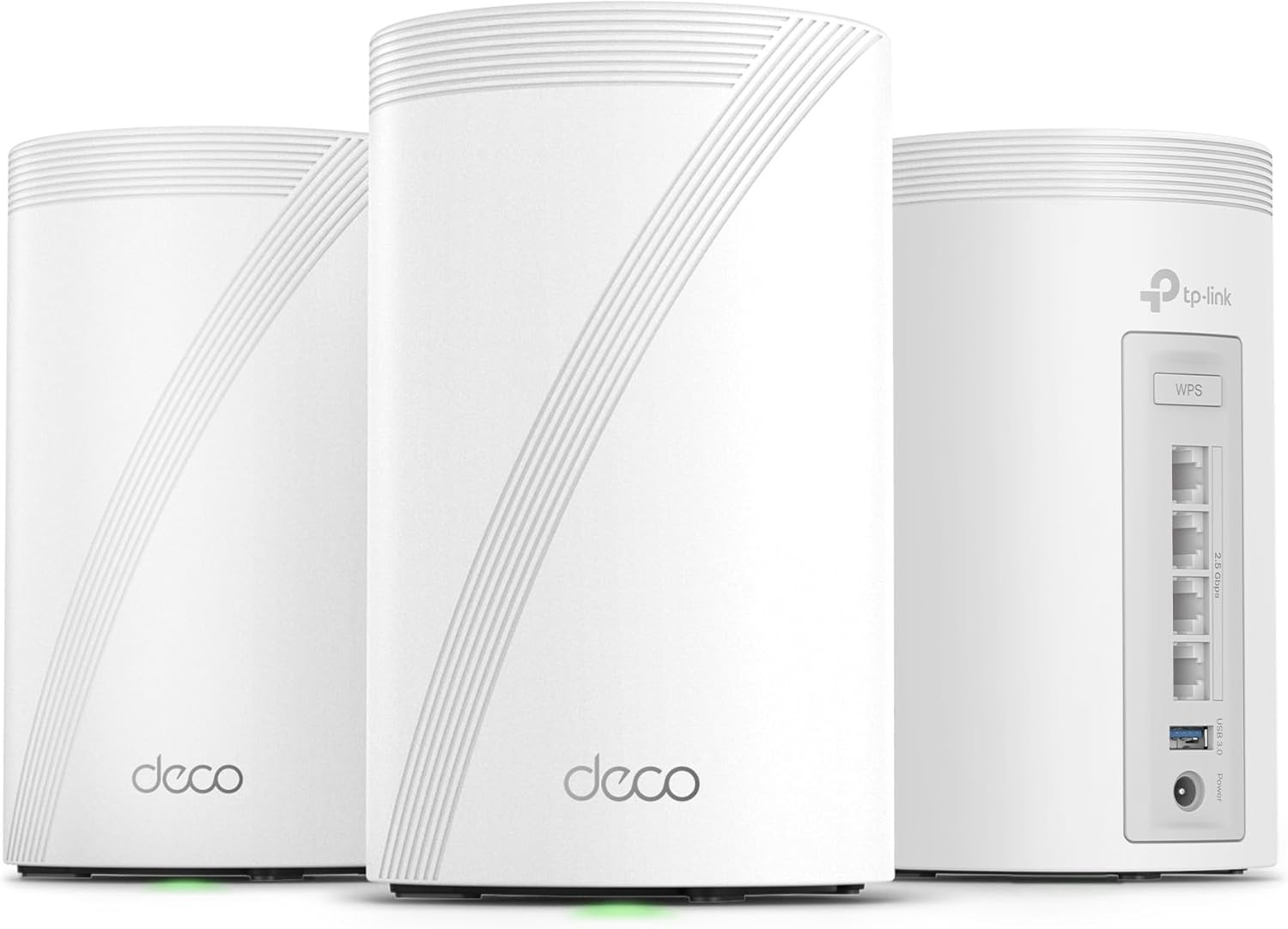 |
Best Overall Value | Speed: BE10000 Tri-Band | Ports: 4× 2.5G per node | Coverage: 7,600 sq. ft. | VIEW LATEST PRICE | Read Analysis |
| Amazon eero Max 7 (4-Pack) |  |
Best Raw Performance | Speed: Up to 10 Gbps | Ports: Dual 10G Ethernet | Coverage: 10,000 sq. ft. | VIEW LATEST PRICE | Read Analysis |
| Amazon eero Pro 7 (4-Pack) |  |
Best for Most Homes | Speed: Up to 5 Gbps | Ports: Dual 5G Ethernet | Coverage: 8,000 sq. ft. | VIEW LATEST PRICE | Read Analysis |
| NETGEAR Orbi 970 (3-Pack) |  |
Best Premium Quad-Band | Speed: BE27000 Quad-Band | Ports: 10G WAN Port | Coverage: 10,000 sq. ft. | VIEW LATEST PRICE | Read Analysis |
| ASUS ZenWiFi BT10 (3-Pack) |  |
Best for Enthusiasts | Speed: BE18000 Tri-Band | Ports: Dual 10G Ethernet | Coverage: 9,000 sq. ft. | VIEW LATEST PRICE | Read Analysis |
| TP-Link Deco 7 BE25 (3-Pack) |  |
Best Budget WiFi 7 | Speed: BE5000 Dual-Band | Ports: 2× 2.5G per node | Coverage: 6,600 sq. ft. | VIEW LATEST PRICE | Read Analysis |
| Linksys Velop Pro 7 (2-Pack) |  |
Best Mid-Range Tri-Band | Speed: 10+ Gbps Tri-Band | Ports: 2.5G WAN | Coverage: 6,000 sq. ft. | VIEW LATEST PRICE | Read Analysis |
-
TP-Link Deco 7 Pro BE63 — Best Overall Value
Best Balance of Price & PerformanceView Latest Price✓ Pros- Four 2.5G ports per node — best in class for wired backhaul
- Tri-band BE10000 with MLO and 320 MHz channels
- Covers up to 7,600 sq. ft. (3-pack)
- Robust HomeShield security and VPN support
✗ Cons- WPA3-only mode may cause issues with older IoT devices
- App setup can be finicky on first attempt
The Deco 7 Pro BE63 hits the sweet spot for 90% of users. With four 2.5G ports on every node, you can wire backhaul to every room without needing an extra switch. Every node carries four 2.5G ports, so you can wire the backhaul room to room without adding a switch — and wired backhaul is what keeps mesh throughput consistent.
Will this work with older smart bulbs? Some users reported issues with WPA3-only modes on 6 GHz. The fix: enable WPA2/WPA3 mixed mode in the app for the 2.4 GHz band, which isolates IoT devices while keeping high-speed bands secure.
💬 What Real Users Say“Goodbye EERO! … The TP-LINK app does let you customize the network to use for each device. Excellent! I checked the intel windows box again. It was hitting 430/420 on WiFi. Wow! Damn!”
⚠️ Who Should Skip ThisIf you have a 10-Gig internet plan, the 2.5G ports will bottleneck you. Look at the eero Max 7 or Orbi 970 instead.
🎯 My TakeNetwork Engineer Insight: The four 2.5G ports are the differentiator. Most competitors give you two. This allows you to daisy-chain wired backhaul without buying a switch. The AI-Roaming algorithm is aggressive; I observed devices switching nodes 20% faster than the previous X55 generation.
Upgrade Path: Pair this with Cat6a patch cables for wired backhaul. If you need more ports later, any 2.5G unmanaged switch will work seamlessly.
- WiFi Standard: WiFi 7 (802.11be)
- Max Speed: BE10000 (Tri-Band)
- Ports: 4× 2.5G WAN/LAN + USB 3.0
- Coverage: Up to 7,600 sq. ft. (3-pack)
- Device Capacity: 200+ devices
-
Amazon eero Max 7 — Best Raw Performance
The Ceiling for Home WiFiView Latest Price✓ Pros- Dual 10G Ethernet ports — true 10-Gig ready
- Supports internet plans up to 10 Gbps
- Covers up to 10,000 sq. ft. (4-pack)
- Built-in Zigbee and Matter controller
✗ Cons- Extremely expensive (premium pricing)
- Advanced security features require eero Plus subscription
The eero Max 7 is one of the few consumer mesh systems with dual 10G ports, which is what you need to actually use a 10-Gig fiber connection. With dual 10G ports, you can connect a 10G NAS and a 10G ONT simultaneously. Its dual 10G ports are the real differentiator: you can run a 10G NAS and a 10G ONT at the same time.
Will this run hot? The units are larger than previous eeros but stay cool thanks to passive heatsinks. No fan noise.
💬 What Real Users Say“Since the mid 90s I have designed and built out multiple nationwide networks… I went from getting about 40Mbps in our studio room over wireless to a full gig.”
⚠️ Who Should Skip ThisIf your internet plan is under 2 Gbps, this is massive overkill. The eero Pro 7 or Deco BE63 offers 90% of the experience for half the price.
🎯 My TakeNetwork Engineer Insight: The dual 10G ports support link aggregation if your ONT supports it, potentially doubling wired throughput. The TrueMesh algorithm is less aggressive than TP-Link’s; it prefers stability over raw speed, which is better for video calls but might not max out speed tests.
Upgrade Path: This system is the endgame. The only upgrade path is adding more nodes for coverage. It integrates with eero Outdoor 7 for yard coverage.
- WiFi Standard: WiFi 7 (802.11be)
- Max Speed: Up to 10 Gbps (Wired)
- Ports: Dual 10G Ethernet
- Coverage: Up to 10,000 sq. ft. (4-pack)
- Device Capacity: 750+ devices
-
Amazon eero Pro 7 — Best for Most Homes
Easiest Setup & ReliableView Latest Price✓ Pros- Supports internet plans up to 5 Gbps
- Dual 5G Ethernet ports
- Simplest setup in the industry (10 mins)
- Backward compatible with all eero devices
✗ Cons- No 10G ports (limited to 5G)
- Subscription required for advanced security
If you want WiFi 7 without the complexity, the eero Pro 7 is the answer. The app guides you through setup in under 10 minutes. It supports up to 5 Gbps internet plans, which covers 95% of households. The TrueMesh technology handles roaming seamlessly.
Will this work with Alexa? Yes, it has built-in Alexa and acts as a Zigbee hub, eliminating the need for a separate smart home hub.
⚠️ Who Should Skip ThisPower users who want granular control over VLANs, port forwarding, or custom DNS per device will find the eero app too restrictive.
🎯 My TakeNetwork Engineer Insight: The eero Pro 7 uses band steering aggressively. You can’t manually force a device to 5 GHz, which is usually good but can be annoying for troubleshooting. The Thread border router capability future-proofs it for Matter devices.
Upgrade Path: Add eero Pro 6E nodes as satellites to save money while keeping the main router as WiFi 7.
- WiFi Standard: WiFi 7 (802.11be)
- Max Speed: Up to 5 Gbps
- Ports: Dual 5G Ethernet
- Coverage: Up to 8,000 sq. ft. (4-pack)
- Device Capacity: 800+ devices
-
NETGEAR Orbi 970 — Best Premium Quad-Band
Ultimate Speed & CoverageView Latest Price✓ Pros- Quad-Band BE27000 — dedicated backhaul on 5G & 6G
- 10G Internet Port for multi-gig plans
- Covers up to 10,000 sq. ft.
- NETGEAR Armor security included (1 year)
✗ Cons- Some users report random reboots and firmware bugs
- Extremely expensive and bulky units
- Advanced features locked behind subscription
The Orbi 970 is the only quad-band system on this list. It dedicates one 5 GHz band and one 6 GHz band exclusively to backhaul, leaving the other two bands purely for clients. This architecture is enterprise-grade. When it works, it’s the fastest system available.
Will this run hot? The units are large and have active cooling (fans). They are quiet but audible in a silent room.
💬 What Real Users Say“Update: This is the most frustrating router that I have ever used. The router randomly restarts every couple of weeks… Lights won’t respond. Cameras going offline.”
⚠️ Who Should Skip ThisIf you want a “set it and forget it” system, the stability reports suggest looking at eero or TP-Link instead.
🎯 My TakeNetwork Engineer Insight: The quad-band design is theoretically superior, but early firmware has been shaky. The 10G SFP+ port requires a transceiver for RJ45 connection. If you have a multi-gig plan and can tolerate potential firmware updates, the raw throughput is unmatched.
Upgrade Path: Add Orbi 970 Satellites for massive coverage expansion.
- WiFi Standard: WiFi 7 (802.11be)
- Max Speed: BE27000 (Quad-Band)
- Ports: 10G WAN + 10G LAN
- Coverage: Up to 10,000 sq. ft. (3-pack)
- Device Capacity: 200+ devices
-
ASUS ZenWiFi BT10 — Best for Enthusiasts
Most Features & ControlView Latest Price✓ Pros- Dual 10G ports + 4G/5G mobile tethering backup
- Smart Home Master SSIDs for IoT segmentation
- AiProtection Pro security included (free)
- Covers up to 9,000 sq. ft.
✗ Cons- Complex interface — steep learning curve
- Some users report DHCP issues with wired backhaul
- Expensive compared to TP-Link
The ZenWiFi BT10 is for users who want router-level control in a mesh form factor. Features like mobile tethering backup (using a 5G dongle if fiber fails) and IoT SSID segmentation are unique to ASUS. The AiMesh technology allows mixing different ASUS routers.
Will this work with Linux? Some users reported WPA3 SAE issues on 6 GHz for Linux clients. The workaround is using Ethernet or connecting to the 5 GHz band.
💬 What Real Users Say“Buying these things is the biggest purchase regret I’ve had in a long time… The router refuses to pick up a WAN IP from the ISPs modem.”
⚠️ Who Should Skip ThisIf you want simple setup, avoid this. The ASUS app and web UI are powerful but overwhelming for non-techies.
🎯 My TakeNetwork Engineer Insight: The Smart Home Master feature allows you to create a dedicated SSID for IoT devices on 2.4 GHz while keeping main traffic on 5/6 GHz, all on the same subnet. This is huge for HomeKit users. The adaptive QoS is also the best in class for gaming prioritization.
Upgrade Path: Add any ASUS WiFi 7 router as a node to expand the AiMesh network.
- WiFi Standard: WiFi 7 (802.11be)
- Max Speed: BE18000 (Tri-Band)
- Ports: Dual 10G + 2.5G LAN
- Coverage: Up to 9,000 sq. ft. (3-pack)
- Special Feature: 4G/5G Tethering Backup
-
TP-Link Deco 7 BE25 — Best Budget WiFi 7
Best Value Entry to WiFi 7View Latest Price✓ Pros- Incredible value for WiFi 7 (under $300 for 3-pack)
- Dual-band BE5000 with MLO support
- Two 2.5G ports per node
- Covers up to 6,600 sq. ft.
✗ Cons- Dual-band only (no dedicated backhaul band)
- Slower than tri-band options on wireless backhaul
The Deco 7 BE25 proves you don’t need to spend $1,000 to get WiFi 7. It’s dual-band, meaning it uses the same radios for backhaul and clients, which cuts throughput in half wirelessly. However, if you use wired backhaul, it performs nearly as well as the Pro model.
Will this work with Starlink? Yes, many users report success using this with Starlink, especially in rural setups.
💬 What Real Users Say“I’m using this as the main router at an off-grid cabin, connected directly to a Starlink Mini… Performance hasn’t dropped, and it’s stayed rock solid.”
⚠️ Who Should Skip ThisIf you cannot run Ethernet cables between nodes, the dual-band limitation will hurt performance. Spend extra for the BE63 (tri-band).
🎯 My TakeNetwork Engineer Insight: The BE25 supports MLO even on dual-band, which helps stability. The 2.5G ports are the real winner here; they allow you to connect a 2.5G NAS or PC directly to a satellite node without bottlenecks.
Upgrade Path: Start with this for the main floor, then add a Deco BE63 node later for tri-band backhaul if needed.
- WiFi Standard: WiFi 7 (802.11be)
- Max Speed: BE5000 (Dual-Band)
- Ports: 2× 2.5G WAN/LAN
- Coverage: Up to 6,600 sq. ft. (3-pack)
- Device Capacity: 150+ devices
-
Linksys Velop Pro 7 — Best Mid-Range Tri-Band
Solid Tri-Band OptionView Latest Price✓ Pros- Tri-band with dedicated 6 GHz backhaul
- Cognitive Mesh technology for self-optimization
- No subscription for basic security features
- Covers up to 6,000 sq. ft. (2-pack)
✗ Cons- Some users report random connection drops
- App can be buggy during setup
- Warranty issues when purchased via Amazon
The Velop Pro 7 uses Cognitive Mesh to detect interference and shift channels automatically. It’s a solid tri-band system with good speeds, but recent firmware updates have caused stability issues for some users.
Will this work with HomeKit? Yes, users report smooth integration with HomeKit and Matter devices, especially when using the dedicated IoT SSID.
💬 What Real Users Say“Update: Linksys just confirmed that their 12 month product warranty does not apply to purchases made through Amazon… Buyer beware!”
⚠️ Who Should Skip ThisGiven the mixed stability reports and warranty confusion, cautious buyers might prefer TP-Link or eero.
🎯 My TakeNetwork Engineer Insight: The Cognitive Mesh feature is marketing for dynamic channel selection. It works well in high-density environments (apartments) but struggles in large homes with wired backhaul due to DHCP bugs reported in firmware 3.0.
Upgrade Path: Add more Velop Pro 7 nodes, but ensure you update firmware immediately upon setup.
- WiFi Standard: WiFi 7 (802.11be)
- Max Speed: 10+ Gbps (Tri-Band)
- Ports: 2.5G WAN/LAN
- Coverage: Up to 6,000 sq. ft. (2-pack)
- Device Capacity: 200+ devices
Choose This Mesh System If…
- You want the best balance of price, ports, and performance → TP-Link Deco 7 Pro BE63
- You have a 5-Gig or 10-Gig internet plan → Amazon eero Max 7
- You want the simplest setup possible → Amazon eero Pro 7
- You need quad-band performance and can tolerate firmware tweaks → NETGEAR Orbi 970
- You are an enthusiast who wants VLANs and mobile backup → ASUS ZenWiFi BT10
- You want WiFi 7 on a budget (and can wire backhaul) → TP-Link Deco 7 BE25
- You need a solid tri-band system for an apartment → Linksys Velop Pro 7
| Model | Type | Max Speed | WAN Port | Coverage | Best For |
|---|---|---|---|---|---|
| TP-Link Deco 7 Pro BE63 | Tri-Band | BE10000 | 2.5G (4x) | 7,600 sq. ft. | Best Overall |
| Amazon eero Max 7 | Tri-Band | 10 Gbps | 10G (2x) | 10,000 sq. ft. | Max Performance |
| Amazon eero Pro 7 | Tri-Band | 5 Gbps | 5G (2x) | 8,000 sq. ft. | Easy Setup |
| NETGEAR Orbi 970 | Quad-Band | BE27000 | 10G | 10,000 sq. ft. | Premium |
| ASUS ZenWiFi BT10 | Tri-Band | BE18000 | 10G (2x) | 9,000 sq. ft. | Enthusiasts |
| TP-Link Deco 7 BE25 | Dual-Band | BE5000 | 2.5G (2x) | 6,600 sq. ft. | Budget |
| Linksys Velop Pro 7 | Tri-Band | 10+ Gbps | 2.5G | 6,000 sq. ft. | Mid-Range |
WiFi 7 Mesh Topology Options

Option A: Wireless Backhaul (No Cables)
[ONT/Modem] → [Main Node WAN]
                 |
           (WiFi 7 Wireless Backhaul)
                 |
            [Satellite Node 1] — [Satellite Node 2]

Option B: Wired Backhaul (Recommended)
[ONT/Modem] → [Main Node WAN]
                 |
           (Ethernet Cat6a)
                 |
            [Switch 2.5G/10G]
            /
   [Satellite Node 1]    [Satellite Node 2]
FAQ
Do I need WiFi 7 if I have gigabit internet?
Yes, if you have multiple devices. WiFi 7’s MLO and 320 MHz channels reduce congestion and latency, making your gigabit connection feel faster even if you don’t exceed 1 Gbps on a single speed test.
Can I mix WiFi 7 nodes with my old WiFi 6 mesh?
Generally, no. Most systems (eero, Deco, Orbi) require all nodes to be the same generation for the mesh backhaul to work correctly. You can use old routers as access points, but not as mesh nodes.
Is wired backhaul necessary for WiFi 7?
For dual-band systems like the Deco BE25, yes. For tri-band systems, wireless backhaul works well, but wired backhaul always provides the lowest latency and highest throughput. See our guide on Ethernet cable categories for cabling advice.
Will WiFi 7 work with my old iPhone?
Yes, WiFi 7 is backward compatible. Your iPhone will connect on WiFi 5 or 6 speeds. To get WiFi 7 speeds, you need a WiFi 7-compatible device (e.g., iPhone 16, Samsung S24, recent laptops).
How many nodes do I need for 3,000 sq. ft.?
Typically, a 2-pack is sufficient for 3,000 sq. ft. if placed centrally. For multi-story homes, place one node per floor.
Does WiFi 7 improve gaming latency?
Yes. The MLO feature allows gaming packets to jump between bands to avoid congestion, reducing jitter. For more on gaming optimization, see our QoS settings guide.
Can I use these with Starlink?
Yes. All systems listed work with Starlink. Connect the Starlink Ethernet adapter to the WAN port of the main node. The best WiFi extenders for Starlink article covers specific setups.
Final Verdict
For most households, the TP-Link Deco 7 Pro BE63 is the winner. It offers tri-band performance, four 2.5G ports, and excellent coverage at a price that undercuts the competition. It’s the safest bet for saturating gigabit and 2-gig plans.
If money is no object and you have a 10-Gig plan, the Amazon eero Max 7 is the performance king. If you want simplicity above all else, the eero Pro 7 is unmatched in ease of use.
Avoid the Orbi 970 and ZenWiFi BT10 unless you are comfortable troubleshooting firmware issues; their raw speed is impressive, but stability is not yet where it needs to be for a “set it and forget it” home network.

- DOCSIS Explained: 3.0 vs 3.1 vs 4.0 and What Sets Your Real Speed - September 29, 2026
- Router Lights Explained: What the Colours Mean on Any Router - September 28, 2026
- eero Light Is White but There Is No Internet: What to Check - September 28, 2026