
Affiliate disclosure: As an Amazon Associate, I earn from qualifying purchases.
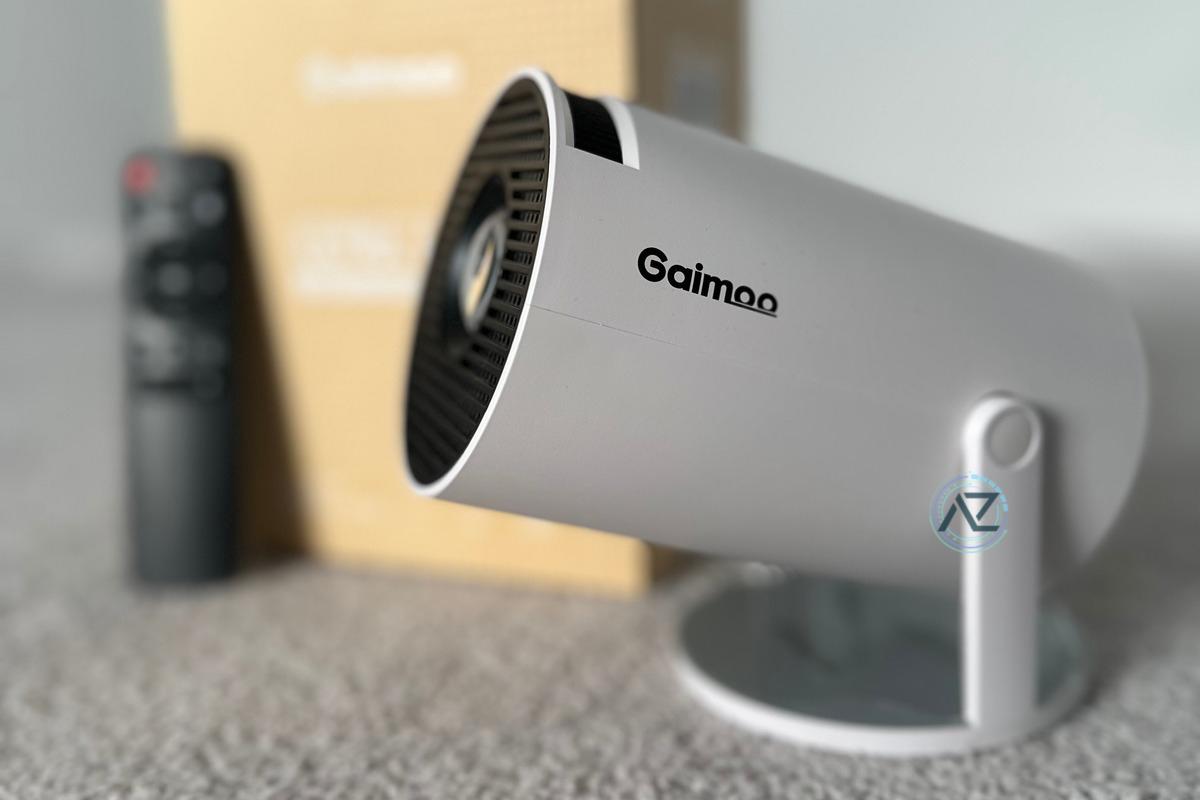
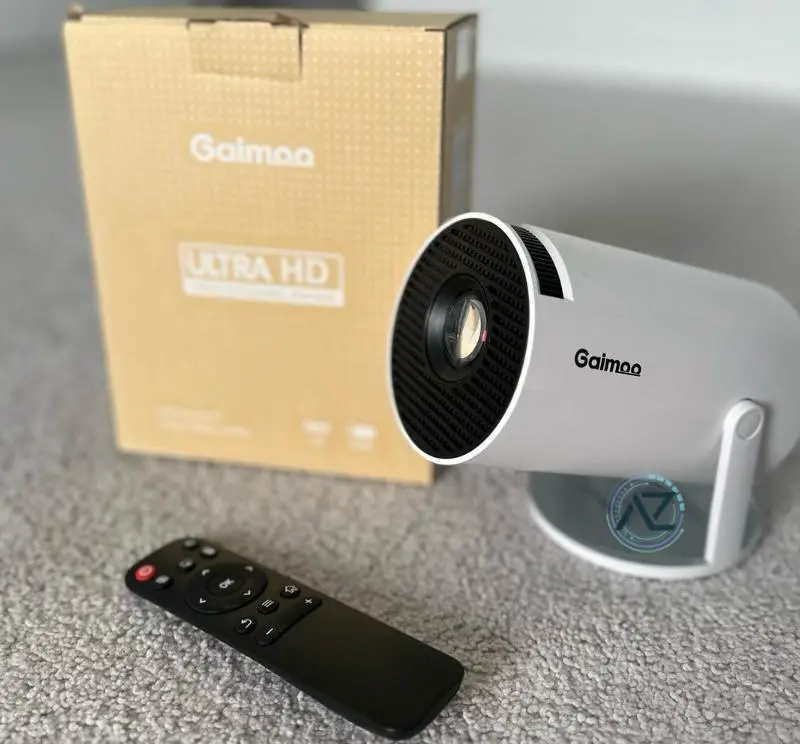
The Gaimoo GM200 Mini Projector delivers capable performance with a native 720p panel and support for 1080p/4K input sources (downscaled to the panel’s resolution). This compact projector includes built-in Android smart features for basic streaming and mirroring. It offers flexible setup options with projection distances from 3 to 18 feet, with a recommended screen size of 35–120 inches for best brightness and clarity.
The auto keystone correction and 180° rotation make positioning hassle-free, while multiple connectivity options, including WiFi 6 and Bluetooth 5.2, support versatile device compatibility. The built-in HiFi speakers provide decent audio for casual use, and external speakers can be connected for fuller sound.
What’s New – Android TV & App Support: The latest firmware improves general app compatibility. YouTube and several apps work via the built-in Android 11–based OS, but Netflix reliability and HD playback are inconsistent on this model class. For the most seamless experience, use a certified HDMI streaming device (e.g., Roku/Chromecast/Fire TV). The included mouse still makes navigating the OS easier than remote-only control.
![[Built-in App] Mini Projector 1080P FHD 4K Support Projector with Mouse Portable Projector with WiFi and Bluetooth 180° Adjustable Auto Keystone HDMI/TV Stick/USB/PS5/Laptop, with HDMI Cable & Mouse](https://m.media-amazon.com/images/I/51JL1p1HgfL._SS520_.jpg)
Quick Verdict – Overall rating: ⭐⭐⭐⭐☆ (4.3 out of 5 stars)
The Gaimoo GM200 Mini Projector is a solid choice for budget-friendly, portable big-screen entertainment in darker rooms. Its native 720p resolution with 1080p/4K input support and simple smart features make it versatile for movie nights and casual gaming. It accepts 4K/1080p sources but displays at the panel’s 720p resolution.
It’s especially beneficial for families and individuals who want a quick setup and the ability to watch content on larger screens without significant complexity.
However, if you prioritize brightness for daytime viewing or require fully certified streaming apps (notably Netflix), consider alternatives with higher ANSI lumens and official app certification. The manual controls and keystone adjustments can take a moment to dial in, but once configured, day-to-day use is straightforward.
Our Verdict: We tested this product for more than a month and decided to keep it for movie nights with kids and family where a compact, affordable projector shines.
Pros and Cons
Here’s a quick overview of the Gaimoo GM200’s pros and cons:
Pros:
-
Affordable price: The Gaimoo GM200 offers strong value for the money, balancing features and portability.
-
1080p/4K input support: Accepts higher-resolution sources and downscales cleanly to its native 720p panel; recommended screen size 35–120 inches.
-
Android 11–based smart features: Access popular apps like YouTube out of the box (Netflix certification not confirmed).
-
Wireless connectivity: WiFi 6 and Bluetooth 5.2 support for casting, mirroring, and audio accessories.
-
Portable and lightweight: Easy to carry and set up around the home or on trips.
-
Dual control mode: Use the remote or the included mouse for easier navigation.
-
Auto keystone correction and 180° rotation aid quick setup once you learn the controls.
-
Integrated speakers are serviceable, with Bluetooth 5.2 output to pair external speakers for better sound.
-
Multiple connectivity options include WiFi 6, Bluetooth 5.2, HDMI, and USB ports for flexible hookups.
Cons:
-
Limited brightness (≈200 ANSI lumens): Best in dark rooms; daytime viewing is challenging.
-
App compatibility varies: Netflix and some services may require an external streaming stick for reliable HD playback.
-
Average sound quality: Built-in speakers are fine for dialog but lack bass.
-
Connection quirks: Ceiling setups may need a 90° HDMI adapter; some laptops require handshake retries.
-
Build quality is basic: Lightweight design can feel fragile compared to premium models.
Tip: For more stable WiFi streaming, use a 5GHz network and keep the projector within line of sight to your router. If an app doesn’t play reliably, connect a certified HDMI streaming device for best results.
See also: Epson EpiqVision Flex CO-W01 Projector Review
Gaimoo GM200 Mini Projector: Specifications
| Feature | Details |
|---|---|
| Brand | Gaimoo |
| Model Number | GM200 |
| System | Android 11–based smart OS (certification for Netflix/Play Protect not confirmed) |
| CPU | Not specified |
| Resolution | Native 720p; supports 1080p/4K input (downscaled) |
| Brightness | ≈200 ANSI lumens (vendor claim ≈920 LED lumens) |
| Contrast Ratio | ≈2,000:1 (manufacturer claims up to 10,000:1) |
| Projection Size | Recommended 35–120 inches |
| Projection Distance | 3–18 feet |
| Keystone Correction | Auto keystone, 180° rotation (tested) |
| Zoom | Digital zoom (35%–100%) |
| Connectivity | WiFi 6, Bluetooth 5.2, HDMI, USB, 3.5mm jack |
| Other Features | Built-in HiFi speaker, Mouse included, AirPlay/Miracast |
| Dimensions | 3.98 x 3.98 x 7.44 inches |
| Weight | ~14.1 oz (0.88 lb) |
Gaimoo GM200 Mini Projector: Features
The Gaimoo GM200 offers a range of features designed to elevate your home entertainment experience:
-
1080p/4K Input Support on a Native 720p Panel:u003c/strongu003e Accepts higher-resolution content and downscales for crisp casual viewing at the recommended 35–120 inches.
-
Built-in Android Smart TV OS: Stream from popular platforms like YouTube without needing an external device; Netflix performance and HD playback may vary.
-
HDR-Compatible Processing: Handles HDR input for improved perceived contrast on supported content.
-
WiFi 6 and Two-way Bluetooth 5.2: Cast and mirror wirelessly, or pair Bluetooth speakers/headphones for better audio.
-
Auto Keystone Correction and 180° Rotation: Quickly square the image and angle the projector to suit your setup.
-
Digital Zoom: Resize between 35% and 100% without moving the projector.
-
Versatile Connectivity: HDMI, USB, and 3.5mm headphone jack cover most sources and use cases.
-
Dual Control Mode: Navigate with the included remote or mouse, whichever you prefer.
-
Screen Mirroring: AirPlay and Miracast support make sharing from phones and laptops simple.
Setup and Installation Process
Setting up the Gaimoo GM200 Mini Projector involves straightforward steps most users can complete within minutes.
The projector’s auto keystone correction and 180° rotation features make positioning user-friendly, whether you’re placing it on a table or mounting it to the ceiling using the built-in 1/4-inch screw hole.
Once positioned, connect devices through WiFi, Bluetooth, HDMI, or USB ports.
The included mouse and remote control enable smoother navigation through the Android smart interface.
If needed, use digital zoom (35%–100%) to fine-tune image size. For the best balance of sharpness and brightness, aim for a 35–120 inch image depending on distance and ambient light.
Picture and Sound Quality
The GM200 produces pleasing results for its class with 720p native resolution and HDR-compatible processing that enhances perceived contrast on suitable content. Expect crisp, colorful images in dark rooms. In brighter spaces, reduce screen size to maintain punch given its ≈200 ANSI-lumen output.
The audio experience is serviceable via the built-in HiFi speaker. For larger rooms or outdoor use, pairing Bluetooth 5.2 speakers or headphones delivers a noticeable upgrade.
Tuned carefully and kept within the recommended size range, the GM200 can deliver an immersive home theater feel for movie nights and casual gaming.
[Built-in App] Mini Projector 1080P FHD 4K Support Projector with Mouse Portable Projector with WiFi and Bluetooth 180° Adjustable Auto Keystone HDMI/TV...
Connectivity Options
A standout feature of the GM200 Mini Projector is its connectivity suite with WiFi 6 and two-way Bluetooth 5.2. You can connect via ports or wirelessly for different entertainment needs. For reliable HD streaming on services like Netflix, a certified HDMI streaming device is recommended.
| Connection Type | Compatible Devices | Key Features |
|---|---|---|
| HDMI | Gaming consoles, laptops, TV sticks | Accepts up to 4K input (downscaled) |
| USB | Flash drives, hard drives | Media playback |
| Bluetooth 5.2 | Speakers, headphones | Two-way audio |
| WiFi 6 | Smart devices, casting | Fast, low-latency connectivity |
The projector’s Android-based OS can reduce reliance on external devices for basic apps, while the 3.5mm headphone jack provides a reliable audio output option. For mounting flexibility, the included 1/4-inch screw hole accommodates both tripod and ceiling installations; some ceiling setups benefit from a 90-degree HDMI adapter.
User Experience and Support
Maneuvering the GM200’s interface is straightforward thanks to its dual control system with remote and mouse.
Users report positive experiences with the auto keystone correction and 180-degree rotation features after a brief learning curve.
Customer support from Gaimoo shows a commitment to long-term service, though the initial setup instructions could be clearer.
The company offers assistance regardless of purchase date, which provides peace of mind for buyers.
While the interface becomes intuitive with use, some users find the remote layout takes time to master.
The sealed optical engine and cooling system contribute to reliability for extended use.
Comparing the Gaimoo GM200 to Other Mini Projectors
The mini projector market is crowded with options, so how does the Gaimoo GM200 stack up against the competition? Here’s a comparison with some popular alternatives:
| Feature | Gaimoo GM200 | Anker Nebula Capsule 3 | Epson EpiqVision Flex CO-W01 | Vankyo Leisure 470 Pro |
|---|---|---|---|---|
| Resolution | Native 720p (supports 1080p/4K input) | 1080p | 1080p | 1080p |
| Brightness | ≈200 ANSI (vendor ≈920 LED) | 300 ANSI lumens | 300 ANSI lumens | Not specified |
| Contrast Ratio | ≈2,000:1 (claim up to 10,000:1) | Not specified | Not specified | Not specified |
| Throw Ratio | ≈1.2:1 | 1.2:1 | Not specified | 1.3:1 |
| Speaker | Built-in HiFi speaker | 8W speaker | 5W speaker | 3W speaker |
| Connectivity | WiFi 6, Bluetooth 5.2 | WiFi, Bluetooth | WiFi, Bluetooth | WiFi, Bluetooth |
| Operating System | Android 11–based (uncertified) | Android TV 11 | ||
| Special Features | Auto keystone, 180° rotation, mouse included, mirroring | Built-in battery, Google Assistant | 3LCD technology | Dolby Audio |
| Price | ~$60–$120 (new) | Around $400 | Around $370 | Around $170 |
Frequently Asked Questions
Q: Can I stream Netflix and Prime Video without an external device?
A: The built-in Android OS supports several apps (e.g., YouTube), but Netflix performance and HD playback are inconsistent. For the best experience, use a certified HDMI streaming device.
Q: Is it true 4K or just 4K input?
A: It accepts up to 4K input but displays at its native 720p resolution.
Q: Does it include a tripod or case?
A: No case or tripod is included; the projector is compact and fits in standard bags.
Q: How loud is the fan?
A: The cooling fan is noticeable in quiet scenes but fades during regular playback; movie mode reduces perceived noise.
Q: Can I use it for presentations?
A: Yes—text and slides are crisp enough for low-light environments on white walls or screens within the recommended image size.
Q: Can I connect a Chromecast or Roku for streaming?
A: Absolutely—plug your device into the HDMI port for the most reliable streaming app support.
Q: How Long Is the Projector Lamp Expected to Last?
A: The LED light source is rated around 30,000 hours, supported by a sealed optical engine for longevity.
Q: Can the Projector Be Used Outdoors or in Direct Sunlight?
A: Outdoor use is possible after dusk or in shaded areas. Direct sunlight will significantly wash out the image at ≈200 ANSI lumens.
Q: What Is the Power Consumption During Regular Operation?
A: Typical power draw is approximately 40W during regular operation.
Q: Does the Projector Work With Streaming Services in All Countries?
A: Streaming availability varies by region and service. If a specific app is required, a certified streaming stick is the most consistent approach.
Q: Is it Google/Netflix certified?
A: Certification is not confirmed. Treat it as an Android 11–based smart projector without guaranteed Netflix or Play Protect certification.
Conclusion
The Gaimoo GM200 Mini Projector is a compelling budget option that delivers enjoyable big-screen viewing in dark rooms. While app certification and brightness have limits, its combination of 720p native resolution with 1080p/4K input support, Android-based smart features, WiFi 6, and auto keystone correction make it a practical pick for casual movie nights.
2025 Verdict: Feature-rich for the price, best in dark rooms. Use a certified streaming stick for Netflix and stick to 35–120 inches for the most satisfying picture.

- Best WiFi 7 Mesh Systems (2026) — Tested & Ranked for Multi-Gig Homes - April 28, 2026
- Best Routers for Verizon FiOS (2026) — WiFi 7 & Mesh Picks Tested - April 13, 2026
- Best 2.5GbE Switches for Home Lab (2026) — Tested & Verified - April 8, 2026