
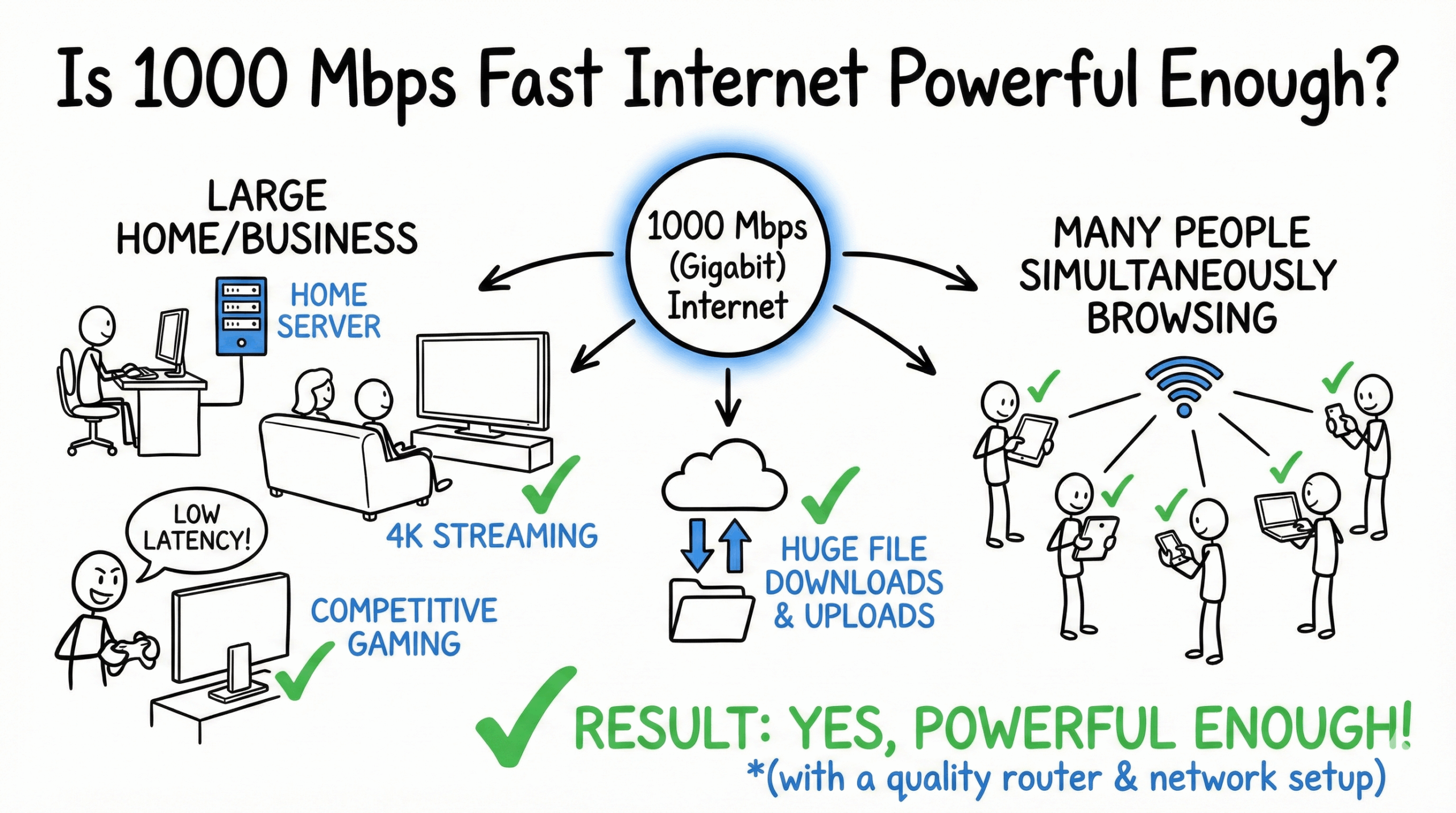
Yes, 1000 Mbps is exceptionally fast. It’s powerful enough for large homes and businesses with many people simultaneously browsing the internet, competitive online gaming, streaming in 4K, downloading and uploading huge files, or even running a home server.
In this article, we’ll dive into the world of 1000 Mbps—also known as gigabit or “gig” internet—and explore the practical answer to the question: Is 1000 Mbps a fast internet speed for you?
What Can You Do with 1000 Mbps Internet?
A 1000 Mbps connection handles virtually any online activity you can throw at it with ease. Instead of thinking about theoretical maximums, it’s more helpful to understand the real-world performance you can expect. Here’s a look at how gigabit internet performs for common tasks.
| Online Activity | Required Speed Range | Performance on 1000 Mbps |
|---|---|---|
| Basic Usage (Email, Web Surfing, Social Media) | 1–5 Mbps | Effortless. Supports an almost unlimited number of users without any slowdown. |
| Voice Calls (WhatsApp, Skype) | 0.1 Mbps | Flawless. Crystal-clear call quality for dozens of simultaneous users. |
| HD Video Calls (Zoom, Teams) | 2–5 Mbps | Seamless. Easily supports a large household or small office of remote workers on video calls. |
| 4K Video Streaming (Netflix, YouTube TV) | 15–25 Mbps | Perfect. You can stream on numerous screens in 4K Ultra HD at the same time without buffering. |
| Online Gaming | 3–5 Mbps | Exceptional. Provides a lag-free experience for multiple competitive gamers at once. |
| Music Streaming | 0.5 Mbps | Instantaneous. Supports a whole-house audio system with everyone listening to their own stream. |
Please note: The performance described assumes you have a modern router capable of handling these speeds. Real-world speeds can also vary based on factors like Wi-Fi signal strength, network congestion, and your device’s capabilities.
Is 1000 Mbps Fast for Gaming?
For gaming, 1000 Mbps isn’t just fast—it’s top-tier. While most online games only require a download speed of 3-5 Mbps to play, a gigabit connection offers two massive advantages: incredibly fast download times for new games and enough bandwidth to ensure your gameplay is never affected by other people in your house.
With a 1000 Mbps connection, a massive 150 GB game can download in about 20 minutes, not hours. This means less waiting and more playing. It also provides a stable, low-latency connection, which is critical for competitive online games where every millisecond counts.
| Game / Task | Typical Size | Estimated Download Time with 1000 Mbps | Simultaneous Use Experience |
|---|---|---|---|
| Downloading a Major Title (e.g., Call of Duty) | ~200 GB | ~27 Minutes | Excellent. Your game downloads quickly while others can still stream 4K video. |
| Downloading a Large RPG (e.g., Baldur’s Gate 3) | ~150 GB | ~20 Minutes | Excellent. Downloads won’t disrupt video calls or other activities. |
| Downloading an Indie Game | 5-20 GB | 1-3 Minutes | Instantaneous. The download will likely finish before you can make a cup of coffee. |
| Playing Online (e.g., Fortnite, Valorant) | N/A (requires 3-5 Mbps) | N/A | Perfect. Provides a smooth, lag-free experience for 10+ simultaneous gamers. |
Even with multiple people in your home gaming, streaming 4K movies, and video conferencing, a 1000 Mbps connection provides a significant buffer to ensure everyone has a smooth, lag-free online experience.
Is 1000 Mbps Fast for Netflix and Other Streaming Services?
Yes, a 1000 Mbps connection is more than enough for any streaming service. To stream in 4K Ultra HD, services like Netflix and Hulu recommend a speed of around 15-25 Mbps. With a gigabit plan, you have enough bandwidth to stream in 4K on dozens of devices at the same time.
This means no more arguments over who is using all the internet—your family can watch their own 4K shows on different TVs, tablets, and laptops without a single moment of buffering.
| Streaming Activity | Recommended Download Speed | Performance on 1000 Mbps |
|---|---|---|
| 4K Ultra HD Streaming (e.g., Netflix, Amazon Prime) | 15-25 Mbps | Perfect for large families or shared homes. |
| HD Video Streaming (e.g., YouTube, Hulu) | 5 Mbps | Effortless, supports a massive number of simultaneous streams. |
| Music Streaming (e.g., Spotify, Apple Music) | 0.5 Mbps | Instant, with zero buffering. |
Is 1000 Mbps Fast Enough for Businesses?
Absolutely. A 1000 Mbps internet connection is an excellent choice for small to medium-sized businesses. It provides the robust performance needed for modern operations, including cloud-based applications, large file transfers, and frequent video conferencing.
With a gigabit connection, a team of 20-50 employees can work online simultaneously without experiencing slowdowns. This is especially important for businesses that rely on fast uploads, such as creative agencies sending large video files or tech companies pushing code. For these scenarios, a fiber optic plan with symmetrical upload and download speeds is ideal.
| Business Activity | Recommended Speed | Performance with 1000 Mbps |
|---|---|---|
| HD Video Conferencing (e.g., Zoom, Microsoft Teams) | 3-5 Mbps per user | Supports a large office of employees on calls without quality drops. |
| Large File Transfers (10 GB file) | As fast as possible | A 10GB file can upload or download in under 2 minutes. |
| Cloud Services (e.g., Google Workspace, Office 365) | 5-10 Mbps per user | Ensures instant access and syncing of cloud documents and apps. |
| Web Browsing and Email | 1-2 Mbps per user | Seamless performance for the entire office. |
Do You Need a Special Router for 1000 Mbps Internet?
Yes, to get the most out of your gigabit internet plan, your equipment matters. An old router can be a bottleneck that prevents you from enjoying the speeds you’re paying for.
- Wi-Fi Router: For the best wireless performance, you need a router that supports the Wi-Fi 6 (802.11ax) standard or newer. Wi-Fi 5 routers will struggle to deliver speeds much higher than 400-500 Mbps. Many internet providers offer a compatible router, but purchasing your own can sometimes provide better performance and features.
- Ethernet Cables: For a wired connection, you’ll get the fastest and most stable speeds. Make sure you are using a CAT5e, CAT6, or newer ethernet cable to connect your computer or gaming console directly to the router.
When Might You Need More Than 1000 Mbps?
While 1000 Mbps is the gold standard for most users, the demand for even faster speeds is growing. Here are a few scenarios where you might consider a multi-gigabit plan (like 2 Gbps or 5 Gbps):
- Content Creators and Tech Professionals: If your job involves constantly uploading or downloading massive files—like raw 8K video footage or large datasets—a multi-gig plan can save you significant time.
- The Ultimate Smart Home: A home with dozens of high-bandwidth connected devices, a powerful home media server, and multiple people working or gaming at the highest level might benefit from the extra headroom.
- Large Businesses or Institutions: Corporations, universities, or data centers with hundreds or thousands of simultaneous users require speeds far exceeding 1 Gbps to maintain performance.
- Future-Proofing: As technology evolves, so will our bandwidth needs. Investing in a multi-gig plan is a way to stay ahead of the curve, though for most people in 2025, 1000 Mbps is more than sufficient.
Remember, while these super-fast plans are becoming more available, they are still overkill for the vast majority of households. For now, 1000 Mbps remains the sweet spot for power users.
Cost and Providers of 1000 Mbps Internet in the US
The price for a 1000 Mbps internet plan typically ranges from $70 to $100 per month, depending on your location and the provider. It’s important to look at both download and upload speeds, as these can differ significantly between fiber and cable providers.
Here’s a general overview of what major US providers offer. Please note that prices and plan specifics change often and vary by region, so always check with the provider directly for current offers.
| Internet Provider | Service Plan | Max Speeds (Download / Upload) | Typical Price | Technology Type | Contract Required |
|---|---|---|---|---|---|
| Comcast Xfinity | Gigabit Internet | 1000 Mbps / 100 Mbps | ~$80 / Mo | Cable / Fiber Hybrid | Varies by plan |
| AT&T | AT&T Fiber 1 GIG | 1000 Mbps / 1000 Mbps | ~$80 / Mo | Fiber | No |
| Spectrum | Internet Gig | 1000 Mbps / 35 Mbps | ~$90 / Mo | Cable | No |
| Verizon Fios | Fios Gigabit Connection | 940 Mbps / 880 Mbps | ~$90 / Mo | Fiber | No |
Notice the difference in upload speeds. Fiber providers like AT&T and Verizon Fios offer symmetrical speeds (same upload and download), which is a huge advantage for video calls, uploading large files, and content creation.
How Good Is 1000 Mbps vs. 400 Mbps vs. 200 Mbps Download Speed?
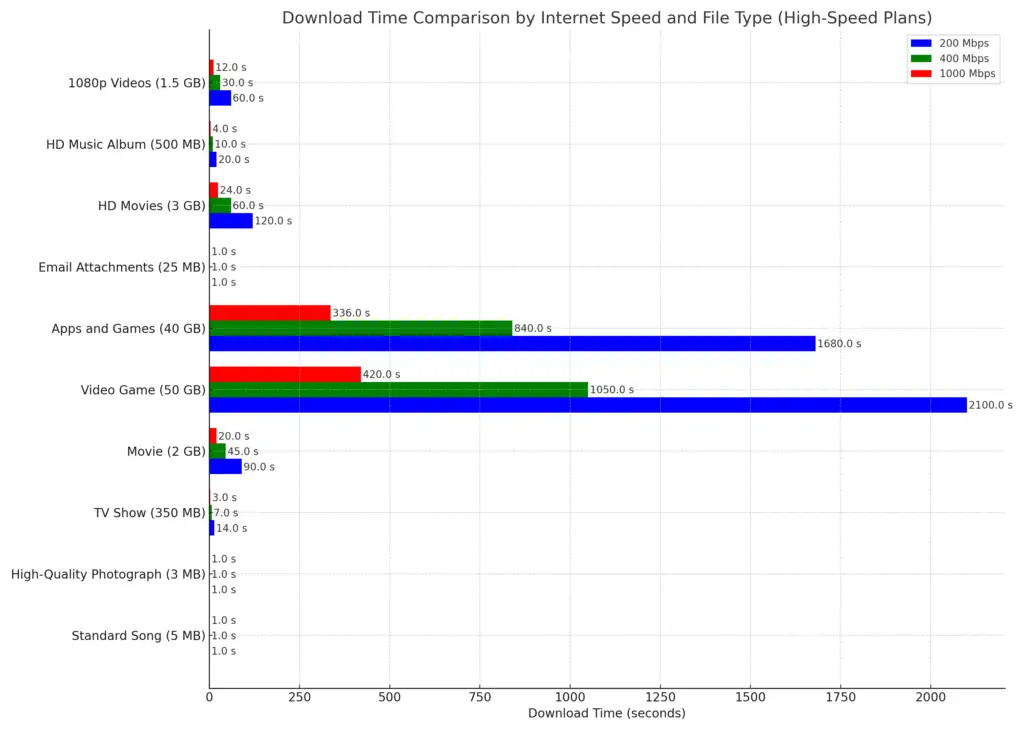
When juxtaposed with other prevalent internet speeds, 1000 Mbps stands out as a premium choice. It’s significantly faster than 200 Mbps or 400 Mbps, making it the ideal choice for environments with numerous devices and heavy internet usage.
The most noticeable difference is in downloading large files, as shown in the table below.
| File Type & Size | Download Time (200 Mbps) | Download Time (400 Mbps) | Download Time (1000 Mbps) |
|---|---|---|---|
| Standard Song (5 MB) | Less than a second | Less than a second | Less than a second |
| TV Show (350 MB) | ~14 seconds | ~7 seconds | ~3 seconds |
| Movie (2 GB) | ~1.5 minutes | ~45 seconds | ~16 seconds |
| Large Video Game (50 GB) | ~34 minutes | ~17 minutes | ~7 minutes |
| HD Movie (3 GB) | ~2 minutes | ~1 minute | ~24 seconds |
| 1080p Video (1.5 GB) | ~1 minute | ~30 seconds | ~12 seconds |
You can also check how fast 10 Mbps, 200 Mbps, or 600 Mbps is for your Internet needs.
Frequently Asked Questions
Is 1000 Mbps overkill for one person?
For a single person who mostly browses the web, checks email, and streams HD video, 1000 Mbps is likely overkill. A 200-400 Mbps plan would be more than sufficient. However, if that one person is a competitive gamer, a content creator, or frequently downloads massive files, the speed of a gigabit connection can be a major quality-of-life improvement.
Is 1000 Mbps good for working from home?
Yes, 1000 Mbps is excellent for working from home, especially if your work involves frequent video calls, cloud applications, and transferring large files. It’s even more beneficial if you share your internet with family members who are also streaming or gaming during your workday. A fiber plan with high upload speeds is particularly valuable for a smooth work-from-home experience.
What’s the difference between 1000 Mbps and 1 Gbps?
There is no practical difference. They are two ways of describing the same speed. “Gbps” stands for Gigabits per second. One gigabit is equal to 1000 megabits, so 1 Gbps is the same as 1000 Mbps. Internet providers use the terms interchangeably.
Conclusion
In conclusion, a 1000 Mbps internet speed is indeed very fast and provides a world-class experience for almost any online activity. From gaming and streaming to running a business, gigabit internet ensures you have a fast, reliable, and buffer-free connection.
However, it’s important to assess your own needs. If you live in a smaller household with light internet usage, a lower-speed plan may be more cost-effective. But if you have a busy, connected home or demand the best performance, you can embrace the digital world with confidence and efficiency with a 1000 Mbps plan.

- pfSense 10G Home Lab Setup: Complete Hardware Guide (2026) - April 1, 2026
- Best Budget Home Lab Setup Under $300 (2026): Complete Starter Stack - March 30, 2026
- Best Modems for Spectrum: Top DOCSIS 3.1 Picks That Actually Work - March 28, 2026