
Affiliate disclosure: As an Amazon Associate, I earn from qualifying purchases.
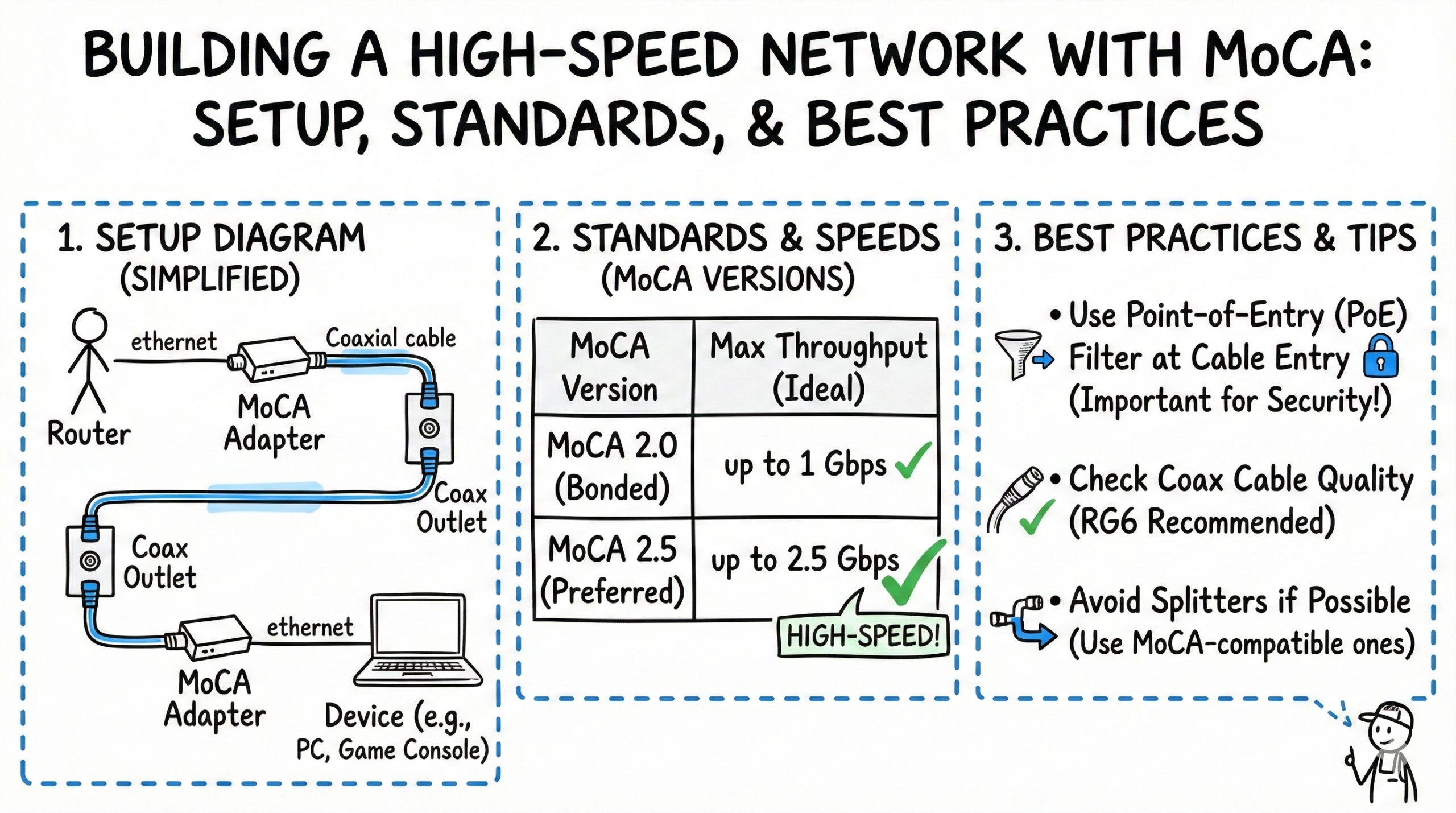
MoCA (Multimedia over Coax Alliance) is a technology that uses existing coaxial cables in homes to create a wired internet network. This offers a faster and more reliable connection than Wi‑Fi, especially in areas with thick walls or multiple floors where Wi‑Fi signals may struggle to penetrate. This article explores MoCA technology, including its setup, standards, and best practices.
What is MoCA and How Does it Work?
MoCA technology takes advantage of the coaxial cables already present in most homes for services like cable TV and internet. By sending data signals over these existing cables, MoCA creates a wired network without the need for any new wiring or drilling. It’s essentially Ethernet over coax.
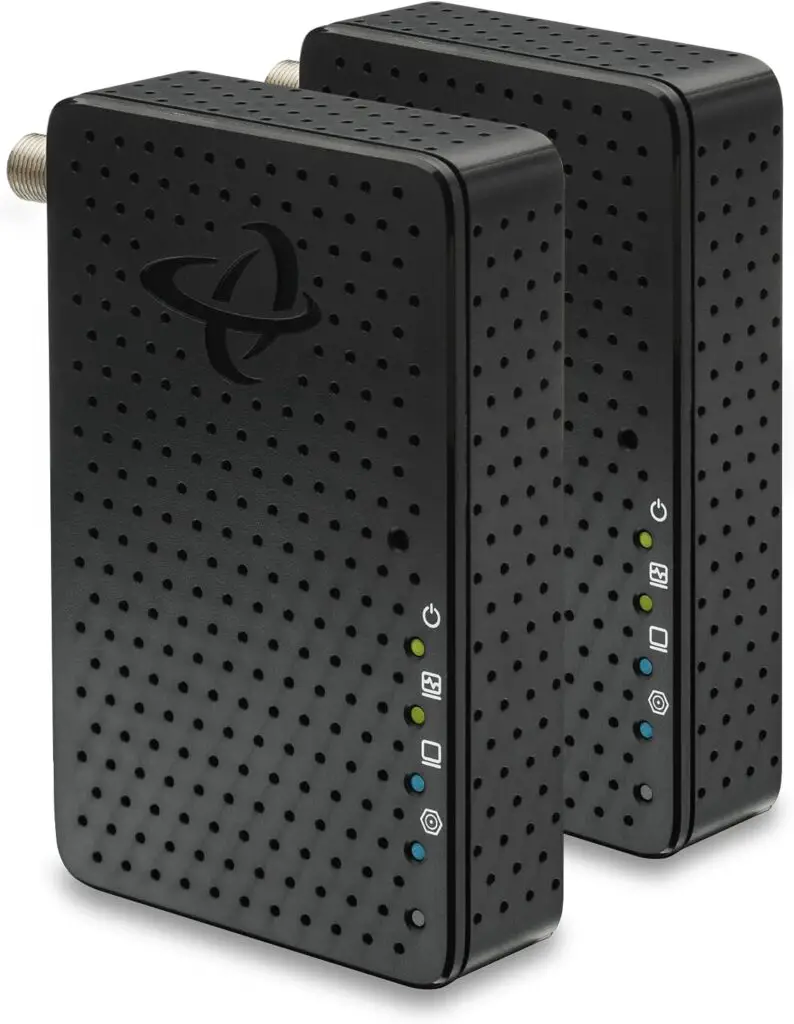
To establish a MoCA network, you’ll need MoCA adapters. These devices connect your devices to the network using the coaxial cables. Typically, one adapter is connected to your router, and another adapter is connected to the device that needs internet access, such as a smart TV, gaming console, or computer.
MoCA creates a shared coax network (half‑duplex). It schedules logical point‑to‑point transmissions between nodes over a common channel for a direct and stable experience between devices.
This setup provides several advantages over traditional Wi‑Fi:
- Reliability: MoCA connections are much more stable and consistent than Wi‑Fi, which can be affected by interference and signal degradation.
- Speed: MoCA 2.5 delivers up to 2.5 Gbps shared throughput with Ethernet‑like stability and latency; it often provides more consistent real‑world performance than Wi‑Fi, especially as a wired backhaul.
- Latency: Lower, steadier latency than Wi‑Fi—useful for online gaming and streaming where responsiveness is crucial.
- Security: MoCA Home supports Enhanced Privacy/MoCASec. For best protection, enable privacy via MPS/pairing on your adapters and install a PoE filter at the point of entry.
Quick Start: MoCA 2.5 Setup (60 seconds)
- Parts: Two MoCA 2.5 adapters, two Ethernet cables, two short RG‑6 patch coax cables, MoCA‑rated splitter (5–1675 MHz) if sharing a jack, and a PoE filter for the incoming coax.
- Place the PoE filter: On the main coax line where it enters the home, ahead of the first splitter.
- Hookup: Router LAN port → Ethernet → MoCA adapter → coax to wall. Remote room: wall coax → MoCA adapter → Ethernet → device.
- Validate: Confirm MoCA link LEDs are solid on both units and run a quick speed/latency test from the remote device.
MoCA Standards
Since its introduction in 2006, MoCA has undergone several revisions. Below is a summary of key standards and what they mean in practice.
| Standard | Net Throughput (MAC Rate) | PHY Rate (Mbps) | Frequency Range (MHz) | Key Features |
|---|---|---|---|---|
| MoCA 1.0 | Up to 135 Mbps | 850 – 1500 | First version, ratified in 2006. | |
| MoCA 1.1 | 175 Mbps | 275 | 850 – 1500 | Improved throughput. |
| MoCA 2.0 | Up to 1 Gbps | 500 – 1650 | Gigabit speeds, lower power modes, backward compatible with MoCA 1.1. | |
| MoCA 2.5 | Up to 2.5 Gbps | 400 – 1675 | Higher data rates, backward compatible with MoCA 2.0 and 1.1, added MoCA Protected Setup (MPS), Management Proxy, Enhanced Privacy/MoCASec, Network‑wide Beacon Power, and Bridge detection. |
MoCA Home networks are half‑duplex, shared‑medium systems that use time‑division multiplexing. MoCA 2.5 increases MAC throughput to 2.5 Gbps but remains half‑duplex.
Usable spectrum: MoCA Home 2.5 supports 400–1675 MHz. Most retail adapters operate in Extended Band D (1125–1675 MHz).
Which version should I buy? For new builds or upgrades, choose MoCA 2.5 adapters. They offer the best throughput and features while remaining compatible with older versions.


Equipment Needed for a MoCA Network
Setting up a MoCA network involves gathering the necessary equipment. Here’s a list of the essentials:
- MoCA Adapters: These are the fundamental building blocks of your MoCA network. You’ll need at least two adapters: one to connect to your router and another to connect to a device in a different room.
- MoCA Wi‑Fi Extenders: These devices extend the reach of your Wi‑Fi network by using MoCA to connect wireless access points to your router. This can help eliminate Wi‑Fi dead spots in your home.
- Coaxial Cables: Use RG‑6 coax with quality compression connectors. The cable itself doesn’t need a “rated to 1675 MHz” label, but all passive components in the path should be MoCA‑compatible and rated to at least 1675 MHz.
- Ethernet Cables: Use Cat5e or better to connect the MoCA adapters to your router and devices. For >1 Gbps throughput, pair MoCA 2.5 adapters with 2.5 GbE ports and compatible switches/NICs.
- Coaxial Splitter: If you intend to use the same coaxial outlet for both MoCA and your cable TV service, choose a MoCA‑optimized splitter rated to at least 1675 MHz (e.g., 5–1675 MHz).
- PoE Filter: A Point of Entry (PoE) filter is highly recommended to contain MoCA signals within your home and to reduce ingress/egress with provider networks. Install it on the main line where coax enters the home.
Setting Up a MoCA Network
Once you have the necessary equipment, setting up a MoCA network is a simple process:
- Connect a MoCA adapter to your router: Use an Ethernet cable to connect one MoCA adapter to an available LAN port on your router. Then, connect the adapter to a coaxial outlet using a coaxial cable.
- Connect a MoCA adapter to your device: Connect the second MoCA adapter to a coaxial outlet in the room where your device is located. Then, use an Ethernet cable to connect the adapter to your device (e.g., smart TV, gaming console).
- Power on the adapters: Plug in the power adapters for both MoCA adapters.
- Verify the connection: Check the LEDs on the MoCA adapters to ensure they are properly connected and communicating. If supported, use the adapter’s web UI to confirm link rates and privacy pairing (MPS).
- Test the network: Connect to the internet on your device and test the speed and stability of the connection.
Best Practices for a MoCA Network
To get the most out of your MoCA network in terms of performance and reliability, consider these best practices:
- Use high‑quality coaxial cables: Opt for RG‑6 coax with good shielding to minimize signal loss and interference.
- Use MoCA‑compatible splitters: If splitters are necessary, ensure they are rated for MoCA frequencies (to at least 1675 MHz).
- Install a PoE filter: A PoE filter helps to contain MoCA signals within your home, preventing interference with other networks.
- Terminate unused coaxial outlets: Cap any unused coaxial outlets with 75‑ohm terminators to prevent reflections and improve signal quality.
- Keep distances reasonable: As a planning guideline, aim for about 300 ft between nodes on typical RG‑6 inside homes. Actual reach depends on attenuation, splitters, and cabling quality—there’s no official Home spec guaranteeing a longer maximum distance for 2.5 vs 2.0.
- Limit the number of devices: While MoCA can support up to 16 devices on a single network, performance may decrease as the number of simultaneous active nodes increases due to the shared medium.
- Check for interference: If you experience performance issues, investigate potential sources such as poorly shielded cables, non‑MoCA splitters, or nearby electronics.
- Amplification and distribution: If you need amplification, use MoCA‑optimized amplifiers or MoCA passive gateways. Avoid non‑MoCA amps that can block/attenuate MoCA frequencies.
Optimizing MoCA Network Performance
To further enhance the performance of your MoCA network, consider these optimization strategies:
- Direct Connections: Whenever possible, establish direct coaxial runs between rooms and minimize cascaded splitters or non‑MoCA amps.
- Intended Use: For high‑bandwidth activities like streaming and gaming, invest in higher‑end MoCA 2.5 adapters and ensure your Ethernet side matches (1 GbE vs 2.5 GbE).
- Number of Connections: Some MoCA adapters include multiple Ethernet ports; this can simplify wiring for a TV area with several devices.
- Avoid port bottlenecks: Many MoCA 2.5 adapters have 1 GbE ports. To exceed 1 Gbps at a device, use adapters with 2.5 GbE ports and pair them with 2.5 GbE switches/NICs.
Troubleshooting Tips
If you encounter any issues with your MoCA network, here are some troubleshooting steps to help you resolve them:
- Check physical connections: Ensure all coax and Ethernet cables are securely connected and that the power adapters are plugged in.
- Power cycle the adapters: Unplug the MoCA adapters from the power outlet, wait a few seconds, and then plug them back in.
- Verify the LEDs: Check the LEDs on the MoCA adapters for any error indications and confirm privacy pairing (MPS) is completed.
- Test with a direct connection: Connect the MoCA adapters directly to each other with a short coaxial cable to verify the adapters. If they link directly but not over house wiring, inspect splitters and ensure they are rated to at least 1675 MHz.
- Factory reset the adapters: If other steps fail, reset to factory defaults and re‑pair privacy.
MoCA and DOCSIS 3.1 Coexistence
When using cable internet, coordinate MoCA channels with DOCSIS 3.1. Prefer non‑overlapping channel plans when possible, place the PoE filter at the point of entry, and favor a home‑run splitter topology to isolate branches and minimize interference.
Advantages and Disadvantages of MoCA Compared to Other Technologies
MoCA presents a strong alternative to both Wi‑Fi and Ethernet for home networking. Let’s take a closer look at its advantages and disadvantages:
Advantages
| Advantages |
|---|
| Uses existing coaxial cables, eliminating the need for new wiring. |
| Offers faster, steadier throughput and lower latency than Wi‑Fi for many real‑world scenarios. |
| Experiences less interference than Wi‑Fi due to the shielded nature of coaxial cables. |
| Easier to set up than Ethernet in finished homes, with no need for drilling or running cables through walls. |
| Provides a secure network when privacy is enabled (MPS/MoCASec) and a PoE filter is installed. |
| Can serve as a wired backbone to enhance Wi‑Fi performance. |
Disadvantages
| Disadvantages |
|---|
| Limited to a maximum of 16 devices on a single network. |
| Requires the purchase of MoCA adapters, adding to the overall cost. |
| Retail MoCA (Extended Band D, 1125–1675 MHz) overlaps satellite IF (950–2150 MHz), so sharing coax with satellite TV is typically not supported without provider‑specific gear. |
| Bandwidth is shared among all devices on the MoCA network (half‑duplex). |
MoCA vs G.hn over Coax
MoCA Home 2.5 delivers up to 2.5 Gbps shared MAC throughput and is widely supported by retail adapters and cable providers. G.hn over Coax products offer competitive multi‑gigabit performance and may simplify deployments on dark‑coax with fewer compatibility concerns in some satellite environments. If you already have cable internet or want the broadest adapter ecosystem, choose MoCA 2.5. If you’re running isolated coax without cable TV or satellite services, compare MoCA 2.5 and G.hn kits based on port speeds, management, and price.
MoCA FAQ
- Is MoCA 2.5 full‑duplex? No—MoCA Home networks are half‑duplex, shared‑medium links that schedule transmissions.
- What splitter rating do I need? Use MoCA‑rated splitters to at least 1675 MHz (e.g., 5–1675 MHz).
- How many MoCA nodes can I have? Up to 16 nodes per MoCA Home network.
- Can MoCA work with satellite TV? Retail MoCA uses Extended Band D (1125–1675 MHz), which overlaps satellite IF; avoid sharing coax with satellite unless using provider‑specific solutions.
- What’s the practical distance between adapters? Plan for about 300 ft per link on RG‑6; actual reach depends on loss, splitters, and cable quality.
Conclusion
MoCA technology offers a high‑speed, reliable, and secure networking solution by utilizing the coaxial cables already present in many homes. It provides a compelling alternative to Wi‑Fi and Ethernet, particularly for demanding applications like 4K/8K video streaming and online gaming, where speed and stability are paramount.
MoCA is especially beneficial in homes with thick walls or multiple floors where Wi‑Fi signals may struggle to reach. Keep in mind the half‑duplex, shared‑medium nature of MoCA, the need for MoCA‑rated splitters and a PoE filter, and port speed considerations on your adapters. If you have a smaller network and prioritize consistency and low latency over minimal cost, MoCA can be an excellent choice for improving your home internet experience.

- Best WiFi 7 Mesh Systems (2026) — Tested & Ranked for Multi-Gig Homes - April 28, 2026
- Best Routers for Verizon FiOS (2026) — WiFi 7 & Mesh Picks Tested - April 13, 2026
- Best 2.5GbE Switches for Home Lab (2026) — Tested & Verified - April 8, 2026