Skip to content
No results
  • Home
  • Learn Networking Basics
  • Blog
  • Courses
  • Tools
    • Subnet Calculator: IPv4, IPv6, VLSM & Wildcard
    • Who Is My ISP? Check Your Provider, IP & ASN
    • Word Counter with Readability & Keyword Analysis
  • About Me
  • Contact
Afroz AhmadAfroz Ahmad
  • Home
  • Learn Networking Basics
  • Blog
  • Courses
  • Tools
    • Subnet Calculator: IPv4, IPv6, VLSM & Wildcard
    • Who Is My ISP? Check Your Provider, IP & ASN
    • Word Counter with Readability & Keyword Analysis
  • About Me
  • Contact
Afroz AhmadAfroz Ahmad
  • ByAfroz Ahmad
  • OnNovember 9, 2023
  • InAdvanced Home WiFi Router Settings, Internet and TV Services, Spectrum, WiFi
  • Read Time8 mins

Guide: How to Separate 2.4 and 5GHz on Spectrum Router Easily
How to Separate 2.4 and 5GHz on Spectrum Router

Discover how to separate 2.4 and 5GHz spectrum with our easy-to-follow guide. Maximize your Wi-Fi speed and performance in a few simple steps. Get started now!


Read MoreGuide: How to Separate 2.4 and 5GHz on Spectrum Router Easily
  • ByAfroz Ahmad
  • OnNovember 9, 2023
  • InInternet and TV Services, Xfinity
  • Read Time10 mins

Guide: How to Separate 2.4 and 5GHz on Xfinity Routers or Modems

how to separate 2.4 and 5ghz xfinity

A practical, up-to-date guide to splitting 2.4 GHz and 5 GHz on Xfinity gateways using the Xfinity app or, where available, the Admin Tool—plus key notes for XB7/XB8, xFi Pods, and 6 GHz.
Read MoreGuide: How to Separate 2.4 and 5GHz on Xfinity Routers or Modems
  • ByAfroz Ahmad
  • OnNovember 6, 2023
  • InInternet and TV Services, Spectrum
  • Read Time13 mins

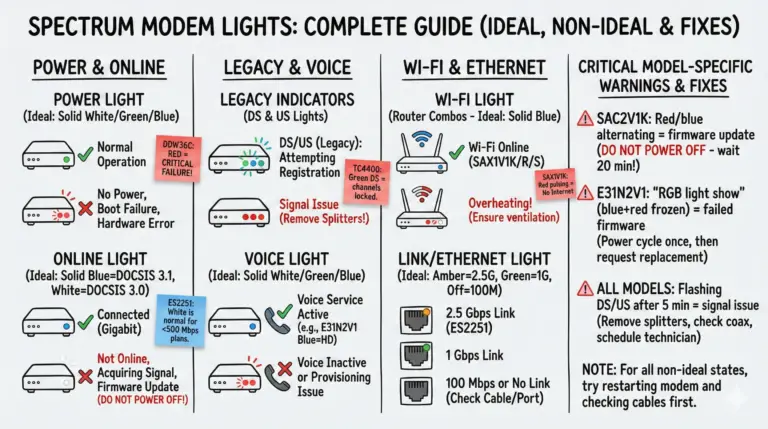
Spectrum Modem Lights: Meanings & Easy Fixes

Spectrum Modem Lights - Meanings and Easy Fixes

Quickly decode Spectrum modem and router lights by color and pattern, then follow simple, reliable fixes to restore your connection.
Read MoreSpectrum Modem Lights: Meanings & Easy Fixes
  • ByAfroz Ahmad
  • OnNovember 6, 2023
  • InInternet and TV Services, Spectrum
  • Read Time13 mins

Spectrum Router Blinking Blue or White Light: Causes & Fixes

spectrum modem online light blinking white and blue

If you see your Spectrum modem blinking white and blue online light, it means it can't connect to the internet. Learn how to troubleshoot and fix this common issue.
Read MoreSpectrum Router Blinking Blue or White Light: Causes & Fixes
  • ByAfroz Ahmad
  • OnNovember 6, 2023
  • InInternet and TV Services, Spectrum
  • Read Time12 mins

How to Fix Spectrum Router Red Light [Blinking and Solid]?

How to Fix Spectrum Router Red Light

Resolve your Spectrum router red light issue with our expert guide. Step-by-step troubleshooting for a stable connection.
Read MoreHow to Fix Spectrum Router Red Light [Blinking and Solid]?
  • ByAfroz Ahmad
  • OnNovember 3, 2023
  • InInternet and TV Services, Spectrum
  • Read Time7 mins

Your Spectrum Router Login Guide

Spectrum Router Login Guide

Explore our detailed guide on the Spectrum router login process. Get troubleshooting tips, learn how to enhance Wi-Fi performance, and maintain strong network security!

Read MoreYour Spectrum Router Login Guide
  • ByAfroz Ahmad
  • OnNovember 2, 2023
  • InGuides, Mesh WiFi, WiFi
  • Read Time11 mins

eero Red Light: What It Means and How to Fix It

eero red light

An eero red light means no internet. If every eero is red, power off the modem for 3 minutes; if only one is red, unplug it, move it closer, then soft reset.

Read Moreeero Red Light: What It Means and How to Fix It
  • ByAfroz Ahmad
  • OnNovember 2, 2023
  • InCox, Internet and TV Services
  • Read Time16 mins

Cox Router or Modem Blinking Green? [Causes & Fixes]

Why is Cox router Blinking Green Light

Solve the mystery of your Cox router modem blinking green. Learn the causes and get step-by-step troubleshooting tips in this quick guide.
Read MoreCox Router or Modem Blinking Green? [Causes & Fixes]
  • ByAfroz Ahmad
  • OnNovember 1, 2023
  • InGuides, Internet
  • Read Time10 mins

Is 5 Mbps Fast Enough? [In-Depth Guide]

Is 5 Mbps Fast

This in-depth guide examines if 5 Mbps download speed provides sufficient bandwidth for streaming, gaming, working from home, and other modern internet activities.

Read MoreIs 5 Mbps Fast Enough? [In-Depth Guide]
  • ByAfroz Ahmad
  • OnOctober 30, 2023
  • InInternet and TV Services, Xfinity
  • Read Time10 mins

Xfinity Router or Modem Blinking Green: Causes and Fixes

Xfinity Modem or Router Blinking Green Light - Causes and Fixes

Xfinity router or modem blinking green? It means the gateway is still connecting. Wait 15 minutes, check for an outage, restart, then check the coax.

Read MoreXfinity Router or Modem Blinking Green: Causes and Fixes
Prev
1 … 18 19 20 21 22 23 24 … 37
Next

About Me - My name is Afroz, and I bring more than 20 years of expertise as a Network Engineer. I've worked with multiple ISPs throughout my career and am currently engaged with one of the major ISP equipment vendors as a Network Designer.  - My Linkedin Profile

Disclosures: As an Amazon Associate, I earn from qualifying purchases (affiliate disclaimer). I use AI tools for research and visuals, but I review, edit and finalize everything myself.

On YouTube

Networking explained by a CCIE

Real outages and hacks broken down, plus networking basics and home-network fixes, in plain English. New videos every week.

Outages Nationwide: Was It a Cyber Attack? Microsoft, FAA, Chase, Zelle (Network Engineer Explains)

Microsoft Outage Explained: Why Outlook Stayed Down So Long

Apache Vulnerability: AI Found It First (CVE-2026-119618)

DHCP Explained: Watch My PC Get Its IP Address, Live

1 / 4
Subscribe on YouTube

  • Home
  • Learn Networking Basics
  • Blog
  • Courses
  • Tools
  • About Me
  • Contact

Policies

  • Terms of Use
  • Privacy Policy

Copyright © 2026 Afroz Ahmad