
5G is reshaping how home internet is delivered, bringing fast, cable‑like service over a wireless connection. Instead of breathless hype, this review focuses on what Verizon 5G Home Internet actually offers today: transparent plan names, multi‑year price locks, typical speed ranges by tier, and straightforward self‑install.
But is Verizon’s wireless home internet service ready for prime time? This Verizon 5G Home Internet review analyzes speeds, pricing, availability, and other factors to determine if it’s a viable cable or fiber alternative.
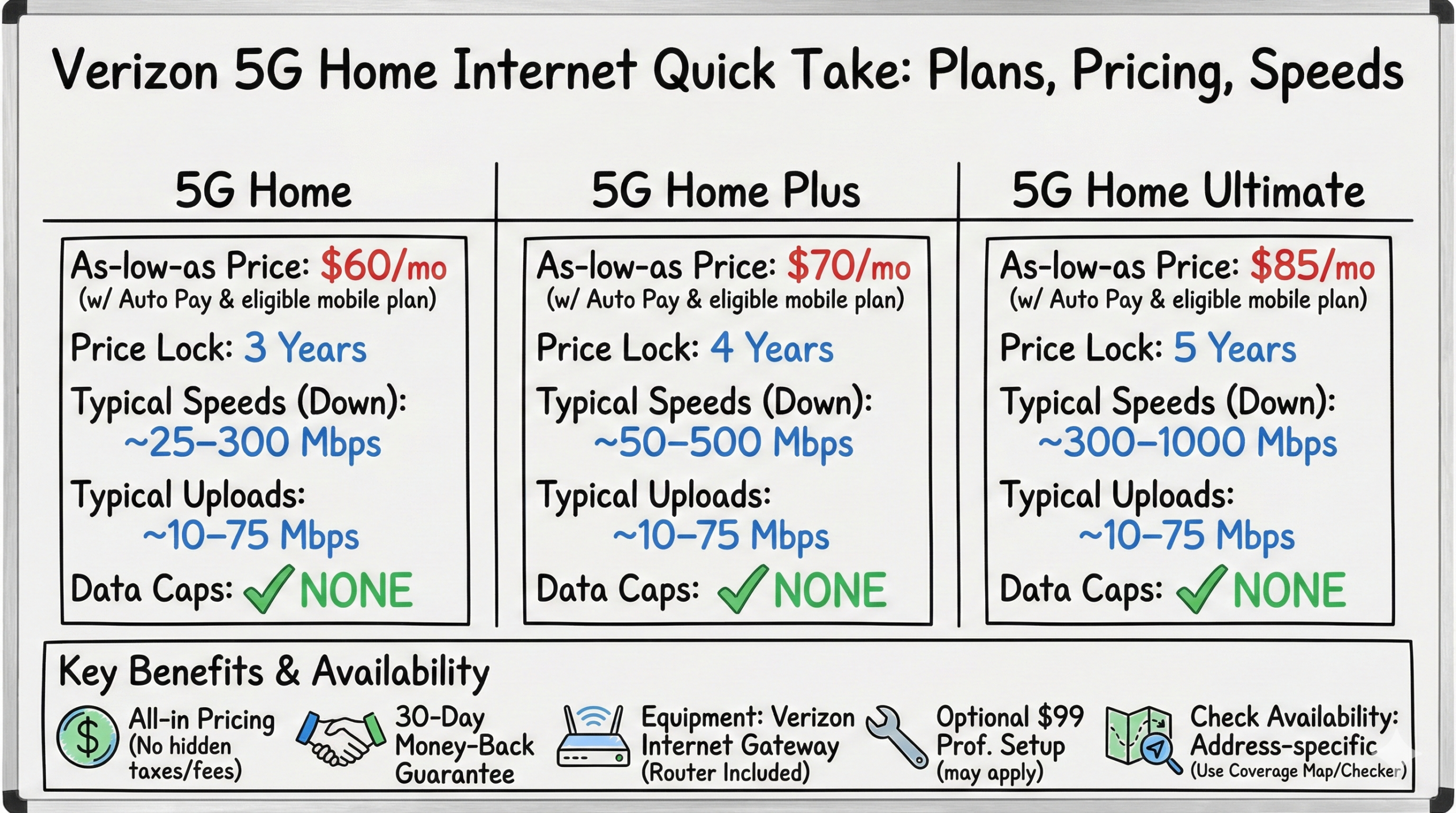
Quick Take: Plans, Pricing, Speeds
Plans: 5G Home, 5G Home Plus, 5G Home Ultimate
As‑low‑as prices: $60/$70/$85 per month with Auto Pay and an eligible Verizon mobile plan; all‑in pricing with no hidden taxes/fees and a 30‑day money‑back guarantee. Multi‑year price locks: 3 years (Home), 4 years (Home Plus), 5 years (Ultimate).
Typical speeds (vary by address and network band): Home ~25–300 Mbps; Home Plus ~50–500 Mbps; Ultimate ~300–1000 Mbps. Typical uploads ~10–75 Mbps.
Data caps: None. Equipment: Verizon Internet Gateway (router included). Optional $99 professional setup may apply in some areas.
Check availability: Eligibility is address‑specific. Use Verizon’s coverage map/address checker.
Pros & Cons – Verizon 5G Home Internet
Key positives and downsides with Verizon’s 5G home offering:
Pros
-
Impressively fast wireless speeds
-
Simple, affordable pricing
-
No contracts or data caps
-
Generous bundling discounts
-
Quick plug-and-play setup
Cons
-
Limited availability
-
Early stage reliability concerns
-
Customer support mediocrity
-
Speeds vary upon location
A Quick Primer on 5G Home Internet
5G uses mid‑band (C‑band) and high‑band (mmWave) spectrum to deliver faster speeds and lower latency than 4G LTE. Mid‑band (often branded as 5G Ultra Wideband) provides wider coverage with typical hundreds of Mbps, while mmWave enables the highest peaks—often gigabit‑class—but is limited to shorter ranges and clear lines of sight.
Verizon leverages these bands to offer fixed wireless home internet without installing fiber to the home. Most customers connect using an indoor gateway placed where the 5G signal is strongest.
Verizon 5G Home Internet Speeds & Performance
Expect address‑specific performance based on signal quality and whether your location connects on mid‑band or mmWave. Typical ranges today:
- 5G Home: roughly 25–300 Mbps downloads (uploads ~5–20 Mbps on mid‑band; higher when available).
- 5G Home Plus: roughly 50–500 Mbps downloads (uploads ~10–35 Mbps).
- 5G Home Ultimate: roughly 300–1000 Mbps downloads (uploads ~25–75 Mbps in optimal conditions).
Latency is typically comparable to cable, and everyday use—4K streaming, multi‑user video calls, cloud gaming—feels responsive when signal is strong. Under heavy upload, some homes may notice bufferbloat causing temporary dips in download speeds; smart QoS settings or pausing large uploads can help.
Verizon 5G Home Internet Pricing & Plans
Verizon now offers three tiers with multi‑year price locks and all‑in pricing (no hidden taxes/fees). Discounted “as‑low‑as” rates require Auto Pay and an eligible Verizon mobile plan via the Mobile + Home Discount.
| Plan | As‑low‑as price | Price lock | Typical downloads | Typical uploads | Video | Perks |
|---|---|---|---|---|---|---|
| 5G Home | $60/mo | 3 years | ~25–300 Mbps | ~5–20 Mbps | Up to 1080p | Router included |
| 5G Home Plus | $70/mo | 4 years | ~50–500 Mbps | ~10–35 Mbps | Up to 1080p | Router included |
| 5G Home Ultimate | $85/mo | 5 years | ~300–1000 Mbps | ~25–75 Mbps | Up to 4K | Router + Whole‑Home Wi‑Fi (select areas), 1 Wi‑Fi extender, free router upgrade after 3 years |
Professional setup may be required in some locations ($99). In many areas, self‑install is standard and included. Verizon doesn’t enforce data caps on these plans.
Equipment, Installation & Account Setup
Most customers self‑install an indoor Verizon Internet Gateway. Place it near a window or exterior wall for the strongest signal. Verizon’s My Verizon app includes a 5G compass that points toward nearby antennas and helps you find the best spot before you plug in.
Setup is step‑by‑step in the app. A $99 professional setup may apply in some areas (often waived on select plans/locations). If you hit account‑activation snags, completing registration in the app before powering the gateway typically smooths the process.
Reliability Concerns
Fixed wireless reliability depends on local signal quality, obstructions, and tower load. A few users report intermittent drops that resolve with a gateway reboot or after moving the unit per the 5G compass guidance. Verizon continues tuning firmware and capacity; reliability tends to improve as sites are upgraded.
Is Verizon 5G Available At Your Address?
Availability is address‑specific. Even within the same neighborhood, one home can qualify while another does not due to line‑of‑sight, building materials, or local site availability. Use Verizon’s coverage map and address checker to confirm eligibility.
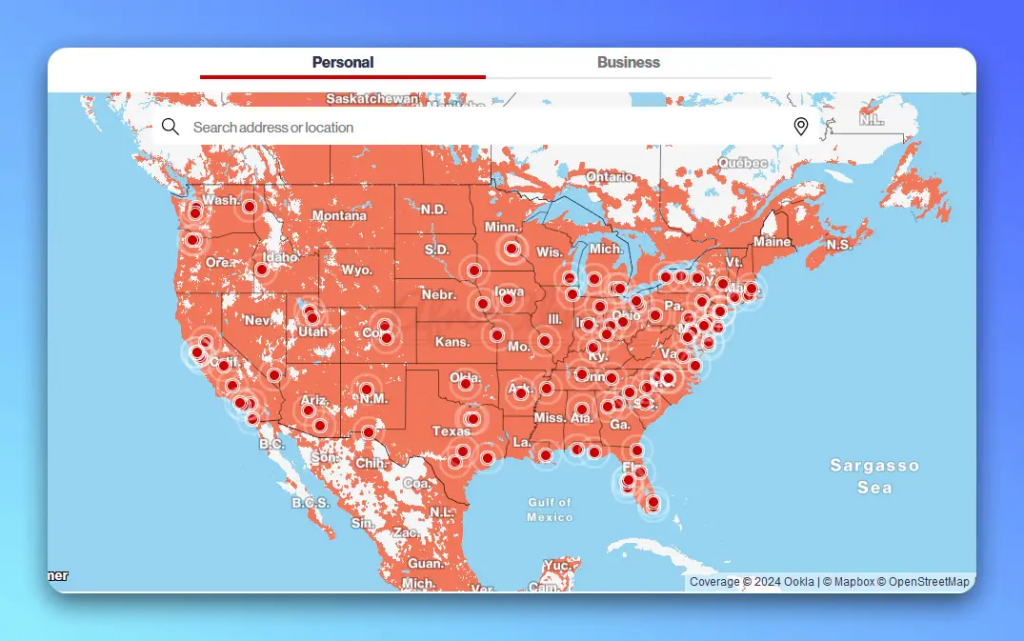
Partial snapshot of Verizon 5G availability map
Competitive Landscape
T‑Mobile Home Internet offers a single, all‑in pricing approach with a 5‑year price guarantee and broad address eligibility. Typical download speeds for current plans commonly land in the ~130–415+ Mbps range with uploads around ~12–55 Mbps, varying by address.
AT&T Internet Air typically ranges ~90–300 Mbps down and ~8–30 Mbps up and uses 5G where available (LTE elsewhere). Verizon’s advantage is a clear gigabit‑class tier (5G Home Ultimate) where mmWave is strong; T‑Mobile’s advantage is simplicity and wide footprint; AT&T’s is integration with its All‑Fi ecosystem.
See also:
- Why Does My Verizon Router Have a Yellow Light? Causes and Fixes
- Why is My Verizon Router Blinking Blue? Causes and Fixes
- Understanding & Fixing Verizon Router Red Light Issue
- Fixing A Blinking White Light On Your Verizon Router
- How to Reset a Verizon Router? – (Soft and Factory Reset)
The Verdict? Worth Considering with Realistic Expectations
For city and suburban households tired of cable price creep or sluggish DSL, Verizon 5G Home Internet delivers competitive performance at a fair, all‑in price—if your address has strong 5G Ultra Wideband coverage.
Rural subscribers may still face an availability waiting game. Reliability continues to improve, but fixed wireless can be more variable than fiber. If your address qualifies, it’s an appealing trial: easy setup, no data caps, and a multi‑year price lock.
FAQs
What is Verizon 5G Home Internet?
It’s a fixed wireless home internet service that uses Verizon’s 5G Ultra Wideband network to deliver broadband to your home via a supplied Verizon Internet Gateway.
How fast is Verizon 5G Home Internet?
Typical downloads vary by plan and address: 5G Home ~25–300 Mbps, 5G Home Plus ~50–500 Mbps, and 5G Home Ultimate ~300–1000 Mbps. Typical uploads range ~10–75 Mbps depending on band and location.
What does it cost?
As‑low‑as pricing with Auto Pay and an eligible Verizon mobile plan: 5G Home $60/mo, 5G Home Plus $70/mo, 5G Home Ultimate $85/mo. All tiers include multi‑year price locks and all‑in pricing (no hidden taxes/fees).
Does Verizon 5G Home Internet have data caps or contracts?
No data caps and no annual contracts. You can cancel anytime, and there’s a 30‑day money‑back guarantee.
What equipment do I need and how do I install it?
Verizon includes an Internet Gateway (router). Self‑install is typical and guided by the My Verizon app and its 5G compass. In some areas, a $99 professional setup may apply (often waived on select plans/locations).
Is Verizon 5G Home Internet available in rural areas?
Availability is growing but remains highly address‑specific. Check your exact address on the coverage map—even next‑door neighbors can see different eligibility.
What is Whole‑Home Wi‑Fi and Wi‑Fi Backup?
Whole‑Home Wi‑Fi includes extender(s) and optimization tools on select plans (included with Ultimate in select areas). Wi‑Fi Backup is a separate add‑on designed to keep basic connectivity if your primary service goes down.

- pfSense 10G Home Lab Setup: Complete Hardware Guide (2026) - April 1, 2026
- Best Budget Home Lab Setup Under $300 (2026): Complete Starter Stack - March 30, 2026
- Best Modems for Spectrum: Top DOCSIS 3.1 Picks That Actually Work - March 28, 2026