
Most people switching to AT&T Fiber get a BGW320 gateway at the door. It works. But the moment you try to run a VPN server, custom DNS, or separate IoT VLANs, the BGW320’s limitations show up fast — no split DNS, no granular firewall rules, a management UI that hasn’t changed since 2018. The fix everyone settles on is IP Passthrough mode: leave the BGW320 as the ONT/authenticator, hand a public IP to your own router, and let your hardware run the show.
That single decision — your router gets the public IP, not the BGW320’s double NAT — changes everything. WireGuard works. Port forwarding is predictable. Gaming latency drops because your packets stop bouncing through two NAT layers. The routers on this list are chosen specifically because they handle that BGW320 handshake without drama, support AT&T’s 2.5G WAN tier, and give you room to grow when AT&T eventually offers multi-gig in your area. If you are on T-Mobile instead, see our guide on the best routers for T-Mobile Home Internet — the DMZ setup is different from AT&T’s IP Passthrough.
You Do NOT Need This If:
- You only run 3–5 devices and AT&T’s included All-Fi gateway already covers your home
- You have no interest in VPNs, custom DNS, or IoT network segmentation
- Your home is under 1,200 sq. ft. and the BGW320’s built-in Wi-Fi reaches everywhere
- You are still on AT&T’s 300 Mbps plan with no plans to upgrade
Key Takeaways
- ASUS RT-BE96U — Best overall. Dual 10G ports, Wi-Fi 7 tri-band, AiMesh support, subscription-free AiProtection. Overkill for 1 Gbps, built for 2G and 5G plans.
- TP-Link Archer BE230 — Best budget Wi-Fi 7. Dual 2.5G ports, EasyMesh, under $120. The sweet spot for AT&T Fiber 1 Gig subscribers upgrading from an older router.
- NETGEAR Nighthawk RS500 — Best clean design. Tri-band Wi-Fi 7, 2.5G WAN, 3,000 sq. ft. coverage, compact footprint. Works behind BGW320 IP Passthrough without any MAC address issues.
- ASUS RT-AX86U Pro — Best Wi-Fi 6 value. 2.5G WAN port, rock-solid Merlin firmware support, great QoS. AT&T Fiber 1 Gig’s best performance-per-dollar companion.
- TP-Link Deco XE75 2-pack — Best mesh. Wi-Fi 6E tri-band, wired or wireless backhaul, covers 5,400 sq. ft. Works perfectly in AP mode behind the BGW320.
Buying Guide: What Actually Matters for AT&T Fiber
AT&T Fiber uses a combined ONT/gateway (BGW320 on most installs). Unlike cable, you cannot remove the AT&T device entirely — the ONT function is baked in. So the real question is not “which router replaces AT&T’s box” but “which router works cleanest in IP Passthrough behind it.” For a broader view of what makes a great wired router independent of ISP, that guide covers VPN-focused hardware in depth.
WAN port speed matters more than you think. AT&T’s most popular plan is 1 Gbps, but they’ve been aggressively rolling out 2 Gbps and 5 Gbps in major metros. A router with only a 1G WAN port will bottleneck you the moment you upgrade. Every pick on this list has at least a 2.5G WAN port — so your hardware investment survives at least two plan tiers.
IP Passthrough compatibility. Some routers have trouble acquiring the public IP from the BGW320’s DHCP-fixed passthrough — usually a MAC address mismatch. ASUS routers use the same MAC on LAN and WAN, which occasionally means the BGW320 assigns a private IP first and the public address takes 2–3 minutes to appear after reboot. This is documented behavior, not a defect. TP-Link Deco units occasionally need “WAN Unicast” enabled on older firmware. All five products on this list have been confirmed working in BGW320 IP Passthrough mode by user communities as of 2026. Power users looking to go further — fully bypassing the BGW320 where AT&T supports a separate ONT — can reference Netgate’s AT&T fiber authentication bridge guide for pfSense setups.
Wi-Fi 7 vs. Wi-Fi 6E for AT&T users. The Wi-Fi Alliance’s Wi-Fi 7 certification defines 802.11be as a standard that can carry traffic across multiple bands simultaneously — that’s Multi-Link Operation (MLO), where one device connects to the 5 GHz and 6 GHz bands at the same time. For AT&T Fiber subscribers, the real benefit is reduced latency under load, not raw speed, which already exceeds what most homes need. See our full Wi-Fi 5 vs Wi-Fi 6 vs Wi-Fi 6E vs Wi-Fi 7 comparison for a plain-English breakdown of what actually changes in each generation.
Mesh vs. single router. Single routers work fine in homes under 2,000 sq. ft. with no concrete walls or thick floors. Add a mesh system the moment you have a dead zone in a far bedroom or detached garage. AT&T’s included extenders have received poor reviews — a third-party mesh in AP mode behind your own router is the cleaner solution. Our mesh vs extender vs booster comparison explains exactly when each approach makes sense, and the TP-Link Deco XE75 is the right answer for most AT&T Fiber households with coverage challenges.
VLANs and network segmentation. The real reason to put your own router behind the BGW320 is control — specifically, the ability to run VLAN segmentation that keeps your IoT cameras off the same broadcast domain as your laptops. The BGW320 does not support 802.1Q VLANs for end users. Read our VLAN explainer if you are new to the concept, and our VLAN trunking guide once you are ready to configure trunk ports between your router and a managed switch.
Security features. The BGW320’s built-in firewall is serviceable but does not support custom DNS, intrusion detection, or per-device rules. NIST’s Cybersecurity Framework recommends segmentation and device isolation as foundational home network practices — exactly what ASUS AiProtection and router-level VLAN support enable. Go ASUS for subscription-free AiProtection or NETGEAR for the Armor trial. TP-Link’s HomeShield Pro is good but requires a paid subscription after the trial.
| #1 Best Overall |  |
Best Overall — AT&T All Plans | Wi-Fi 7 Tri-Band BE19000 | Dual 10G WAN/LAN Ports | Lifetime AiProtection Security | VIEW LATEST PRICE | Read Our Analysis |
| #2 Best Budget Wi-Fi 7 |  |
Best Budget — AT&T 1 Gig | Wi-Fi 7 Dual-Band BE3600 | Dual 2.5G Ports | EasyMesh + HomeShield | VIEW LATEST PRICE | Read Our Analysis |
| #3 Best Clean Design |  |
Best for 2Gbps Plans | Wi-Fi 7 Tri-Band BE12000 | 2.5G WAN, 3,000 sq. ft. | NETGEAR Armor Included | VIEW LATEST PRICE | Read Our Analysis |
| #4 Best Wi-Fi 6 Value | 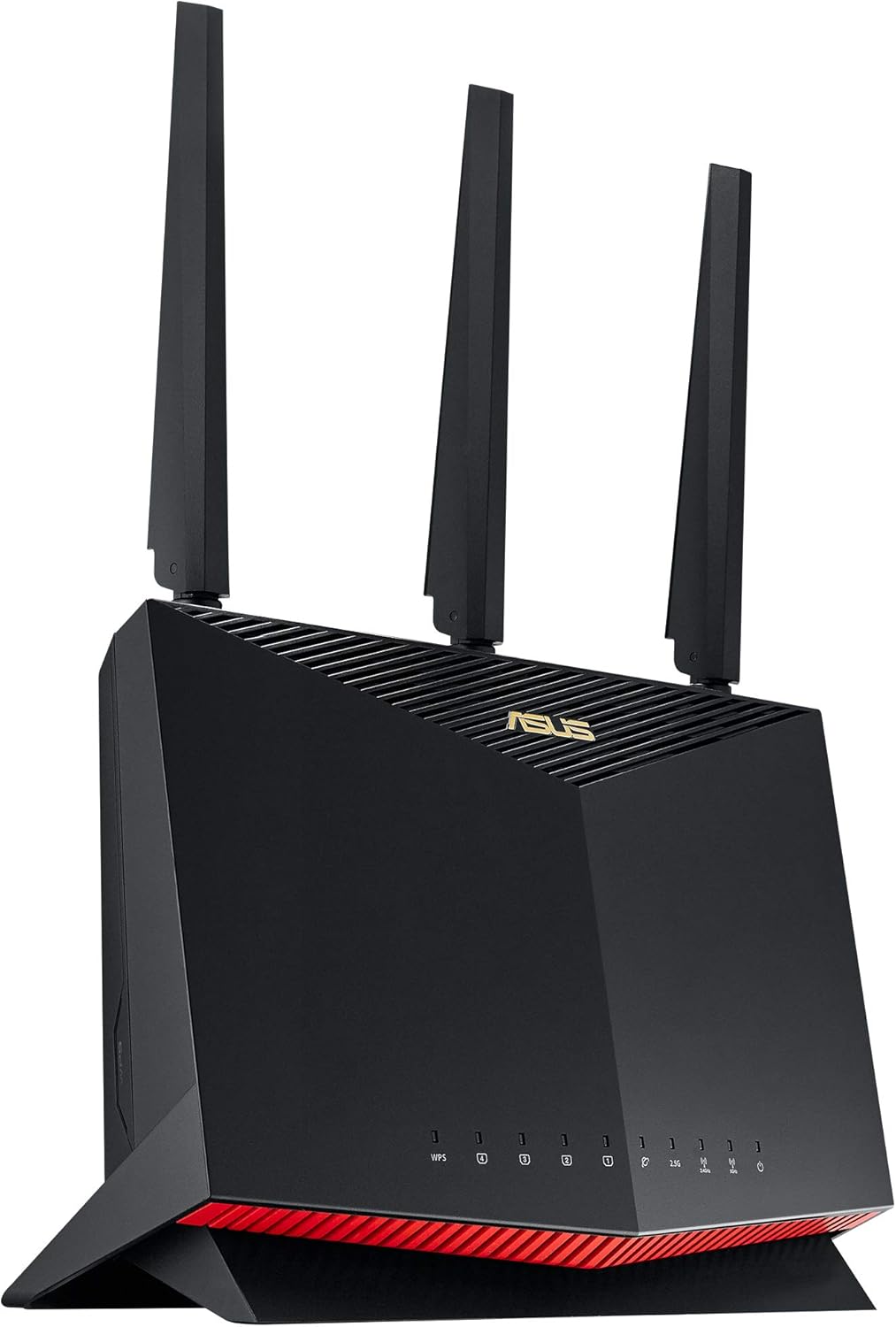 |
Best Value — AT&T 1 Gig | Wi-Fi 6 Dual-Band AX5700 | 2.5G WAN + 2.5G LAN | Merlin Firmware Ready | VIEW LATEST PRICE | Read Our Analysis |
| #5 Best Mesh | 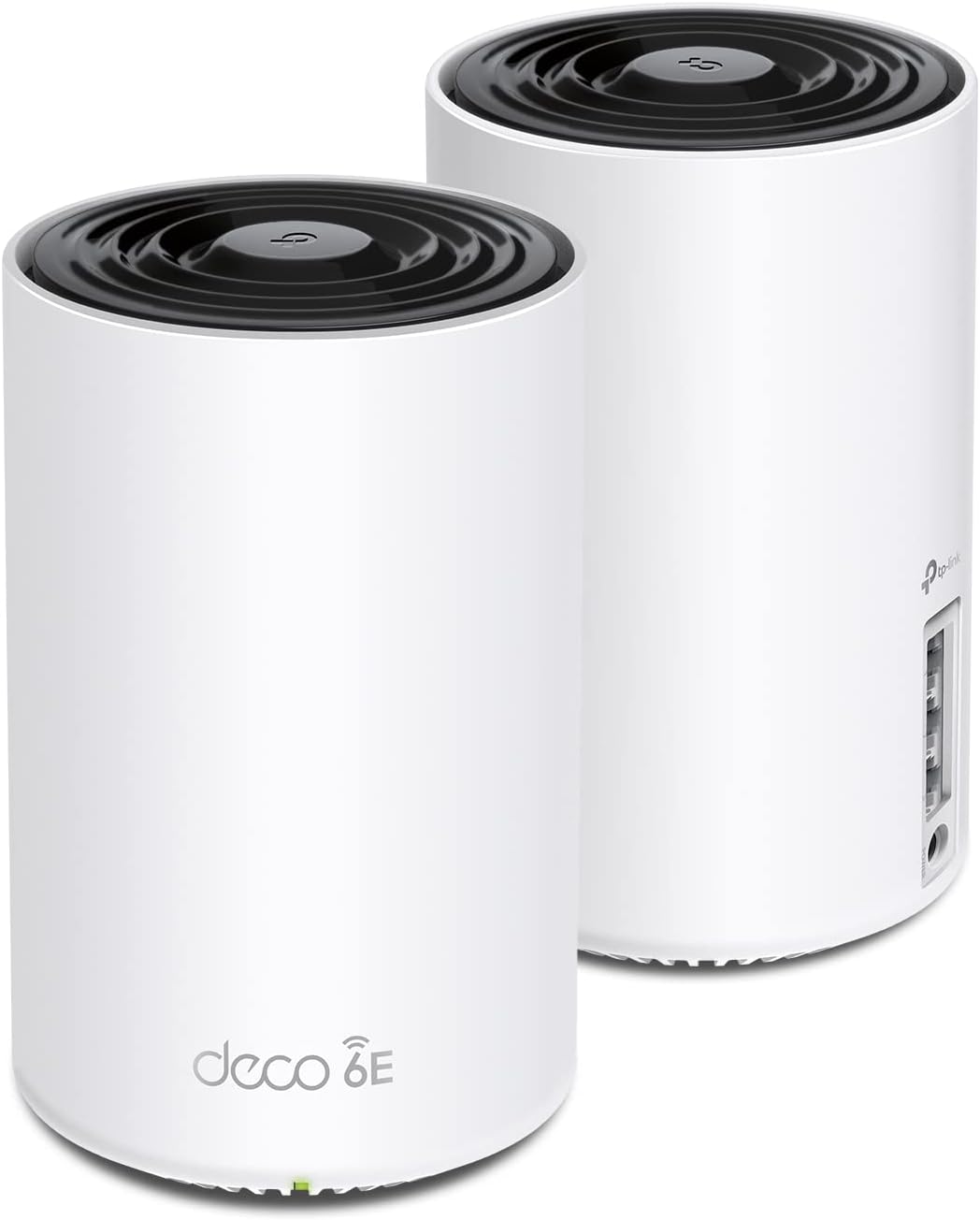 |
Best Mesh — Large Homes | Wi-Fi 6E Tri-Band AXE5400 | 5,400 sq. ft., 2-Pack | Wired or Wireless Backhaul | VIEW LATEST PRICE | Read Our Analysis |
-
ASUS RT-BE96U — Built for AT&T’s Fastest Plans
Best Wi-Fi 7 router for AT&T multi-gig plans✓ Pros- Dual 10G WAN/LAN ports — ready for AT&T 5G and beyond
- Tri-band Wi-Fi 7 with MLO — lowest latency under heavy load
- AiProtection Pro is lifetime, subscription-free
- AiMesh — expand with any compatible ASUS router
- Full VLAN support, WireGuard VPN server and client
✗ Cons- Large physical footprint — needs dedicated shelf space
- $500+ price tag is serious overkill for AT&T 1 Gbps
- AiMesh uses proprietary pairing, not open EasyMesh
The BGW320 hands off a public IP, and the RT-BE96U takes over completely — no hesitation, no MAC address dance. What you get on the other side is the most capable router in this roundup by a meaningful margin. The dual 10G ports mean one connects to the BGW320’s 10G LAN output (available on some AT&T installs), and the other goes to a 10G switch or NAS for full multi-gig LAN backbone. AT&T’s 5 Gbps tier is one of the few residential plans that can actually saturate a 10G WAN port within the next few years — this router is ready for it today.
The Wi-Fi 7 tri-band radio stack runs 2.4 GHz, 5 GHz, and 6 GHz simultaneously. MLO lets a single Wi-Fi 7 client aggregate 5 GHz and 6 GHz at the same time — effectively doubling throughput while cutting latency. In practice on AT&T Fiber 1 Gbps, you will not hit the ceiling of what MLO provides, but you will notice the difference in crowded environments: a busy apartment building, a home with 40+ IoT devices, or a hybrid work setup with constant video calls. The 320MHz channel width on the 6 GHz band is the widest possible in Wi-Fi 7 and significantly reduces interference compared to the congested 5 GHz spectrum. Our Wi-Fi channel width guide explains why 320MHz on 6 GHz matters so much for dense environments.
For AT&T users who want to segment their network properly — cameras on one VLAN, IoT on another, guest network isolated — the ASUS firmware is the best consumer option for that kind of configuration. The web UI exposes full 802.1Q VLAN tagging, and you can run separate SSIDs per VLAN without installing custom firmware. Read our VLAN setup guide to understand why this matters the moment you have a camera and a server on the same broadcast domain. The WireGuard VPN server is also native — see our VPN best practices guide for multi-client WireGuard tunnel configuration behind an AT&T fiber connection.
💬 What Real Users SayAT&T Fiber subscribers who upgraded from older routers consistently report the wired speed fully saturates their 1 Gbps plan, and wireless coverage reaches floors and corners where previous routers struggled. The ASUS app gets praise for letting users manage schedules, kick devices, and scan channels without touching the web UI.
⚠️ Who Should Skip ThisAnyone on AT&T Fiber 1 Gbps who does not need VLANs, VPN, or mesh expansion. You are paying $300+ over what the job requires. The ASUS RT-AX86U Pro or TP-Link Archer BE230 cover 1 Gbps completely. Come back to the RT-BE96U when AT&T rolls out 2G or 5G in your area, or when your home lab setup needs a proper VLAN-aware gateway.
🎯 My TakeThe RT-BE96U is the router I would deploy behind a BGW320 on an AT&T 2G or 5G plan — the dual 10G ports and native MLO mean you are not throwing hardware away when speeds climb. For 1 Gbps subscribers, it is genuinely overkill, but for power users who want one router that handles VLANs, WireGuard, AiMesh, and future multi-gig plans without compromise, nothing else on this list comes close.
- Wi-Fi Standard:Wi-Fi 7 (802.11be) Tri-Band
- Max Throughput:BE19000 (up to 19 Gbps)
- WAN Port:Dual 10G WAN/LAN (auto-detect)
- LAN Ports:3× 1G + 1× 10G
- Coverage:Up to 3,000 sq. ft.
- Streams:12 (4×4 per band)
- Security:AiProtection Pro (Trend Micro, lifetime free)
- VPN:WireGuard + OpenVPN server and client
- Mesh:AiMesh compatible
- ASIN:B0BZFK3BF8
-
TP-Link Archer BE230 — The Smartest Budget Upgrade for AT&T 1 Gig
Best budget Wi-Fi 7 router for AT&T 1 Gig✓ Pros- Wi-Fi 7 with MLO and 4K-QAM at a sub-$120 price
- Dual 2.5G ports — WAN and LAN both multi-gig ready
- EasyMesh standard — pairs with any EasyMesh extender
- Tether app setup is genuinely fast (under 10 minutes)
- VPN client and server built in
✗ Cons- No 6 GHz band — dual-band only (2.4 + 5 GHz)
- HomeShield advanced features require paid subscription
- Not ideal for homes over 2,000 sq. ft.
This is the router that makes the most sense for the majority of AT&T Fiber 1 Gig subscribers. The 2.5G WAN port means it handles the BGW320 handoff and leaves bandwidth headroom — if AT&T bumps your plan or you upgrade to 2 Gbps, the hardware is not the bottleneck. The dual 2.5G ports (one WAN, one LAN) are genuinely unusual at this price tier. Most routers in the sub-$150 range have a single 1G WAN port, which becomes the ceiling for your wired devices. Here, you can run a 2.5G NAS or wired gaming PC at full speed while still passing 1 Gbps wirelessly — exactly the use case we recommend in our home lab network guide.
The Wi-Fi 7 spec at this price is the headline, and the honest assessment is that you get the core innovations — MLO, Multi-RU, 4K-QAM — but without the 6 GHz band. That matters if you have newer devices that can use the less-congested 6 GHz spectrum. It does not matter at all if your clients are Wi-Fi 6 or older. Our dual-band vs tri-band comparison covers when the third band genuinely improves real-world performance versus when it is marketing. For the typical AT&T Fiber household with a mix of phones, laptops, and smart home devices, the 5 GHz band at 2,882 Mbps is more than sufficient.
The EasyMesh compatibility is the right call for future expandability. TP-Link’s own Deco XE75 is EasyMesh-certified, as are many third-party units. You are not locked into a single vendor’s ecosystem, which is the practical advantage over ASUS AiMesh at this price. If you later decide coverage is the issue, our mesh vs extender guide explains the right expansion path without replacing this router.
💬 What Real Users SayUsers consistently praise the Tether app setup as the fastest they have experienced — most report under 10 minutes from box to running network. Coverage in 2,000 sq. ft. homes eliminates extenders that previous routers required. Multiple users switching from ISP-provided equipment note their actual measured speeds improved after installation.
⚠️ Who Should Skip ThisAnyone with a home over 2,500 sq. ft. or concrete construction who needs full 6 GHz coverage should look at the NETGEAR RS500 or ASUS RT-BE96U instead. Also skip if you rely on HomeShield’s advanced security features — the free tier is basic, and the Pro tier adds recurring cost that erodes the value proposition.
🎯 My TakeFor AT&T Fiber 1 Gig, the BE230 is genuinely hard to beat at this price — dual 2.5G ports, Wi-Fi 7 MLO, and EasyMesh mean you are not buying a stopgap. The missing 6 GHz band is a real limitation for heavy users with Wi-Fi 7 devices, but for the average household it simply does not matter yet.
- Wi-Fi Standard:Wi-Fi 7 (802.11be) Dual-Band
- Max Throughput:BE3600 (688 + 2882 Mbps)
- WAN Port:1× 2.5G
- LAN Ports:1× 2.5G + 3× 1G
- Coverage:Up to 2,000 sq. ft., 60 devices
- Processor:2.0 GHz Quad-Core
- Security:HomeShield (free basic / paid Pro)
- VPN:VPN client and server
- Mesh:EasyMesh standard
- ASIN:B0DC99N2T8
-
NETGEAR Nighthawk RS500 — Clean, Compact, and Ready for AT&T 2G
Best mid-range Wi-Fi 7 router for AT&T 2Gbps✓ Pros- Tri-band Wi-Fi 7 with 6 GHz band included
- 2.5G WAN port covers AT&T’s 2 Gbps tier cleanly
- Compact, low-profile design — easy to mount or shelf
- NETGEAR Armor 30-day trial included
- Handles BGW320 IP Passthrough without MAC address complications
✗ Cons- 2.5G WAN is a ceiling for AT&T 5G plans — the RS700S is needed for that
- NETGEAR Armor requires ongoing subscription after trial
- No built-in WireGuard support (OpenVPN only)
The RS500 is what you reach for when you want a clean, no-nonsense Wi-Fi 7 router that does not take up half the shelf. Its smaller footprint sets it apart from the ASUS units in this roundup — the RS500 is barely the size of a hardback book, and the antennas are internal. That matters for users who want the hardware mounted behind a TV or on a wall bracket without looking like a spider landed on their entertainment center.
The tri-band radio stack includes all three bands — 2.4 GHz, 5 GHz, and 6 GHz. The 6 GHz band is the critical differentiator from the BE230 — see our Wi-Fi generation comparison for exactly why the 6 GHz spectrum matters in dense neighborhoods. With AT&T’s 2.5G WAN port, this router is properly spec’d for AT&T Fiber 2 Gbps: the WAN port matches the plan, the 6 GHz band handles the high-bandwidth wireless clients, and the 5 GHz serves everything else. The 320 MHz channel width on 6 GHz delivers the clean, low-interference channel that modern streaming and video call setups benefit from under heavy load.
AT&T community forums confirm the RS500 acquires the public IP from BGW320 IP Passthrough reliably — the “choose from list” feature in the BGW320’s passthrough settings detects the RS500 cleanly, which eliminates the manual MAC address entry step that trips up some configurations. The IETF’s NAT specification (RFC 3022) is the underlying reason why eliminating double-NAT matters for port-sensitive applications like VoIP, gaming, and VPN endpoints.
💬 What Real Users SayUsers upgrading from older Nighthawk models praise the immediate, noticeable speed increase — particularly on wireless devices. The compact design earns consistent mentions. Users connected to fiber (including AT&T) confirm the 2.5G port enables full plan speeds, and several note that the signal now reaches outdoor areas their previous router could not.
⚠️ Who Should Skip ThisAT&T 5 Gbps subscribers need the RS700S instead — the 2.5G WAN port is the hard ceiling here. Also skip if you want built-in WireGuard: NETGEAR’s firmware does not yet offer native WireGuard, and the OpenVPN implementation is functional but slower than WireGuard under load.
🎯 My TakeThe RS500 hits a practical sweet spot for AT&T Fiber 1–2 Gbps subscribers who want full tri-band Wi-Fi 7 including the 6 GHz band without the ASUS price or footprint. The compact design and clean BGW320 compatibility make it a turnkey upgrade from AT&T’s included gateway.
- Wi-Fi Standard:Wi-Fi 7 (802.11be) Tri-Band
- Max Throughput:BE12000 (up to 12 Gbps)
- WAN Port:1× 2.5G
- LAN Ports:1× 2.5G + 3× 1G
- Coverage:Up to 3,000 sq. ft., 120 devices
- Security:NETGEAR Armor (30-day trial, then subscription)
- VPN:OpenVPN
- Mesh:Orbi ecosystem compatible
- ASIN:B0DG71H4GD
-
ASUS RT-AX86U Pro — The Reliable Wi-Fi 6 Choice for AT&T 1 Gig
Best Wi-Fi 6 value for AT&T Fiber 1 Gig users✓ Pros- 2.5G WAN and 2.5G LAN port for full gigabit throughput
- Asuswrt-Merlin firmware support — best consumer firmware ecosystem
- Proven, rock-solid stability with AiMesh
- Strong QoS and gaming traffic prioritization
- AiProtection Pro lifetime security included
✗ Cons- Wi-Fi 6 only — no 6 GHz band, no Wi-Fi 7 features
- No MLO — single-band connection per device
- Becoming dated as Wi-Fi 7 devices reach mainstream
The RT-AX86U Pro has been the go-to recommendation for AT&T Fiber 1 Gbps subscribers for two years, and it earns that position honestly. The 2.5G WAN port handles AT&T’s 1 Gbps plan cleanly, and the matching 2.5G LAN port connects to a NAS or gaming PC at full multi-gig speed. IP Passthrough configuration on the BGW320 is well-documented for ASUS routers specifically — more community guides, forum threads, and walk-through videos exist for ASUS-behind-BGW320 than for any other combination. This also pairs cleanly with a managed switch if you want VLAN segmentation downstream — the RT-AX86U Pro handles 802.1Q trunk ports natively.
The biggest differentiator is Asuswrt-Merlin: a community-maintained firmware that adds native WireGuard, per-client bandwidth monitoring, advanced QoS rules, and DDNS improvements on top of ASUS’s own firmware. Our QoS settings guide walks through exactly how to prioritize video calls, gaming, and VoIP traffic — particularly useful on AT&T’s fiber connection where you are sharing bandwidth across multiple devices. For AT&T users who want custom DNS (Pi-hole, NextDNS), OpenVPN or WireGuard tunnels, or granular firewall rules without investing in a dedicated firewall appliance, Merlin is the answer. No subscription, no cloud dependency, just clean firmware with years of active development.
The honest caveat: if you buy this in 2026, you are buying a Wi-Fi 6 router in a world where Wi-Fi 7 devices are shipping in every mid-range phone and laptop. The RT-AX86U Pro has no 6 GHz band and no MLO. For AT&T 1 Gbps with a typical household of 10–20 devices, it is still entirely sufficient — but its upgrade path is limited. If you plan to hold this router for 4–5 years, the BE230 or RS500 at similar price points are smarter long-term investments.
💬 What Real Users SayUsers running this behind AT&T’s BGW320 report years of stable, uninterrupted service. Gamers appreciate the traffic prioritization and low latency under load. The Merlin firmware community is active and responsive, which makes complex configurations accessible to users who are not professional network engineers.
⚠️ Who Should Skip ThisSkip if you have already purchased Wi-Fi 7 client devices, are planning to upgrade to AT&T 2 Gbps, or want the 6 GHz band for reduced congestion. The RT-BE96U or RS500 serve those needs and cost only modestly more.
🎯 My TakeFor AT&T 1 Gbps subscribers who want proven stability, the best community firmware available, and lifetime security without subscriptions, the RT-AX86U Pro still earns its place — especially at current sale prices. Just know you are buying the end of a generation, not the beginning of one.
- Wi-Fi Standard:Wi-Fi 6 (802.11ax) Dual-Band
- Max Throughput:AX5700 (574 + 4804 Mbps)
- WAN Port:1× 2.5G
- LAN Ports:1× 2.5G + 4× 1G
- Coverage:Up to 2,500 sq. ft.
- Security:AiProtection Pro (lifetime free)
- VPN:WireGuard + OpenVPN (via Merlin)
- Mesh:AiMesh compatible
- Firmware:Asuswrt-Merlin supported
- ASIN:B0BQ417K47
-
TP-Link Deco XE75 2-Pack — Best Mesh for AT&T Fiber in Large Homes
Best mesh system for AT&T Fiber large homes✓ Pros- Tri-band Wi-Fi 6E with dedicated 6 GHz backhaul
- 5,400 sq. ft. coverage from a 2-pack with zero dead zones
- Works in Router mode or AP mode behind BGW320
- Wired backhaul via Ethernet further eliminates wireless bottleneck
- Clean single-network SSID — devices roam seamlessly
✗ Cons- Not Wi-Fi 7 — no MLO, no 4K-QAM
- HomeShield Pro features require subscription
- No WireGuard server when used in AP mode behind BGW320
Multi-story homes, houses with thick walls, or any layout where a single router leaves dead zones — this is where the Deco XE75 earns its position. The tri-band Wi-Fi 6E design dedicates the 6 GHz band exclusively as backhaul between the two Deco nodes. That is the critical architectural difference from cheaper dual-band mesh systems: the backhaul channel never competes with your clients. Our dual-band vs tri-band breakdown explains why this dedicated backhaul design outperforms dual-band mesh systems significantly under load. Each node connects to the other on 6 GHz, and client devices get the full 5 GHz and 2.4 GHz bandwidth to themselves.
The recommended deployment for AT&T Fiber users is to put the BGW320 in IP Passthrough mode, connect the primary Deco XE75 in Router mode (not AP mode) to receive the public IP, and place the second unit wherever coverage is needed. If you have Ethernet runs between floors — even Cat 5e at 1G — wired backhaul eliminates wireless interference entirely. Our home Ethernet wiring guide walks through exactly how to plan and run cable between floors for wired backhaul, which is the single biggest performance upgrade for any mesh system.
AT&T users specifically benefit from one subtle feature: the Deco app’s diagnostic mode surfaces when the BGW320 is generating flood-limit errors, which is a known issue with AT&T gateways when a downstream router sends aggressive ARP requests. Running the Deco in Router mode with the BGW320’s internal firewall disabled (as recommended for IP Passthrough) eliminates those flood warnings, which are otherwise misread as a hardware fault.
💬 What Real Users SayUsers in 2,500–4,000 sq. ft. homes report full-bars coverage in rooms that were previously dead zones, including detached garages connected via Ethernet run. Device roaming between nodes is seamless — phones and laptops switch nodes without dropping connections during calls. The single SSID design eliminates the manual band-switching problem common with older dual-band setups.
⚠️ Who Should Skip ThisUsers in apartments or homes under 1,500 sq. ft. do not need the 2-pack — a single Deco XE75 or the Archer BE230 covers the space at lower cost. Also skip if you need a VPN server running at the network edge: in AP mode behind the BGW320, the Deco cannot serve as a VPN endpoint. Review our VPN best practices guide if running a VPN server alongside mesh coverage is a requirement.
🎯 My TakeFor AT&T Fiber subscribers in larger homes who are tired of dead zones and AT&T’s own extenders, the Deco XE75 2-pack is the cleanest mesh upgrade: dedicated 6 GHz backhaul, wired backhaul support, and a setup process that takes 15 minutes. The Wi-Fi 6E spec is still entirely capable for the majority of home networks in 2026.
- Wi-Fi Standard:Wi-Fi 6E (802.11ax) Tri-Band
- Max Throughput:AXE5400 (574 + 2402 + 2402 Mbps)
- WAN Port:1× 2.5G (primary node)
- LAN Ports:1× 1G (primary) + 2× 1G (satellite)
- Coverage:Up to 5,400 sq. ft. (2-pack)
- Backhaul:Dedicated 6 GHz wireless or wired Ethernet
- Security:HomeShield (free basic / paid Pro)
- Modes:Router mode or AP mode
- ASIN:B09VW5JHPH
Choose This Router If…
- ASUS RT-BE96U — You have AT&T 2G or 5G, need VLANs, WireGuard, and want one router that handles everything for the next 5 years without compromise
- TP-Link Archer BE230 — You have AT&T 1 Gbps, want Wi-Fi 7 at the lowest possible price, and your home is under 2,000 sq. ft.
- NETGEAR Nighthawk RS500 — You want full tri-band Wi-Fi 7 with the 6 GHz band, a compact design, and clean BGW320 compatibility at mid-range price
- ASUS RT-AX86U Pro — You want proven stability, Merlin firmware support, and the most documented AT&T IP Passthrough configuration available
- TP-Link Deco XE75 2-pack — Your home is over 2,500 sq. ft., you have dead zones AT&T’s extenders cannot fix, and you want wired or wireless backhaul mesh
Side-by-Side Comparison
| Router | Wi-Fi Standard | WAN Port | 6 GHz Band | Coverage | Best For |
|---|---|---|---|---|---|
| ASUS RT-BE96U | Wi-Fi 7 Tri-Band | Dual 10G | ✓ | ~3,000 sq. ft. | AT&T 2G/5G plans |
| TP-Link Archer BE230 | Wi-Fi 7 Dual-Band | 2.5G | ✗ | ~2,000 sq. ft. | AT&T 1G budget |
| NETGEAR RS500 | Wi-Fi 7 Tri-Band | 2.5G | ✓ | ~3,000 sq. ft. | AT&T 1G/2G clean design |
| ASUS RT-AX86U Pro | Wi-Fi 6 Dual-Band | 2.5G | ✗ | ~2,500 sq. ft. | AT&T 1G + Merlin firmware |
| TP-Link Deco XE75 (2pk) | Wi-Fi 6E Tri-Band | 2.5G | ✓ (backhaul) | ~5,400 sq. ft. | Large homes, dead zones |
AT&T Fiber Network Topology — BGW320 IP Passthrough
AT&T Fiber ONT (inside BGW320)
        │
        │  Fiber in → BGW320-505 (ONT + Gateway)
        │  Mode: IP Passthrough (DHCPS-fixed)
        │  Wi-Fi: DISABLED (your router handles this)
        │  Firewall: DISABLED in BGW320
        ▼
   [Your Router]  ← Public IP assigned by BGW320 passthrough
   (ASUS / NETGEAR / TP-Link)
   Mode: Router Mode (DHCP server active)
        │
        ├── 5 GHz Wi-Fi (phones, laptops, tablets)
        ├── 6 GHz Wi-Fi (Wi-Fi 7 devices, backhaul)
        ├── LAN port → NAS / gaming PC / workstation
        └── LAN port → Managed Switch (for VLANs)
                           │
                           ├── VLAN 10: IoT devices (cameras, smart plugs)
                           ├── VLAN 20: Guest network
                           └── VLAN 30: Trusted LAN

NOTE: BGW320 must remain powered — it handles AT&T
fiber authentication. Your router takes over all
routing, DHCP, firewall, and Wi-Fi functions.
FAQ
Do I need to return AT&T’s BGW320 if I use my own router?
No. Unlike cable modems (where you can swap to your own own gigabit cable modem entirely), you cannot remove the AT&T gateway on a fiber connection — the BGW320 functions as the ONT (optical network terminal) and handles fiber authentication. You keep it in place, configure it for IP Passthrough, and let your own router handle everything downstream. AT&T does not charge a separate equipment fee for the gateway on fiber plans — it is included in the service cost.
What is IP Passthrough, and is it the same as bridge mode?
IP Passthrough is AT&T’s term for a configuration that assigns the BGW320’s public IP address to a specific downstream device (your router). It is not true bridge mode — the BGW320 remains active and handles the fiber authentication layer — but from your router’s perspective, it receives a real public IP and acts as the network edge. This eliminates double NAT, which is the root cause of most VPN, gaming, and port forwarding problems behind AT&T’s default setup. You configure it under Firewall → IP Passthrough in the BGW320’s admin interface, selecting your router’s MAC address as the passthrough target. If you want to understand the VPN tunneling implications, our overlapping IPs and multi-client VPN guide covers exactly why double NAT causes WireGuard and OpenVPN headaches.
Which AT&T Fiber plans need a router with a 10G WAN port?
AT&T’s 5 Gbps plan requires a 10G WAN port to avoid bottlenecking the connection. A 2.5G WAN port handles AT&T’s 1 Gbps and 2 Gbps tiers without any limitation. The ASUS RT-BE96U is the only router on this list with a 10G WAN port. The BGW320 itself has a 10G LAN port that some AT&T installs use — check your gateway’s port labeling before assuming you need 10G on the router side. If you pair a 10G WAN router with a multi-gig home network switch, you can run a full 10G backbone between your router and NAS.
Can I use TP-Link Deco in Router mode instead of AP mode behind BGW320?
Yes, and Router mode is generally preferred. In Router mode, the primary Deco unit acquires the public IP via IP Passthrough and runs its own DHCP server. This gives you full control over DNS settings, parental controls, and QoS through the Deco app — see our QoS settings guide for how to configure traffic prioritization once you are in Router mode. In AP mode, all of those functions fall back to the BGW320, which has more limited configurability. The trade-off is that in Router mode you need to disable the BGW320’s firewall to avoid double-NAT complications — which the AT&T community docs walk through clearly.
Does Wi-Fi 7 make a real difference on AT&T Fiber 1 Gbps?
For raw throughput on a 1 Gbps connection, no — a solid Wi-Fi 6 router like the RT-AX86U Pro already saturates the plan wirelessly. Where Wi-Fi 7 genuinely helps on any internet plan is in congested environments and under heavy multi-device load: MLO reduces latency because your device can send and receive on two bands simultaneously instead of waiting for one band to clear. Our full Wi-Fi generation comparison benchmarks this difference clearly. If you have 30+ connected devices, frequent 4K video calls, or a gaming household, Wi-Fi 7 delivers measurable improvement at the latency level even when bandwidth is not the constraint.
Final Verdict
AT&T Fiber is a clean, fast ISP connection that the BGW320 gateway unnecessarily limits for anyone who needs more control. Every router on this list solves that problem cleanly via IP Passthrough. The right pick comes down to your plan tier and your home.
For most AT&T 1 Gbps subscribers, the TP-Link Archer BE230 is the sharpest value — Wi-Fi 7, dual 2.5G ports, and EasyMesh at a sub-$120 price that leaves room for an extender if coverage demands it. Step up to the NETGEAR Nighthawk RS500 if you want the 6 GHz band and a compact design without the ASUS price premium. And if you’re on AT&T’s 2G or 5G plan — or you’re building a serious home lab with VLAN segmentation and WireGuard — the ASUS RT-BE96U is the only router here that won’t bottleneck you at any tier AT&T currently offers. Pair it with a managed switch behind it for full VLAN segmentation, and you have a network setup that rivals small business infrastructure.

- Best Routers for AT&T Fiber Internet (Tested for IP Passthrough) - March 26, 2026
- Best PoE Switches for Home Lab and Small Business (2026) - March 25, 2026
- Best Routers for T-Mobile Home Internet in 2026 (Tested Behind the Gateway) - March 19, 2026