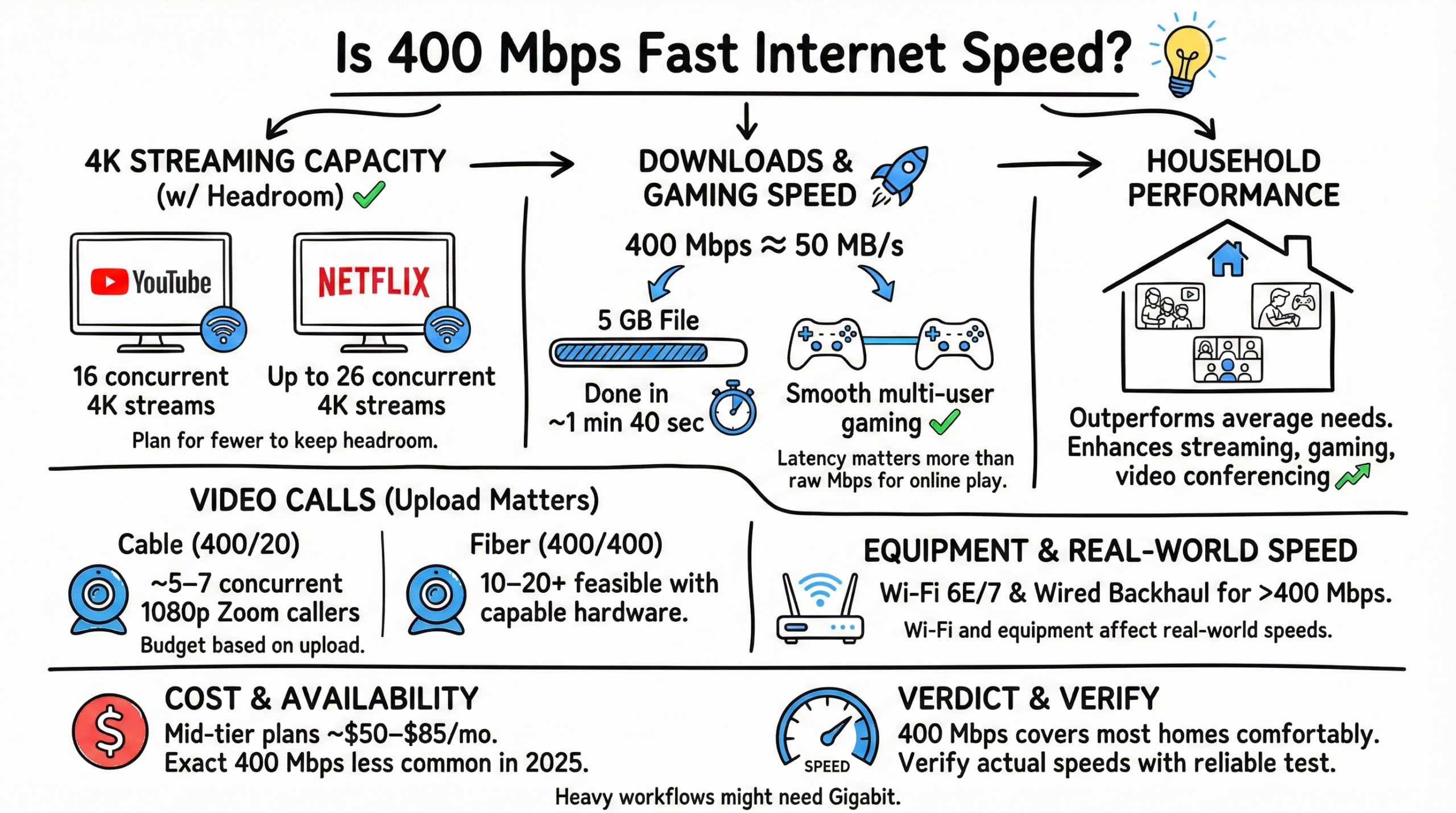
Is 400 Mbps Fast Internet? Yes. A 400 Mbps connection is fast for most homes. Expect quick downloads, smooth streaming and responsive gaming—exact capacity depends on your upload speed, Wi‑Fi quality, and each app’s bitrate. As a practical guide, you can handle up to about ~16 4K streams on high‑bitrate services like YouTube and up to ~26 on Netflix’s 4K profile, though it’s smart to plan for fewer to leave headroom. A 5 GB file takes about 1 minute 40 seconds at 400 Mbps (≈50 MB/s).
Read on for a detailed analysis.
400 Mbps Internet Meaning
What does 400 Mbps internet mean?
400 Mbps translates to 400 Megabits of data transfer per second. 400 Mbps equates to the ability to transfer 50 megabytes (MB) per second since 1 byte = 8 bits (so 400 Mb = 50 MB).
Mbps stands for Megabits per second, the standard unit for measuring internet speeds.
Key Takeaways
- 💡 400 Mbps internet can support about ~16 concurrent 4K streams on YouTube and up to ~26 on Netflix’s 4K profile. Plan for fewer to keep headroom.
- 🚀 Translates to ~50 MB/s, making it ideal for smooth gaming downloads and a 5 GB file in ~1 min 40 sec.
- 📊 Outperforms average needs for most households, enhancing streaming, gaming, and video conferencing.
- 🎮 Latency matters more than raw Mbps for online play. Expect stable multi‑user gaming on a solid network; avoid exaggerated “dozens of sessions” claims.
- 📹 Video calls depend on upload: on 400/20 cable, budget ~5–7 concurrent 1080p Zoom callers; on 400/400 fiber, 10–20+ is feasible with capable hardware.
- 🏠 Sufficient for households with moderate to high internet use and many connected devices.
- 📡 Wi‑Fi and equipment affect real‑world speeds. Prefer Wi‑Fi 6E/7 and wired backhaul for >400 Mbps performance.
- 💲 Mid‑tier plans near 400–500 Mbps commonly run about $50–$85/mo depending on provider and price‑lock options; exact 400 Mbps tiers are less common in 2025.
- 🔄 Heavy, simultaneous 4K streaming, large cloud backups, or creator workflows might benefit from gigabit or multi‑gig—though 400 Mbps covers most homes comfortably.
- 📏 Always verify actual internet speeds with a reliable speed test before upgrading.
How fast is 400 Mbps? – Comparisons With Other Internet Speeds
| Speed | Download Time (1GB) | YouTube Streams | Netflix Streams | Online Gaming (No. of Users) | Video Conferencing (No. of SD/HD Calls) |
|---|---|---|---|---|---|
| 10 Mbps | 800 seconds | 3 | 0 | 1-3 | 20/4 |
| 100 Mbps | 80 seconds | 10 | 2 | 10-33 | 200/40 |
| 200 Mbps | 40 seconds | 20 | 4 | 20-66 | 400/80 |
| 400 Mbps | 20 seconds | 40 | 8 | 40-133 | 800/160 |
| 500 Mbps | 16 seconds | 50 | 10 | 50-166 | 1000/200 |
| 600 Mbps | 13 seconds | 60 | 12 | 60-200 | 1200/240 |
| 1 Gbps | 8 seconds | 100 | 20 | 100-333 | 2000/400 |
The above data uses simplified assumptions. Real‑world streams vary by platform (for example, Netflix 4K typically targets ~15 Mbps per stream while YouTube 4K recommendations are higher), so treat concurrency as directional rather than absolute.
- Video Conferencing:
- Zoom group calls: ~2.6 Mbps up / 1.8 Mbps down for 720p; ~3.8 Mbps up / 3.0 Mbps down for 1080p.
- Plan using your upload speed if you host or speak on video regularly.
- Online Gaming:
- Most online games use roughly 3–6 Mbps; latency and jitter matter more than raw bandwidth. Cloud gaming can require 20–70+ Mbps.
In comparison to other common tiers, 400 Mbps is a high‑performance option that surpasses typical household needs.
- 10–25 Mbps: Light browsing and SD streaming.
- 100 Mbps: HD streaming, video calls, and casual gaming for a few devices.
- 200 Mbps: Adds comfortable headroom for multiple devices and some 4K.
- 400 Mbps: Supports many simultaneous 4K streams, multi‑user gaming, and team video calls when upload is adequate.
- 1 Gbps (1000 Mbps) and multi‑gig (2–5 Gbps): Premium tiers for large homes and creator workflows where multi‑user uploads and huge downloads are routine.
Real-World 400 Mbps Internet Performance
But what does 400 Mbps really mean in everyday use? Here is an overview:
Downloading
At 400 Mbps, downloading files and games is very fast:
- 170 GB game = typically completes in about an hour with good conditions.
- 5 GB HD movie = about 1 minute 40 seconds.
You’ll rarely wait long for downloads to finish on a wired connection.
Video Streaming
400 Mbps provides ample bandwidth for smooth 4K and HD streaming on multiple devices when you leave some headroom. Platform bitrates vary; planning for ~15 Mbps per 4K Netflix stream or ~20–25 Mbps for 4K YouTube is a good rule of thumb.
- Stream on many devices in 4K simultaneously with sensible headroom.
- Run numerous 1080p streams at once without buffering on a stable network.
With proper Wi‑Fi and wiring, quality drops and buffering should be rare.
Online Gaming
400 Mbps enables responsive online gaming, even with multiple players, provided latency, Wi‑Fi, and router quality are solid.
- Expect stable multi‑user sessions; bandwidth use per game is modest (often 3–6 Mbps), while latency is the key factor.
- Large AAA downloads (100 GB+) finish quickly compared with lower‑tier plans.
Serious gamers gain most from low latency, wired connections, and good QoS—not just headline Mbps.
Video Calling & Conferencing
Handle multiple high‑quality video calls without interruption, especially if your upload speed matches your download.
- On 400/20 cable, budget for about 5–7 concurrent 1080p Zoom callers (using ~3.8 Mbps up each).
- On 400/400 fiber, 10–20+ concurrent 1080p callers are realistic with capable devices and network gear.
Group calls will be most reliable when you prioritize upload and keep some bandwidth in reserve.
So in summary, 400 Mbps provides an excellent experience for modern internet activities—streaming, downloading, gaming, and video calls—especially when upload and Wi‑Fi are optimized.
Check out the below post for more information on other internet speeds:
- Is 10 Mbps fast Enough?
- The Ultimate Guide to 200 Mbps Internet Speed: Is 200 Mbps Fast Enough
- Is 600 Mbps Fast Internet Speed?
- Is 1000 Mbps Fast Internet? (The Gold Standard of Internet Speeds)
But speed isn’t everything. Keep reading to learn other important factors to consider.
Is 400 Mbps Fast Enough?
400 Mbps is considered extremely fast internet. But that doesn’t necessarily mean it’s fast enough for everyone’s needs.
Here are some key considerations when deciding if 400 Mbps meets your speed requirements:
Number of Connected Devices
The more devices concurrently accessing your home or office connection, the more bandwidth you’ll need.
As a benchmark, 400 Mbps can comfortably support:
- 5–7 devices performing high‑bandwidth activities like 4K streaming or game downloads at the same time.
- Up to 50 devices with moderate usage like browsing and SD/HD video.
Consider the number of active users and the heaviest tasks during your peak hours.
4K Streaming & Gaming
For homes and offices with heavy 4K streaming across multiple TVs/devices and frequent online gaming, 400 Mbps should suffice. If you regularly combine many simultaneous 4K streams with large uploads, gigabit or multi‑gig tiers provide more breathing room.
Households & Businesses
For reference, the necessary speeds for households and businesses:
- Households – 400 Mbps works for families with moderate to high internet use.
- Small businesses – Offices with 30+ employees or heavy cloud use may benefit from gigabit or multi‑gig fiber, especially for uploads.
Match the plan to your unique usage, especially your upload needs for calls and backups.
Internet Speed Requirements for Specific Activities
It also helps to examine internet speed requirements for specific online activities:
| Activity | Minimum Speed | Ideal Speed |
|---|---|---|
| SD Video Streaming (480p) | 3 Mbps | 5+ Mbps |
| HD Video Streaming (1080p) | 10 Mbps | 25+ Mbps |
| 4K Video Streaming | 25 Mbps | 50+ Mbps |
| Music Streaming | 1 Mbps | 5+ Mbps |
| Online Gaming | 3–6 Mbps (typical) | 20–70+ Mbps for cloud gaming |
| Large Downloads | 50 Mbps | 400+ Mbps |
| HD Video Calling | ~2–4 Mbps up/down | ~4–6 Mbps up/down (1080p) |
| Basic Web Browsing | 1 Mbps | 10+ Mbps |
400 Mbps satisfies nearly all of the “Ideal” recommendations—from casual browsing to smooth 4K streaming and responsive online play. For video calls, prioritize your upload capacity.
The only activities that may push 400 Mbps to the limit involve many simultaneous 4K streams or extremely large transfers. Even then, a 170 GB game download completes in around an hour.
Factors that Affect 400 Mbps Speeds
While a 400 Mbps plan is objectively fast, devices may see lower real‑world speeds. Key factors include:
Wi‑Fi Performance
Wi‑Fi can be significantly slower than wired. Over Wi‑Fi, you may see 50% or less of the headline 400 Mbps. Interference and walls degrade performance. Upgrading to a Wi‑Fi 6 or newer system—and preferably Wi‑Fi 6E/7 with 6 GHz support—plus proper router placement and wired mesh backhaul can maximize speeds.
Connection Type
Fiber connections reliably deliver advertised speeds with excellent upload. Cable can fluctuate depending on neighborhood usage but high‑end tiers still perform well.
Location & Distance to Server
Being far from servers or in remote areas can impact latency and throughput.
Network Congestion
During peak hours, shared networks can slow. Business‑class or fiber plans may mitigate congestion and provide higher, more consistent upload.
In short: even at 50–75% of 400 Mbps, you’ll have a great experience for common tasks when your network is configured well.
400 Mbps Internet Cost
Pricing varies by market and provider. In 2025, many ISPs standardized mid‑tier packages around 500 Mbps. Expect representative pricing in the $50–$85/mo range for these tiers, with fiber often offering the best value and upload performance. Exact 400 Mbps plans are less common now, though similar‑priced options exist at neighboring tiers.
Compare all providers in your area and consider price‑lock offers and included equipment to get the best deal.
Top Internet Providers for 400 Mbps
The best internet providers offering plans near the 400–500 Mbps range include the following examples. Plan names and speeds may have shifted to 300/500/1G/2G lineups in many areas.
| Internet Service Provider | Plan Name | Download Speed | Type | Monthly Price |
|---|---|---|---|---|
| AT&T Fiber | Internet 300 | 300 Mbps | Fiber | $55/mo.† |
| AT&T Fiber | Internet 500 | 500 Mbps | Fiber | $65/mo.† |
| Xfinity | 500 Mbps tier (national lineup) | 500 Mbps | Cable | $55–$85 per month |
| Spectrum | Internet® 500 Mbps | 500 Mbps | Cable | $50/mo. (promo, region‑dependent) |
| Verizon Fios | 500 Mbps Internet | 500 Mbps | Fiber | ~$85/month |
The table above summarizes mid‑tier options suitable for streaming, gaming, and working from home. P.S: Prices and availability change. Contact your local provider for current offers.
Choosing Between 400 Mbps vs. Gigabit Internet
Gigabit internet offers even faster speeds than 400 Mbps. But is it overkill? Or should you pay extra for a full gig (1000 Mbps)?
Here’s how to decide:
For light users or small households, 400 Mbps provides more than enough speed at an affordable price point.
Gigabit and multi‑gig make sense for larger families, 4K/8K early adopters, creators, or businesses transferring huge files. You’ll fully leverage the extra speed with simultaneous heavy tasks and higher uploads.
Upgrades from mid‑tier to gigabit often cost $20–$40 more per month depending on provider and region. If the benefits match your needs and budget, the extra headroom is worthwhile.
But you can’t go wrong with a 400 Mbps‑class connection—it balances “blazing fast” performance with sensible pricing for most households.
How to Check Your Internet Speed
Before upgrading your internet, always verify your current speeds. Many providers have online speed test tools. For independent measurement, use a third‑party test like Speedtest.
This confirms whether your plan is delivering as expected or whether network optimization is needed.
Speed tests also help set realistic expectations for any upgrade.
Conclusion
With a clear picture of what 400 Mbps delivers—and how upload speed, Wi‑Fi, and app bitrate shape the experience—you can choose the plan that fits your home or office. This tier is a strong, future‑friendly choice for most users.
FAQs about 400 Mbps Internet
Is 400 Mbps fast for gaming?
Yes—400 Mbps is more than enough bandwidth for most online games. What matters most is latency and stability. Use wired where possible, enable QoS on your router, and avoid congested Wi‑Fi channels.
Fiber typically provides the best latency and upload. Cable 400 Mbps plans can still perform very well on a good network.
Is 400 Mbps good for working from home?
A 400 Mbps connection easily supports video conferences, file transfers, and VPN use for multiple people. If you host frequent HD meetings or upload large media, prioritize higher upload (e.g., fiber).
For larger offices or teams with heavy cloud workflows, consider gigabit or multi‑gig.
How many devices can 400 Mbps support?
Roughly 50+ connected devices with mixed usage is realistic, but not all will be heavy at once. For concurrent HD video calls, use upload‑based planning: ~5–7 callers on 400/20 cable; 10–20+ on 400/400 fiber.
It’s unrealistic for every device to demand maximum bandwidth simultaneously; capacity planning and good Wi‑Fi matter most.
Should I pay for faster gigabit internet?
Choose gigabit if you routinely combine many heavy tasks (numerous 4K streams, frequent large uploads, creator workflows). Otherwise, a 400 Mbps‑class plan will feel very fast for most households.
Also note: the FCC now benchmarks broadband at 100/20 Mbps, so 400 Mbps is well above the baseline for modern service.