
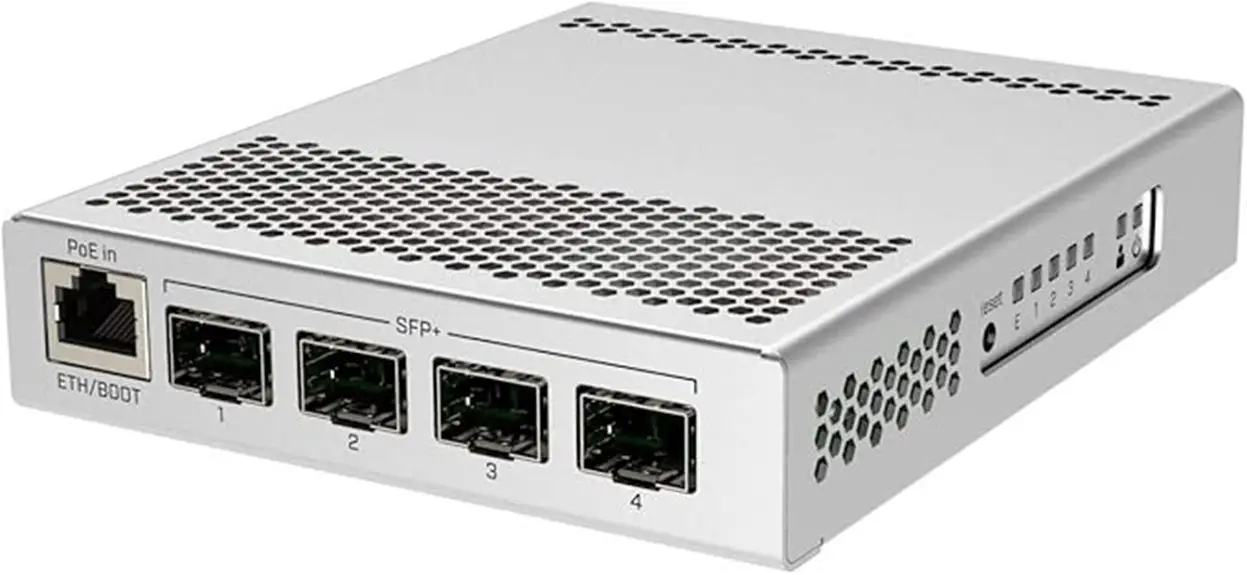
The MikroTik CRS305-1G-4S+ packs four 10GbE SFP+ ports, one 1GbE port, silent cooling, and triple power inputs into a very small box that usually sells around one hundred fifty dollars. On paper it looks like an ideal budget 10GbE switch for a homelab or small office.
I have worked with carrier and data center switches for more than eighteen years and run the CRS305 in my own lab. I have used it with NAS appliances, Proxmox clusters, VMware hosts, and small business storage networks. This review is based on that hands‑on use, not just spec sheets.
The aim here is simple: explain where the CRS305 excels as a Layer 2 switch, where it falls short as a router, and how to deploy it in real‑world homelab and office networks—without surprises.
Key Takeaways
- Excellent value for 10GbE. Four SFP+ ports and one 1GbE port deliver full line rate for normal Layer 2 traffic in my tests, at a price that undercuts most rivals.
- Triple power inputs. Two DC jacks plus PoE-in on the 1GbE port give a level of power redundancy rarely seen anywhere near this price.
- Silent, fanless metal chassis. The case runs hot to the touch by design, so it needs clear airflow, but noise is effectively zero.
- Two OS choices. RouterOS and SwOS dual boot let you pick between a full feature set and a very simple switch UI. For most homelabs, SwOS is the better fit.
- Great SFP+ compatibility. The CRS305 works with a wide range of third‑party optics, DAC cables, and RJ45 modules, which keeps link costs low.
What Is the MikroTik CRS305-1G-4S+? Understanding the Hardware Foundation
The CRS305-1G-4S+IN is a compact, low‑power 10GbE switch aimed at homelab and small business users who want fast storage and server links without data center noise.
Key hardware points:
- CPU: Marvell 98DX3236 ARM at 800 MHz
- Memory: 512 MB RAM, 16 MB flash
- Ports: 4 × SFP+ (1/10GbE), 1 × 1GbE RJ45 (often used for management and PoE-in)
- Case: Small metal chassis with lots of ventilation; the metal acts as a heat sink
Status LEDs and reset live on the side, which keeps the front clean but makes link checks slightly less direct. The unit ships with one DC power adapter and supports wall or desk mounting.
For readers trying to pick between CRS305 and CRS309, this quick table helps:
| Feature | CRS305-1G-4S+IN | CRS309-1G-8S+IN |
|---|---|---|
| 10GbE SFP+ Ports | 4 | 8 |
| 1GbE RJ45 Ports | 1 | 1 |
| CPU and RAM | Same as CRS305 | Same as CRS305 |
| Cooling | Passive fanless | Passive fanless |
| DC Power Inputs | Dual jacks plus PoE-in | Single jack plus PoE-in |
| Size | Very compact desktop | Wider, shallow rack style |
Used as a 10GbE access switch for a few key devices, the CRS305 is a very capable base.
Passive Cooling Design: The Silence Trade-Off
The CRS305 is completely fanless. The metal chassis and perforations handle heat dissipation, which keeps the switch silent—ideal for desks, studios, and living rooms.
The trade‑off:
- The case often sits above sixty degrees Celsius on the outside.
- MikroTik prints a hot surface warning on the chassis for a reason.
- Internally, temperatures stay within spec, but the case can feel uncomfortable to the touch.
Good placement solves most concerns:
- Give it open space on at least three sides.
- Do not stack routers or NAS units on top.
- In warm racks, a slow 120 mm fan near the unit drops temperatures several degrees with little added noise.
Port Configuration and Connectivity Options
Port layout is simple:
- 4 × SFP+ cages on the front (supporting 1GbE and 10GbE)
- 1 × 1GbE RJ45 port (management and PoE-in)
Each SFP+ cage accepts:
- 10GbE optical modules
- Passive/active DAC cables
- 1GbE SFP modules (for older devices)
The 1GbE RJ45 port:
- Acts as a management or uplink port
- Accepts 802.3af/at PoE-in, which is handy where power outlets are scarce
For cabling:
- Use passive DAC up to about 5 m for servers and NAS units in the same rack.
- Use fiber (10GBASE-SR or LR) for room‑to‑room or building‑to‑building runs.
The switch fabric rated at 82 Gbps and 61 Mpps is more than enough for full‑duplex traffic on all 10GbE ports under typical lab and office loads.
Triple Power Redundancy: Enterprise Reliability at Budget Pricing
One standout feature of the CRS305 is its triple power input design:
- 2 × DC barrel jacks on the back
- 1 × PoE-in (via the 1GbE RJ45 port)
The switch can run from any one source or several at once. There is no manual failover; it simply stays online as long as at least one feed is present.
Typical setups:
- Homelab:
- One DC brick on a small UPS
- Optional PoE feed from an existing PoE switch
- Small office:
- Two DC bricks on different circuits
- Optional PoE as a third backup
Compared with many alternatives:
- CRS309 has only one DC jack plus PoE-in.
- A lot of low‑cost 10GbE switches from other brands ship with a single internal PSU and no PoE power option.
- True redundant PSU enterprise switches cost far more and draw a lot more power.
Measured Power Consumption and Efficiency
Real‑world power draw is very modest:
- Around 10 W at idle with a couple of 10GbE links up
- Around 13 W under heavy 10GbE traffic
- Rated maximum is 18 W
That translates to roughly 15 dollars per year in power at typical energy prices. Used enterprise switches often sit between 70–120 W, so over a few years they can cost more in power than buying a CRS305 new.
Low draw also means:
- Long runtimes on small UPS units
- Minimal heat load in small rooms
For homelabs and offices, the power profile is a strong advantage.
RouterOS vs. SwOS: Choosing the Right Operating System
The CRS305 can boot either RouterOS or SwOS, and that choice defines how you manage it.
- RouterOS – Full MikroTik network operating system with routing, firewall, advanced VLANs, and scripting.
- SwOS – Lightweight, web‑managed Layer 2 switch OS with a very clear interface.
By default it boots RouterOS, but you can switch to SwOS from RouterOS or during boot.
Summary:
| Area | RouterOS on CRS305 | SwOS on CRS305 |
|---|---|---|
| Role | Layer 2 + light Layer 3 | Pure Layer 2 |
| Interface | WebFig, WinBox, CLI | Simple web UI |
| Boot Time | Slower | Faster |
| Routing & Firewall | Available but CPU-limited | Not available |
| VLAN & LACP | Very flexible | Covers core needs |
| Best Fit | Learning lab, advanced users | Homelab, storage, small office core |
For about 95% of homelabs, I suggest running SwOS and keeping a stronger separate router for Layer 3 work.
RouterOS Capabilities and Limitations on CRS305
RouterOS exposes a wide feature set on the CRS305, but the small CPU restricts what you can do at speed:
- Hardware‑offloaded Layer 2 (bridging, VLANs, LACP) runs at full 10GbE line rate.
- When you start routing between VLANs, using many firewall rules, or adding VPNs, every packet hits the CPU.
Typical numbers:
- Around 2.3 Gbps of plain IPv4 routing with large packets
- Only a few hundred Mbps with small packets
- With ~25 firewall rules, large‑packet throughput can drop near 1.1 Gbps or below
So:
- Use RouterOS on this box for switching features, VLANs, and light routing tests.
- Do not use it as your main internet router or heavy inter‑VLAN router at 10GbE.
I prefer to place the CRS305 behind a more capable router (CCR, pfSense, OPNsense, or similar) and let it focus on fast switching.
SwOS: Streamlined Management for Pure Switching
SwOS turns the CRS305 into a very clean managed switch:
- Boots in roughly 15 seconds
- Simple web interface with tabs for ports, VLANs, mirroring, QoS, and stats
- No routing, firewall, or complex services
You still get:
- Port‑based config
- 802.1Q VLAN tagging
- Link aggregation
- Port mirroring and basic QoS
- SNMP support
SwOS has no CLI, but you can back up and restore configs from the web UI.
For a typical homelab:
- One VLAN for management
- One VLAN for storage
- One VLAN for lab traffic
SwOS makes that layout easy to see and maintain months later.
“The cheapest, fastest, and most reliable components are those that aren’t there.” — Gordon Bell
SwOS fits that idea very well on this hardware.
Management Interfaces: WebFig, WinBox, and CLI Access
When running RouterOS, the CRS305 supports three main management methods:
- WebFig: Full browser interface; covers every setting.
- WinBox: Native Windows app with fast response and MAC‑level discovery (handy if IP is misconfigured).
- CLI over SSH: For scripting, automation, and admins who prefer keyboard control.
On SwOS, a narrower but very clear web UI handles everything.
Initial access pattern:
- The switch tries DHCP on the management port.
- If that fails, it falls back to a default IP.
- You log in with the default credentials, then change them right away.
From that first login, it is smart to:
- Put management on a dedicated VLAN
- Restrict which IPs can manage the switch
Essential Security Configuration Steps
Even in a homelab, the switch often sits next to critical storage and hypervisors. I follow this short checklist:
- Change the default admin password immediately; use a long passphrase rather than a simple word.
- Disable unused services (Telnet, FTP, plain HTTP); keep encrypted options such as SSH and HTTPS.
- Move management to a separate VLAN, only reachable from a trusted subnet.
- Limit management access by IP (and, if you like, by MAC) so only your own devices can reach it.
- Update firmware to the latest stable or long‑term release after taking a config backup.
- Tighten discovery and SNMP:
- Turn off LLDP/CDP on ports facing untrusted networks.
- Change SNMP community strings and restrict them to your monitoring host.
“Complexity is the worst enemy of security.” — Bruce Schneier
Keeping the CRS305 simple, with a few well‑chosen controls, goes a long way.
Layer 2 Switching Performance: Where the CRS305 Excels
Layer 2 is where the CRS305 really shines.
Specs and tests:
- Switch fabric: 82 Gbps, 61 Mpps
- All four 10GbE ports can run at line rate simultaneously for common packet sizes.
- In iperf3 tests between a workstation and NAS, I consistently saw 9.2–9.4 Gbps (about 1,150–1,180 MB/s) over 10GbE.
- Multiple concurrent transfers did not raise packet loss or jitter; the ASIC handled the work while CPU stayed low.
With jumbo frames (MTU 9000):
- Throughput improves slightly
- CPU load on servers drops a bit, which is useful for storage traffic
Latency stays in the low microsecond range and VLAN tagging has negligible impact on throughput. For backups, file copies, VM storage, and media editing, the switch is not the bottleneck.
Real-World Use Case: Proxmox Cluster Storage Network
One practical pattern:
- 3 × Proxmox nodes with local SSDs in a Ceph pool
- Each node cabled via 10GbE DAC to the CRS305
- 1GbE from the CRS305 to the main LAN for management
Typical setup steps:
- Put Ceph traffic on a dedicated storage VLAN.
- Use MTU 9000 on that VLAN (switch + hosts).
- Keep management and VM traffic on other VLANs or on separate NICs.
In this layout I observed:
- Around 700–800 MB/s of real Ceph throughput per link
- Fast live migrations (tens of seconds for a 20 GB VM)
- No sign of stress on the switch
Keeping storage on its own VLAN and fabric helps the cluster feel far more responsive.
VLAN Configuration and Trunking Best Practices
VLAN mistakes cause many of the support questions I see. A few habits prevent most of them:
- Treat edge ports as access ports in a single VLAN (untagged).
- Treat links between switches/routers as trunks carrying multiple tagged VLANs.
- Make sure the management VLAN is allowed and correctly tagged on every trunk that needs it.
- Keep native/untagged VLANs consistent on both ends of a trunk.
- Test each VLAN with a laptop before relying on it for storage or production traffic.
- Save a known‑good config backup before major VLAN changes.
In SwOS, the VLAN matrix view makes it easy to check which ports belong to which VLANs.
The KISS principle (“Keep It Simple, Stupid”) applies strongly to VLAN design—simple plans fail less often.
Layer 3 Routing Limitations: Understanding the Bottleneck
The CRS305 can route with RouterOS, but it is not a high‑speed router:
- Routed traffic leaves the fast switch path and hits the 800 MHz CPU.
- Throughput drops sharply with small packets, many firewall rules, or NAT.
Typical results:
- Around 2.3 Gbps IPv4 routing with large packets and no filters
- Around 300 Mbps with small packets
- With ~25 firewall rules, large‑packet routing can fall to roughly 1.1 Gbps; small‑packet performance drops further.
In my own lab, inter‑VLAN routing above 500–600 Mbps starts to push CPU usage toward 100%.
Conclusion:
- Great switch.
- Not a main internet router or heavy inter‑VLAN routing box.
When You Actually Need Routing: Alternative Solutions
If you truly need multi‑gigabit routing plus 10GbE switching, use the CRS305 with:
- A separate hardware router (e.g., MikroTik CCR series, pfSense/OPNsense on x86, or a capable all‑in‑one router).
- Or a virtual router (e.g., OPNsense VM with passthrough NICs on a Proxmox host).
In many of my builds:
- The router handles WAN, firewall, VPN, and inter‑VLAN routing.
- The CRS305 provides fast Layer 2 for storage and servers.
This split keeps both devices in roles they handle well.
SFP+ Module Compatibility: Breaking Vendor Lock-In
A big win for the CRS305 is its open attitude to SFP+ modules. Unlike some large vendors that force you into branded optics, the CRS305 usually accepts third‑party modules without complaint.
In practice:
- I have used Cisco‑coded, Intel, Mellanox, fs.com, and other generic SFP/SFP+ modules.
- Well over 90% worked perfectly: no errors, stable links, full speed.
- Failures were mostly very old optics or a few quirky 1GbE copper SFPs.
Cost difference is huge:
- Brand‑name 10GBASE‑SR can cost hundreds.
- Good third‑party modules often sit in the $12–$20 range.
I recommend buying from known suppliers (for example, fs.com or 10GTek) with clear specs rather than random listings.
Direct Attach Copper (DAC) Cables: The Budget Option
For short runs, DAC cables are my default:
- SFP+ connectors with a fixed twinax cable between them
- Lengths from 0.5–5 m are common and cheap
- Lower power draw than optics, which keeps the CRS305 and servers cooler
Good use cases:
- Server ↔ CRS305 inside the same rack
- NAS ↔ CRS305 on a nearby shelf
Common symptoms of a bad DAC:
- Intermittent link flaps
- Rising error counters
- No link at all
Swapping in a known‑good DAC is usually the quickest test.
Fiber Optic Transceivers: Long-Distance and Multi-Building Scenarios
For longer distances or between buildings, fiber is the right tool:
- OM3/OM4 multi‑mode + 10GBASE‑SR for up to a few hundred meters
- OS2 single‑mode + 10GBASE‑LR for multi‑kilometer runs
Typical pattern:
- CRS305 in the house, CRS305 or another SFP+ switch in a detached garage
- Fiber in conduit or outdoor‑rated cable between buildings
- 10GbE link feels just like a short DAC once correctly installed
Keep connectors clean, avoid tight bends, and use LC patch leads from patch panels to the switch.
10GBASE-T Copper: Connecting RJ45 Devices
To connect RJ45‑only devices (QNAP, some Macs, motherboards with 10GBASE‑T) you can use an SFP+ to RJ45 module, such as MikroTik’s S+RJ10:
- Supports 10M/100M/1G/2.5G/5G/10G over Cat6A or better
- Works well up to about 30 m at 10GbE with good cable
Trade‑offs:
- Each module draws several watts and runs hot in a fanless switch.
- I generally keep no more than two RJ45 modules in a CRS305 and give the case good airflow.
- Modules cost far more than DACs or optics.
If both ends can use SFP+, use DAC or fiber instead; it is cheaper, cooler, and simpler.
Deployment Scenarios and Real-World Configurations
The CRS305 works best as the high‑speed core for a small set of important devices. Common patterns include:
- A powerful workstation, NAS, and one or two hypervisors
- A small Proxmox cluster with Ceph
- A quiet 10GbE core in the house with noisier gear in a garage
- A mixed 1G/2.5G/10G home network
Below are four practical scenarios I see most often.
Scenario 1: Basic Homelab with NAS and Workstation
Goal: Fast 10GbE between one PC and one NAS, plus room for a small server.
- CRS305 as the 10GbE core
- PC, NAS, and server connected via short DACs
- 1GbE port uplinked to the home router
Simple approach:
- Keep everything in VLAN 1.
- Give 10GbE interfaces their own subnet for storage (for example,
10.0.10.0/24). - Leave normal LAN/Internet on the router’s existing network.
This gives near‑line‑rate file transfers for a total hardware cost that often stays under $200.
Scenario 2: Proxmox Cluster with Dedicated Storage Network
Goal: Separate Ceph storage, VM traffic, and management.
- 3 × Proxmox nodes with 10GbE NICs to the CRS305
- Another switch (1G/2.5G) for management and user devices
- One trunk between CRS305 and the main switch/router
Typical VLAN plan:
- VLAN 10 – Ceph storage (MTU 9000)
- VLAN 20 – VM traffic
- VLAN 30 – Management
Steps:
- Mark Proxmox‑facing ports as trunks carrying VLANs 10 and 20.
- Tag all required VLANs on the uplink to the router.
- Build matching bridges and VLAN interfaces inside Proxmox.
Result: High‑speed storage on its own network, with VM and management traffic kept separate and easier to troubleshoot.
Scenario 3: Connecting Multiple Buildings with Fiber
Goal: Put noisy lab gear in a garage or shed while keeping a quiet 10GbE core in the house.
- CRS305 in the house, second switch (CRS305/CRS309/other SFP+ model) in the lab
- OM3/OM4 multi‑mode fiber and 10GBASE‑SR modules between buildings for runs under a few hundred meters
Basic steps:
- Pull fiber through conduit or use outdoor‑rated cable.
- Terminate to patch panels or boxes, then LC patch leads to the switches.
- Start with a single flat LAN; add VLANs later if needed.
Once the link is up and tested with iperf3, you have full‑speed connectivity without copper length limits or ground loop worries.
Scenario 4: Multi-Gigabit Home Network (2.5G/5G Integration)
Goal: Mix 10GbE, 2.5G, and 1G in one home network.
- CRS305 at the center
- WAN router with at least 2.5G on the LAN side
- One or two S+RJ10 modules for 2.5G/5G Wi‑Fi access points and a multi‑gig NAS
- Remaining SFP+ ports used for 10GbE devices or uplinks
Tips:
- Let ports auto‑negotiate speed; if you see instability, try forcing 2.5G on both ends.
- Watch module temperatures in the UI when using RJ45 adapters.
- Use another small multi‑gig switch if you need many 2.5G copper ports.
This gives you a flexible core that can handle fast internet plans and high‑speed local storage.
Practical Challenges and Solutions
The CRS305 is a solid device, but a few recurring issues come up in labs and forums:
- Concerns about heat
- Link problems with certain NICs
- VLAN misconfigurations that cut off access
Most of these are fixable with a few simple checks.
Challenge 1: Excessive Heat and Thermal Throttling
The case often feels very hot even when everything is fine. Real trouble usually shows as:
- Random link drops across several ports
- Sudden speed reductions
- Loss of management until a power cycle
What to do:
- Check internal temperature in the UI; high 50s or low 60s °C are common and acceptable.
- Move the unit out of closed cabinets; clear the vents.
- Add a quiet 120 mm fan near the switch if room temperature is high or several hot modules are installed.
In my own lab, a slow Noctua fan over a group of passive devices—including the CRS305—keeps them comfortably cool year‑round.
Challenge 2: Link Negotiation Failures with Specific NICs
Some older Mellanox and Intel 10GbE cards can be picky. Symptoms:
- Link LEDs never light
- OS reports “no carrier”
- Links only come up after rebooting one side
Fix checklist:
- Test with another DAC or SFP+ module.
- Try a different port on the CRS305.
- Update NIC firmware and drivers.
- Force 10GbE full‑duplex on the NIC instead of auto‑negotiation.
- Swap to a different brand of SFP+ module if issues persist.
Often a firmware update or speed/duplex tweak clears the problem.
Challenge 3: VLAN Configuration Mistakes
VLAN errors often lead to “I locked myself out” stories. Common issues:
- Forgetting to tag the management VLAN on the uplink trunk
- Mismatched native VLANs between the CRS305 and another switch/router
- Forgetting to add a VLAN to all the trunks that need it
Suggested approach:
- Draw a simple VLAN diagram before changing anything.
- Change and test one link at a time with a laptop.
- Keep multiple config backups at known‑good stages so you can roll back quickly if something breaks.
Comparing Alternatives: Is the CRS305 the Right Choice?
The CRS305 sits in a crowded low‑port 10GbE market that includes its bigger brother CRS309, Ubiquiti aggregation switches, used enterprise gear, and copper‑only models from Netgear and others.
Key questions to ask yourself:
- How many 10GbE ports do you really need in the next few years?
- How important is silence and low power draw?
- Do you prefer simple web management or are you comfortable with deeper CLIs and more complex systems?
Power matters too:
- CRS305 at ~13 W costs maybe $45 in power over three years.
- A 120 W used enterprise switch can burn $400–$500 in the same time frame.
For most homelabs up to four 10GbE devices, the CRS305 is my first recommendation. Above that, or in certain stacks, other options can make more sense.
Alternative 1: MikroTik CRS309-1G-8S+IN (8-Port SFP+)
The CRS309 is the natural upgrade path:
- 8 × SFP+ plus 1 × 1GbE
- Same OS options and general behavior as CRS305
- Passive and silent, but with one DC jack + PoE-in (no dual DC)
Choose CRS309 when:
- You know you will soon have five or more 10GbE devices.
- You want to avoid stacking multiple 4‑port units.
If four ports are enough and space is tight, the CRS305 still wins on size and extra DC jack.
Alternative 2: Ubiquiti UniFi USW-Aggregation (8-Port SFP+)
The USW‑Aggregation aims at UniFi users:
- 8 × SFP+ ports
- Deep integration with the UniFi Controller
- Polished interface and unified monitoring with UniFi routers and APs
Trade‑offs:
- Significantly higher price than CRS305/CRS309
- Feature set tuned for UniFi, with less low‑level control than RouterOS
- Some models use internal fans and draw more power
If you already run a UniFi stack and value single‑pane management, this can be worth it. Otherwise, MikroTik usually offers better value per dollar.
Alternative 3: Used Enterprise Switches (Aruba, Arista, Juniper)
Used enterprise switches bring:
- Dozens of 10GbE ports
- Full Layer 3 capability at line rate
- Advanced QoS, telemetry, and stacking
But they also bring:
- Loud fans, often too noisy for a living space
- High power draw (100–250 W is common)
- Heavier management via proprietary CLIs and licensing quirks
They are great for a garage rack or training lab, not for a living room or quiet office.
Alternative 4: Netgear XS708E (8-Port 10GBASE-T)
The XS708E focuses on RJ45 10GBASE‑T:
- 8 × 10GbE copper ports
- Simple web‑managed features
- No need for SFP+ modules if all devices use 10GBASE‑T
Downsides:
- Much higher power consumption than SFP+ designs
- Less flexible for fiber or DAC runs
- Fans can be noisier than the fanless CRS305
If every device you own is 10GBASE‑T and you never plan to use SFP+, it can work. Once you mix in fiber or DAC, the CRS305 is usually more practical and efficient.
Long-Term Reliability and Maintenance
Passively cooled hardware like the CRS305 tends to last well when kept in reasonable temperatures:
- No fans means one less moving part to fail.
- In my experience, 5–7 years of service is realistic in a home or small office environment.
For ongoing care:
- Stick to stable or long‑term MikroTik firmware branches.
- Check logs and port error counters a few times per year.
- Use SNMP or a light monitoring tool if you want automatic alerts.
Tracking:
- When the unit went into service
- What firmware it runs
- What role it serves
…makes future upgrades and audits far easier, especially if you document builds on sites like Afroz Ahmad dot com or in your own notes.
Firmware Management and Update Strategy
A simple, safe update routine:
- Pick the right channel: Use stable or long‑term for homelab/office use.
- Back up configs: Export RouterOS or SwOS configs before any change. Store backups off the device.
- Upload and reboot:
- Download the new firmware from MikroTik.
- Upload via WebFig/WinBox or SwOS.
- Reboot to apply.
- Avoid chasing every minor release:
- Update when there is a relevant bug fix or security advisory.
- Test big jumps (for example major version changes) in a lab if your setup is critical.
If the network is stable and secure, you do not need to update constantly just because a new build appears.
Conclusion
The MikroTik CRS305-1G-4S+ offers a rare mix of low price, silent operation, and serious 10GbE performance. Four SFP+ ports, one 1GbE management/PoE port, triple power inputs, and strong SFP+ compatibility make it a fantastic fit for homelabs and many small offices.
Used as a Layer 2 switch behind a capable router, it is hard to beat:
- Fast enough for storage, VM, and backup traffic
- Quiet enough for living spaces
- Flexible enough to grow from simple flat networks into VLAN‑aware designs
It is not a high‑speed router, and it is not meant to replace a big enterprise core. But if you are building a first 10GbE lab, wiring a couple of high‑end workstations to a NAS, or building a compact Proxmox or VMware cluster, I am comfortable recommending the CRS305 as your central 10GbE switch.
For deeper builds and more step‑by‑step walkthroughs, resources such as Afroz Ahmad dot com explore many of these patterns in detail.
FAQs
Can the CRS305 replace my main home router for internet access?
It can route and even do NAT, but throughput falls once you add real firewall or VPN rules. Routing performance is well below modern multi‑gigabit links, especially with small packets. I recommend using a separate router for WAN and inter‑VLAN routing, and using the CRS305 purely as a switch.
How many S+RJ10 10GBASE-T modules can I safely use in the CRS305?
From a power and heat point of view, I treat two modules as the practical limit. Each adds several watts and a lot of heat in a fanless chassis. If you need many RJ45 10GbE ports, a copper‑focused switch is usually a better fit.
Is the CRS305 a good choice for a small business office?
Yes—when you need fast links to file servers, design workstations, or backup targets, the CRS305 works very well. It is quiet, power efficient, and supports VLANs and link aggregation. Just pair it with a reliable router and follow the basic security steps described above.
Will the CRS305 work with my existing third-party SFP+ modules?
In most cases, yes. MikroTik does not lock this model to branded optics. I have used modules coded for Cisco, Intel, Mellanox, and several generic brands with a high success rate. Buying from reputable optic vendors further improves your odds.
What is the main reason to move from CRS305 to CRS309 later?
Port count. Once you outgrow four 10GbE SFP+ ports—because you add more NAS units, hypervisors, or uplinks—the CRS309 with eight SFP+ ports gives more room to expand. You can still keep the CRS305 for dedicated storage or lab roles.

- pfSense 10G Home Lab Setup: Complete Hardware Guide (2026) - April 1, 2026
- Best Budget Home Lab Setup Under $300 (2026): Complete Starter Stack - March 30, 2026
- Best Modems for Spectrum: Top DOCSIS 3.1 Picks That Actually Work - March 28, 2026