
If you want to build the best home lab network setup, you need more than just a fast router. A real home lab has a proper firewall, a managed switch for VLAN segmentation, a wireless access point with per-SSID controls, centralized storage for your virtual machines, and a UPS to protect everything when the power blinks. Get that stack right and you have a network that mirrors what you find in real enterprise environments — built at home, for a fraction of the cost.
You do NOT need this if:
- You just want faster Wi-Fi at home — a good mesh router handles that without any of this complexity
- You only have one or two devices and no plans to run servers or VMs
- You are not studying for a networking certification and do not work in IT
- Your total budget is under $80 — wait until you can invest properly, a half-built lab teaches bad habits
I have spent 20 years designing networks professionally — enterprise campuses, ISP cores, carrier infrastructure. In this guide I apply that experience to help you build a home lab that genuinely teaches you something, whether you are chasing a CCNA or CCIE certification, running self-hosted services, or just want to understand your network inside out.
Key Takeaways
- Tier 1 (~$290–$350): TP-Link ER605 + TL-SG108E + Beelink EQ12 — routing, managed switching with VLANs, and a Proxmox virtualization host.
- Tier 2 (~$800–$950): Protectli FW4B (pfSense) + MikroTik CRS305 + TL-SG108PE + EAP670 + Synology DS223 + CyberPower UPS — enterprise-quality at home lab cost.
- VLANs are non-negotiable in a serious lab. Without them your lab traffic and home network share the same broadcast domain.
- A UPS is not optional once you have a NAS or VM host. One unclean shutdown can corrupt a ZFS pool or RAID array.
- The firewall is your most important decision. Protectli FW4B running pfSense gives you stateful inspection, IDS/IPS, WireGuard VPN, and VLAN-aware routing.
What Is a Home Lab Network?
A home lab is a private network where you safely experiment, break things, and rebuild them without touching your real internet connection. The network is the foundation everything else sits on.
For certification study: A real managed switch teaches things simulators cannot — actual spanning tree events, real VLAN misconfigurations, real topology changes affecting forwarding tables.
For self-hosting: Running Nextcloud, Plex, Gitea, or Vaultwarden requires a NAS, proper DNS, a reverse proxy, and a firewall enforcing ingress rules.
For security research: An isolated pfSense-firewalled VLAN lets you run Kali Linux against vulnerable VMs with zero risk to your home devices.
For DevOps and cloud skills: Kubernetes on bare metal, Proxmox clusters, Docker Swarm — all benefit from VLAN-segmented networks and dedicated storage VLANs.
Home Lab Network Topology
Internet (ISP Modem/ONT)
         |
   [Firewall/Router]      -- Protectli FW4B (pfSense) or TP-Link ER605
         |
   [Core Switch]          -- MikroTik CRS305 (10G SFP+) or TL-SG108E
      /
[Access Sw]  [PoE Sw]     -- TL-SG108E / TL-SG108PE
     |              |
[Lab Host]    [AP + Cams] -- Beelink EQ12 / EAP670 / IP cameras
                    |
               [NAS]      -- Synology DS223 on Storage VLAN
What Does a Home Lab Network Actually Need?
1. Firewall / Router. The perimeter gatekeeper. On the Protectli FW4B, pfSense gives you stateful packet inspection, IDS/IPS via Snort or Suricata, WireGuard VPN, DNS filtering via pfBlockerNG, and full VLAN-aware routing. See our best wired routers guide for additional options.
2. Core Managed Switch. Must understand 802.1Q VLAN tagging. Start with the TL-SG108E for a budget lab, upgrade to the MikroTik CRS305 when you need 10G. See our best network switches guide.
3. PoE Switch. Run power to your AP and cameras over the same cable as data. The TL-SG108PE handles 4 PoE+ ports at 64W total.
4. Wireless Access Point. A standalone AP with per-SSID VLAN assignment is the only way to do wireless network segmentation properly. See our WiFi 6 vs WiFi 7 comparison.
5. NAS. NFS or iSCSI from a Synology NAS lets Proxmox store VM disk images on shared storage with proper backup workflows. For cabling see our home network wiring guide.
6. Lab Host. A physical machine running Proxmox. Mini PCs like the Beelink EQ12 with dual 2.5GbE NICs draw under 15W idle and handle 4–8 VMs easily.
7. UPS. Battery backup for everything. Required once you have a NAS or running VMs. Pure sine wave output is mandatory for NAS devices with PFC power supplies.
Top 9 Home Lab Network Equipment Picks
| Protectli Vault FW4B — 4-Port Fanless Firewall |  | Best Overall Firewall | Ports: 4x Intel Gigabit Ethernet, AES-NI | OS: pfSense CE / OPNsense (BYO) | Note: Barebone — RAM & SSD sold separately | VIEW LATEST PRICE | Read Our Analysis |
| TP-Link ER605 V2 — Omada Gigabit VPN Router |  | Best Budget Router | Ports: 1 WAN + 2 WAN/LAN + 2 LAN + USB | VPN: IPsec, OpenVPN, L2TP, PPTP | Sessions: 150,000 concurrent | VIEW LATEST PRICE | Read Our Analysis |
| MikroTik CRS305-1G-4S+IN — 10G SFP+ Core Switch |  | Best Prosumer Switch | Ports: 4x 10G SFP+ + 1x 1G RJ45 | OS: RouterOS v7 / SwOS | Power: ~8W fanless | VIEW LATEST PRICE | Read Our Analysis |
| TP-Link TL-SG108E — 8-Port Gigabit Easy Smart Switch |  | Best Budget Managed Switch | Ports: 8x Gigabit Ethernet, metal chassis | VLANs: 32 802.1Q VLANs | Extras: LAG, QoS, port mirroring | VIEW LATEST PRICE | Read Our Analysis |
| TP-Link TL-SG108PE — 8-Port PoE+ Smart Switch |  | Best PoE Switch | Ports: 8x GbE, 4x PoE+ (802.3at) | PoE budget: 64W total, 30W per port | Feature: PoE Auto Recovery built-in | VIEW LATEST PRICE | Read Our Analysis |
| TP-Link EAP670 V2 — WiFi 6 AX5400 Access Point |  | Best Lab WiFi AP | Standard: WiFi 6 (802.11ax) AX5400 | Port: 2.5GbE uplink, PoE+ 802.3at powered | VLANs: Per-SSID VLAN tagging | VIEW LATEST PRICE | Read Our Analysis |
| Synology DS223 — 2-Bay NAS (Diskless) |  | Best Entry NAS | Bays: 2x 3.5/2.5-inch SATA, diskless | OS: Synology DSM, native Docker | Network: 1x 1GbE, NFS/iSCSI ready | VIEW LATEST PRICE | Read Our Analysis |
| Beelink EQ12 — Intel N100 Mini PC, Dual 2.5GbE |  | Best Budget Lab Host | CPU: Intel N100, 4C/4T, 3.4GHz | RAM/Storage: 16GB DDR5, 500GB NVMe | NICs: Dual 2.5GbE Intel i225-V, under 15W idle | VIEW LATEST PRICE | Read Our Analysis |
| CyberPower CP1500PFCLCD — 1500VA Pure Sine Wave UPS | 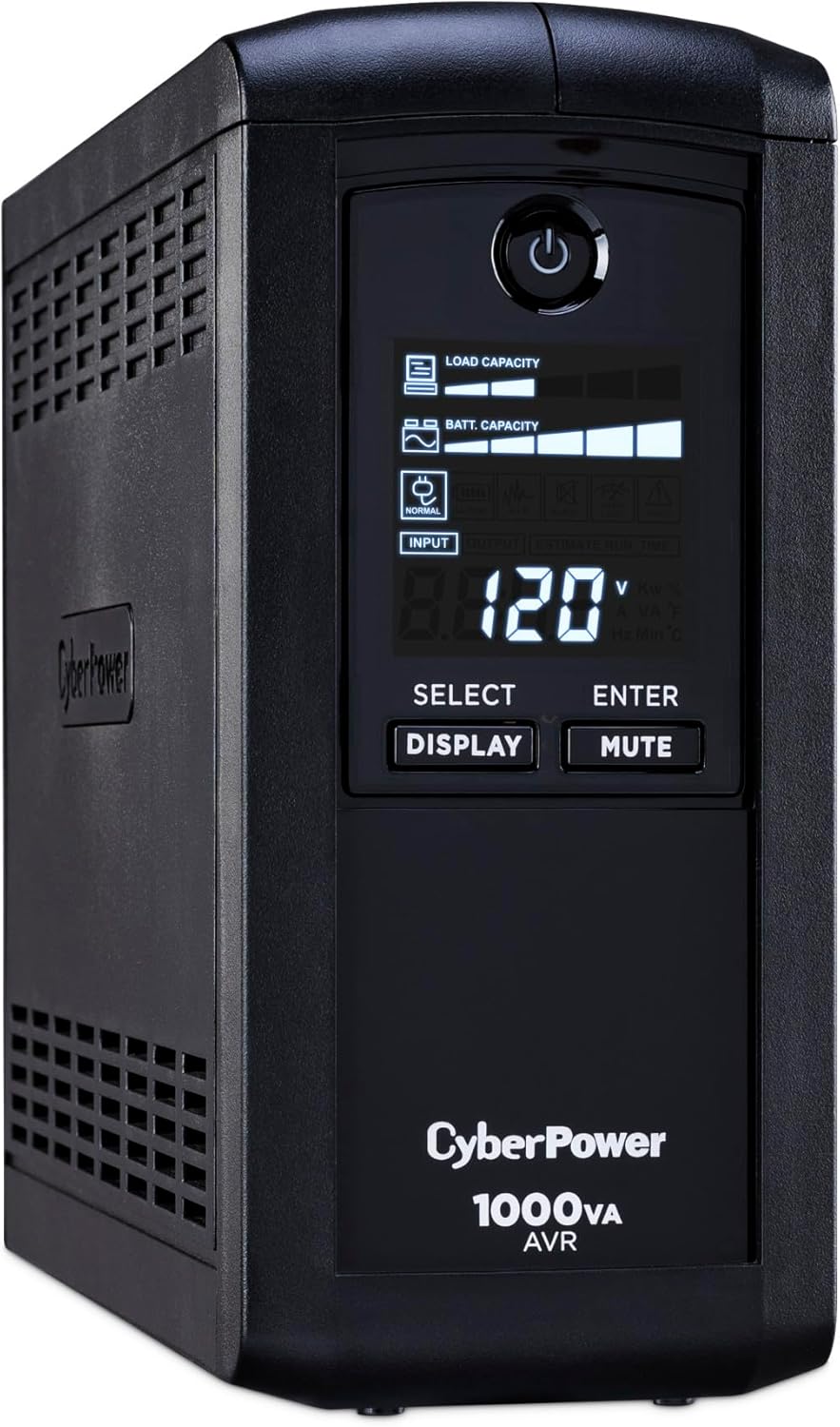 | Best UPS | Capacity: 1500VA / 900W pure sine wave | Outlets: 12 total (8 battery+surge) | Interface: USB shutdown + LCD panel | VIEW LATEST PRICE | Read Our Analysis |
Full Comparison — All 9 Products
| Product | Category | Key Spec | PoE | ~Price | Best Tier |
|---|---|---|---|---|---|
| Protectli FW4B | Firewall | 4x Intel 1GbE, AES-NI, Barebone | No | ~$329 | Mid–Pro |
| TP-Link ER605 V2 | Router | 5x 1GbE + USB WAN | No | ~$40 | Starter |
| MikroTik CRS305 | Core Switch | 4x 10G SFP+ + 1x 1G | No | ~$130 | Mid–Pro |
| TP-Link TL-SG108E | Access Switch | 8x 1GbE, 32 VLANs | No | ~$30 | Starter |
| TP-Link TL-SG108PE | PoE Switch | 8x 1GbE, 4x PoE+ 64W | Yes 64W | ~$60 | Starter–Mid |
| TP-Link EAP670 V2 | WiFi AP | WiFi 6 AX5400, 2.5GbE + PoE in | Powered by PoE | ~$90 | Mid |
| Synology DS223 | NAS | 2-bay, 1GbE, DSM+Docker | No | ~$300 | Mid |
| Beelink EQ12 | Lab Host | N100, 16GB DDR5, Dual 2.5G Intel | No | ~$220 | Starter–Mid |
| CyberPower CP1500PFCLCD | UPS | 1500VA/900W pure sine wave | N/A | ~$170 | Mid |
3 Real Home Lab Builds by Budget
Tier 1 — Starter Lab (~$290–$350)
Best for: CCNA students, first home lab, tight budget.
ISP Modem → TP-Link ER605 V2 (~$40) → TL-SG108E (~$30) → Beelink EQ12 (~$220) running Proxmox VE.
Tier 2 — Mid-Range Lab (~$800–$950)
Best for: IT professionals, serious homelabbers, CCNP/CCIE study.
ISP Modem → Protectli FW4B / pfSense (~$329) → MikroTik CRS305 (~$130) → TL-SG108PE (~$60) → EAP670 (~$90) + Synology DS223 (~$300 + drives) + CyberPower UPS (~$170).
Tier 3 — Pro Lab (~$1,500+)
Best for: CCIE candidates, network engineers mirroring real enterprise environments.
Add a used Cisco Catalyst 3650 or 3750 (~$50–$100 on eBay) for hands-on IOS practice. Upgrade the Protectli to the VP2420 (~$450) if your WAN exceeds 500 Mbps. Add a second Beelink EQ12 for a Proxmox cluster with live migration. Run EVE-NG Community Edition inside Proxmox.
Sample VLAN Design for a Home Lab
See our complete VLAN guide and VLAN trunking guide for step-by-step setup instructions.
| VLAN | Name | Subnet | What Goes Here | Default Firewall Rule |
|---|---|---|---|---|
| VLAN 1 | Native | — | Switch management only | Block from all VLANs |
| VLAN 10 | Management | 192.168.10.0/24 | Firewall GUI, switch GUIs, Proxmox web UI | Allow outbound. Block inbound from others. |
| VLAN 20 | Lab VMs | 192.168.20.0/24 | Proxmox VMs, Docker containers | Isolated from Home and Management. |
| VLAN 30 | IoT | 192.168.30.0/24 | Smart bulbs, cameras, thermostats | Internet only. Blocked from all VLANs. |
| VLAN 40 | Guest WiFi | 192.168.40.0/24 | Visitor devices, phones, tablets | Internet only. Fully isolated. |
| VLAN 50 | Storage | 192.168.50.0/24 | NAS NFS/iSCSI shares, backup targets | Allow from VLAN 10 and 20 only. |
More Details on Our Top Picks
More Details on Our Top Picks
Protectli Vault FW4B — 4-Port Fanless Firewall Appliance
Best Overall Firewall for Home LabsView Latest Price✓ Pros- Intel I211 NICs — rock-solid pfSense/FreeBSD drivers
- AES-NI hardware VPN encryption
- Fanless — completely silent, always on
- Runs 35+ clients at gigabit with VPN active
- US-based support
✗ Cons- Barebone — RAM and SSD not included
- Requires pfSense/OPNsense OS install from USB
- Runs warm under load — needs airspace
Note: Protectli now lists a newer model — the Vault V1410 — on their Amazon listing. The FW4B remains available and fully supported.
The Protectli FW4B is a small, fanless, all-aluminum box that plugs into your internet connection and acts as the gatekeeper for your entire home lab. You load pfSense CE or OPNsense onto it yourself — both are free, open-source firewall software used by real businesses. The FW4B uses Intel I211 Gigabit NICs — this matters because pfSense runs on FreeBSD, which has had rock-solid Intel driver support for years. The AES-NI hardware acceleration handles VPN encryption in hardware. Important: This is barebones — no RAM or SSD included. You add your own (8GB DDR3L + 120GB mSATA SSD is the recommended combo). Download pfSense CE free from Netgate’s documentation.
💬 What Real Users SayUsers report running 35+ clients on gigabit networks including VoIP and VPN without any CPU strain. Running for years without a reboot is the most common theme across verified reviews.
⚠ Who Should Skip ThisIf you are not comfortable installing an OS from a USB drive and doing basic CLI configuration, start with the TP-Link ER605 instead. The unit runs warm under load — do not place it in an enclosed space. One verified reviewer reported AZERTY keyboard layouts not recognized during pfSense install — US/QWERTY users are unaffected.
🎯 My TakeThis is the firewall I would put in any serious home lab without hesitation. The Intel NICs, AES-NI, and pfSense compatibility are the exact same reasons we use Protectli appliances in production SMB deployments. Budget $30 extra for 8GB RAM and a 120GB mSATA SSD and you have a firewall that will outlast everything else in your rack.
- CPU:Intel Celeron J3160 Quad-Core, up to 2.2GHz, AES-NI
- RAM:Not included — supports DDR3L (up to 8GB recommended)
- Storage:Not included — mSATA SSD slot (120GB recommended)
- Ports:4x Intel Gigabit Ethernet (I211 NICs)
- Additional ports:2x USB 3.0, 1x RJ-45 COM, 2x HDMI
- AES-NI:Yes — hardware VPN encryption
- Cooling:Fanless all-aluminum passive chassis
- OS:None pre-loaded — pfSense, OPNsense, Untangle tested
- Warranty:30-day money back, US-based support
TP-Link ER605 V2 — Omada Gigabit VPN Router
Best Budget Router for BeginnersView Latest Price✓ Pros- $40 — lowest entry cost for a proper business router
- 150,000 concurrent sessions
- USB WAN for 4G/LTE cellular failover
- Omada SDN — scales to full enterprise stack
- 3-year warranty
✗ Cons- Some settings require full hard reboot to apply
- No IDS/IPS or DNS filtering (step up to pfSense for that)
- Omada controller UI can confuse beginners
If you are just getting started and not ready to install pfSense yet, the TP-Link ER605 V2 is the right first router for your home lab. It is a proper wired business router — not a consumer Wi-Fi router — built to be configured, not just plugged in and forgotten. You get five Gigabit ports, a USB port for 4G/LTE modem backup WAN, and it integrates with TP-Link’s Omada SDN platform. Check our best wired routers guide for the full comparison.
The ER605 supports up to 20 LAN-to-LAN IPsec tunnels, plus 16 OpenVPN, 16 L2TP, and 16 PPTP connections. It handles 150,000 concurrent sessions.
💬 What Real Users SayOne owner has run it for over three years paired with fiber and cellular failover — automatic WAN failover worked flawlessly every time. Users describe it as a solid foundation for larger smart home and lab networks managing 150+ connected devices.
⚠ Who Should Skip ThisSome settings require a full hard reboot to apply. If you need VLAN ACLs at L3 switch level, step up to the ER7206. The Omada controller interface can confuse users who want central management — standalone mode is simpler for most home lab setups.
🎯 My TakeThe ER605 is the right entry point for anyone building their first lab who is not ready for pfSense yet. At $40 it teaches you everything — VLANs, static routes, port forwarding, multi-WAN failover — without any of the FreeBSD complexity. When you are ready to upgrade to a Protectli box, your switch and AP configs stay exactly as they are.
- WAN ports:1 dedicated + 2 switchable + 1 USB WAN (4G/3G modem)
- LAN ports:2 fixed GbE + 2 switchable
- VPN:IPsec (20 tunnels), 16x OpenVPN, 16x L2TP, 16x PPTP
- Sessions:Up to 150,000 concurrent
- SDN:TP-Link Omada (controller optional)
- Firewall:SPI, ACL, IP/MAC/URL filtering, DoS defense
- Standards:IEEE 802.3, 802.3u, 802.3ab, 802.3x, 802.1q
- Warranty:3-year limited
MikroTik CRS305-1G-4S+IN — 10G SFP+ Core Switch
Best Prosumer 10G Core SwitchView Latest Price✓ Pros- 4x 10G SFP+ — connects firewall, NAS, Proxmox at 10G
- RouterOS v7 — OSPF, BGP, VXLAN, EVPN for CCIE study
- ~8W fanless — under $1/month electricity
- 5-year continuous operation reported by owners
- SwOS mode available for simpler switch-only config
✗ Cons- 800MHz CPU caps routing throughput at ~330 Mbps
- Runs hotter than expected for a fanless device
- LED lights cannot all be turned off
- RouterOS has a steep learning curve
The MikroTik CRS305 packs four 10-gigabit SFP+ ports and one Gigabit RJ45 into a fanless desktop box drawing ~8 watts. In a home lab, connect your firewall to one SFP+ port, your NAS to a second for fast NFS/iSCSI, your Proxmox host to a third, and your access switch to the fourth. See our full MikroTik CRS305 review.
The dual-boot feature lets you choose between SwOS (simple browser-based switch OS) and RouterOS, which gives you full 802.1Q VLAN support, trunk configuration, RSTP, MSTP, LACP, OSPF, and BGP. RouterOS v7 also adds VXLAN and EVPN per MikroTik’s official documentation.
💬 What Real Users SayOne verified owner has run it continuously for 5 years with zero failures. Users call it the best price-to-performance 10G switch available, with one noting it powered a full load-balanced 10GbE backbone between NAS, ESXi server, and gaming rig for under $150.
⚠ Who Should Skip ThisDo not use this as your primary router at gigabit speeds — its 800MHz CPU caps real-world routing throughput at ~330 Mbps. It runs hotter than you might expect for a fanless device — leave airspace around it. LED lights cannot all be turned off, which bothers some users in bedroom setups.
🎯 My TakeFor a 10G home lab core at this price, nothing else comes close. RouterOS is the same platform used on enterprise MikroTik gear in ISP networks — practicing on a CRS305 at home builds exactly the command-line muscle memory that matters when you are sitting in a CCIE lab exam. Just treat it as a switch, give it airspace, and it will run for years.
- SFP+ ports:4x 10G SFP+
- RJ45 port:1x Gigabit management
- Switching capacity:40 Gbps non-blocking
- CPU:800 MHz, 512MB RAM
- OS:RouterOS v7 / SwOS (dual boot)
- VLANs:802.1Q, up to 4094
- Spanning tree:RSTP, MSTP
- Power:~8W typical, fanless, dual DC jacks
- Warranty:1-year
TP-Link TL-SG108E — 8-Port Gigabit Easy Smart Switch
Best Budget Managed Switch PickView Latest Price✓ Pros- $30 with metal chassis — no reason to buy unmanaged
- 32 802.1Q VLANs, QoS, port mirroring, cable diagnostics
- Static LAG for double bandwidth to a server
- 58% power saving on idle ports
- 3-year warranty
✗ Cons- No PoE — step up to TL-SG108PE for PoE devices
- No SFP uplink for fiber to a core switch
- HTTP management only — no HTTPS
At around $30 with a metal chassis, the TL-SG108E is the best value managed switch for a starter lab in 2026. It gives you 8 Gigabit ports, 32 802.1Q VLANs, QoS, IGMP snooping, port mirroring, cable diagnostics, and static link aggregation. See our full TL-SG108E vs GS308E comparison.
Port mirroring copies all traffic from one port to another for Wireshark packet capture — invaluable for studying real network behavior. Static LAG lets you bond two ports for double bandwidth to a server. See the best network switches for home networks roundup for more options.
💬 What Real Users SayMultiple owners report running two of these 24/7 for 3+ years with zero issues. Users confirm 802.1Q VLAN config works cleanly with pfSense once you understand that untagged ingress needs the default VLAN set per-port on a separate config screen.
⚠ Who Should Skip ThisIf you need VLAN-aware PoE for access points or cameras, step up to the TL-SG108PE. No SFP uplink if you need fiber to a core switch. HTTP-only management is a limitation on untrusted networks — acceptable on a dedicated management VLAN.
🎯 My TakeI recommend this as the default starting switch for every beginner home lab build. At $30, there is no reason to compromise with an unmanaged switch — you get 802.1Q VLANs, port mirroring for Wireshark captures, and link aggregation, all of which you will use the moment you start studying for any networking certification. Buy two, run them in your lab for a year, and you will understand switch behavior at a level that no simulator can teach you.
- Ports:8x Gigabit Ethernet
- VLANs:32 simultaneous (802.1Q tagged + port-based)
- QoS:802.1p, DSCP, port-based
- LAG:Static LAG (2 groups, 4 ports each)
- Monitoring:Port mirroring, loop prevention, cable diagnostics
- IGMP snooping:Yes
- Management:Web GUI + EasySmartConfigure utility
- Chassis:All-metal, fanless, desktop or wall mount
- Warranty:3-year limited
TP-Link TL-SG108PE V3 — 8-Port PoE+ Smart Switch
Best PoE Switch for Home LabsView Latest Price✓ Pros- 64W PoE budget — WiFi 6 AP + 2 cameras simultaneously
- PoE Auto Recovery — reboots unresponsive devices automatically
- 802.1Q VLANs + QoS + IGMP snooping
- Clean integration with pfSense + Omada networks
- 3-year warranty
✗ Cons- HTTP management only — no HTTPS
- Only 4 PoE ports — step up to TL-SG1210MPE for 8 PoE ports
- No SFP uplink
PoE means Power over Ethernet — the switch sends power through the same cable that carries data. No separate power cable to your access point or IP cameras. The TL-SG108PE powers ports 1 through 4 with a total budget of 64W and up to 30W per port. The Wi-Fi Alliance documents the 802.3at standard governing PoE+ device classifications.
The standout feature the TL-SG108E does not have: PoE Auto Recovery. The switch automatically detects when a PoE-powered device stops responding and reboots it — no manual intervention needed.
💬 What Real Users SayA sysadmin noted it handled PoE for two APs and a camera out of the box with zero config issues. Multiple users confirm clean integration into pfSense + Omada networks for separate IoT, guest, admin, and camera VLANs.
⚠ Who Should Skip ThisThe management web interface runs over HTTP, not HTTPS — credentials are unencrypted in transit. Acceptable on a trusted management VLAN, but worth knowing. If you need more than 4 PoE ports, step up to the TL-SG1210MPE (8 PoE ports, 150W budget).
🎯 My TakeOnce you add a wireless access point or IP cameras to your lab, this replaces the TL-SG108E as the right switch. The 64W PoE budget handles a WiFi 6 AP and two cameras simultaneously, and PoE Auto Recovery means you are not manually cycling power when an AP locks up at 2am. This is the switch I would spec into any Tier 2 home lab build.
- Ports:8x GbE (ports 1–4 PoE+, ports 5–8 non-PoE)
- PoE standard:IEEE 802.3at (PoE+) and 802.3af
- PoE budget:64W total, 30W max per port
- PoE Auto Recovery:Yes — auto-detects and reboots unresponsive PoE devices
- VLANs:802.1Q tagged + port-based + MTU VLAN
- QoS:Port-based, 802.1p, DSCP priority
- IGMP snooping:Yes
- Management:Web GUI, EasySmartConfigure
- Chassis:Metal, fanless, desktop or wall mount
- Warranty:3-year limited
TP-Link EAP670 V2 — WiFi 6 AX5400 Omada Access Point
Best WiFi Access Point for LabsView Latest Price✓ Pros- Per-SSID VLAN tagging — enterprise wireless practice
- 2.5GbE uplink (V2) — no 1G backhaul bottleneck
- Free Omada Essentials cloud management
- 5-year warranty
- Handles 150+ simultaneous devices
✗ Cons- ~3ms latency vs ~1ms on dedicated gaming routers
- Larger ceiling-mount form factor vs some budget APs
- Omada controller discovery requires same VLAN as AP
Most consumer routers treat all wireless devices as one group. The EAP670 broadcasts multiple SSIDs simultaneously, each on its own VLAN — your laptop on VLAN 10, smart TV on IoT VLAN 30, guests on VLAN 40 (completely isolated). Up to 16 SSIDs, powered from your PoE+ switch. The V2 upgrade adds a 2.5GbE uplink port. See our WiFi 6 vs WiFi 7 comparison.
WiFi 6 uses OFDMA to serve multiple devices simultaneously rather than taking turns. Management is free through Omada Essentials cloud. 5-year warranty. For 802.11ax standards see Wi-Fi Alliance.
💬 What Real Users SayOne owner runs four of these across 150+ simultaneous devices — IoT, streaming, gaming, cameras, work gear — with zero drops. Users praise seamless roaming between units and clean per-SSID VLAN setup for network segmentation.
⚠ Who Should Skip ThisIf your primary use case is gaming or VR, reviewers note ~3ms latency vs ~1ms on a dedicated gaming router. The ceiling-mount form factor is larger than some budget APs if low-profile matters to you. Omada controller discovery requires the AP and controller to be on the same VLAN — use standalone mode if you run them on different VLANs.
🎯 My TakeThe EAP670 V2 is the access point I recommend for every home lab that needs wireless VLAN segmentation. Per-SSID VLAN tagging is how enterprise wireless works — this is exactly the feature you need to practice it. The 2.5GbE uplink on V2 eliminates a common bottleneck, and the 5-year warranty at this price is hard to beat.
- Standard:WiFi 6 (802.11ax) AX5400 dual-band
- 2.4 GHz:574 Mbps (2×2 MIMO)
- 5 GHz:4804 Mbps (4×4 MIMO, 1024-QAM)
- Uplink port:2.5GbE RJ45
- Power:802.3at PoE+ or included 12V/1.5A DC adapter
- SSIDs:Up to 16 (4 per band)
- VLANs:Per-SSID VLAN tagging
- Security:WPA3, WPA2-Enterprise 802.1X
- Advanced:Mesh, seamless roaming, band steering, beamforming
- Warranty:5-year limited
Synology DS223 — 2-Bay NAS (Diskless)
Best Entry NAS for Home LabsView Latest Price✓ Pros- NFS + iSCSI — Proxmox VM storage integration works cleanly
- Native Docker via Container Manager package
- SHR RAID — mix drive sizes for incremental expansion
- DSM is the most full-featured NAS OS available
- RAM expandable to 6GB
✗ Cons- ⚠ CRITICAL: Inserts a drive with existing data → formats it immediately on first boot without adequate warning
- Only 1x 1GbE port — no 10G option
- Drives sold separately
- Learning curve — not a USB external drive
The DS223 takes two drives (ships empty), runs Synology DSM, and becomes your lab’s central storage hub. Your Proxmox host stores VM disk images on it via NFS. Security cameras record to it. Docker containers run on it. Check the Synology Knowledge Center for drive compatibility — use only drives on their approved list.
The two most important home lab features are NFS sharing (Proxmox mounts it as a storage datastore) and iSCSI (makes a share look like a directly attached drive, better for databases). Add two Seagate IronWolf or WD Red drives configured as SHR or RAID 1.
💬 What Real Users SayAn IT professional using Synology in production says the DS223 “has been running amazingly” as a home network hub. Multiple users praise DSM as one of the most full-featured NAS interfaces available — Docker, download server, DHCP, VPN server, and office suite all installable through the Package Center.
⚠ Who Should Skip ThisCritical warning: if you insert a drive that already has data, the DS223 will format it immediately on first boot without adequate warning. Back up any existing drive data before inserting it. Only one 1GbE port — step up to the DS923+ if you need 10G NAS performance.
🎯 My TakeThe DS223 is the NAS I would recommend for anyone running Proxmox in a home lab. DSM’s NFS and iSCSI support integrates cleanly with Proxmox storage configuration, and having VM images on a dedicated NAS rather than local storage is the right architectural habit to build from the start. Add two NAS-rated drives in RAID 1, plug it into your Storage VLAN, and your lab immediately looks like a real production environment.
- Drive bays:2x SATA 3.5″/2.5″ (diskless)
- CPU:Realtek RTD1619B quad-core ARM, 1.7GHz
- RAM:2GB DDR4 (expandable to 6GB)
- Network:1x 1GbE RJ45
- OS:Synology DSM 7.x
- RAID:JBOD, RAID 0, RAID 1, SHR
- Docker:Yes — native Container Manager package
- NFS/iSCSI:Yes — Proxmox compatible
- Warranty:2-year hardware
Beelink EQ12 Mini PC — Intel N100, Dual 2.5GbE
Best Budget Proxmox Lab HostView Latest Price✓ Pros- Dual 2.5GbE Intel i225-V NICs — perfect Proxmox driver support
- VT-x/VT-d — full VM + PCIe passthrough
- Under 15W idle — low electricity cost
- 16GB DDR5 handles 4–6 simultaneous VMs
- WiFi 6 built-in as bonus
✗ Cons- USB-C port is recessed — some cables cannot make solid contact
- Single SODIMM slot — RAM not upgradeable beyond 16GB
- 1-year warranty
The Beelink EQ12 is a palm-sized mini PC for under $220, drawing less power than a light bulb at idle. Run Proxmox VE and spin up a Windows 11 VM, a Kali Linux attack machine, an Ubuntu server running Pi-hole, and a pfSense test instance all simultaneously on one box. Proxmox’s official documentation covers the full setup process.
The standout feature is dual 2.5GbE NICs — confirmed Intel i225-V. Intel NICs mean rock-solid driver support under Proxmox VE 8.x and pfSense/OPNsense (FreeBSD). Assign one NIC to VM management (VLAN 10) and the other to storage (VLAN 50) for NFS/iSCSI to the NAS — the same NIC segmentation design used in real VMware vSphere environments.
💬 What Real Users SayOne owner uses it as a Linux router, calling it “fast enough to handle gigabit+ speeds — better routing performance than commercial rack mount gear at 5x the price.” Another runs Rocky Linux 9 as a standalone server without any issues.
⚠ Who Should Skip ThisThe USB-C port is recessed in the case — one reviewer notes some cables cannot make solid contact. Test cables before relying on USB-C for anything critical. Single SODIMM slot means RAM is not upgradeable beyond 16GB.
🎯 My TakeThe EQ12 is the lab host I recommend for anyone starting out. The N100 with VT-x/VT-d handles 4–6 simultaneous VMs without complaint, the Intel i225-V NICs work flawlessly under Proxmox and pfSense, and the dual 2.5GbE lets you properly segment management and storage traffic from day one. At under $220 it delivers enterprise lab architecture at mini PC prices.
- CPU:Intel N100 (12th Gen Alder Lake), 4C/4T, up to 3.4GHz
- RAM:16GB DDR5 4800MHz (single SODIMM, max 16GB)
- Storage:500GB NVMe SSD (M.2 2280, PCIe/SATA3)
- Additional storage:2.5″ SATA HDD/SSD bay (up to 2TB)
- NICs:Dual 2.5GbE RJ45 (Intel i225-V)
- VT-x/VT-d:Yes — full VM + PCIe passthrough
- Wireless:WiFi 6 (600Mbps), BT 5.2
- Power draw:6W TDP, up to ~25W under load
- Certifications:CE, EMC, FCC, RoHS
- Warranty:1-year manufacturer
CyberPower CP1500PFCLCD — 1500VA Pure Sine Wave UPS
Best UPS for Home Lab ProtectionView Latest Price✓ Pros- Pure sine wave — required for NAS/server PFC power supplies
- Synology DSM recognizes it by name over USB
- 12 outlets (8 battery + 4 surge)
- 3-year warranty including battery
- ~20 minutes runtime at typical home lab loads
✗ Cons- Battery degrades after 3–5 years — budget for replacement
- ⚠ Verify you are buying CP1500PFCLCD (pure sine), NOT CP1000AVRLCD (simulated sine) — they look identical
- Mini-tower form factor takes rack space
A UPS is a battery backup for your network gear. When power goes out, your router, switches, NAS, and lab host keep running long enough to ride out a brief outage or shut down cleanly. Without one, a sudden power cut while your NAS is writing data can corrupt your entire RAID array. ZFS — which Proxmox uses by default — flags the pool as degraded after an unclean shutdown. NIST guidelines cover power quality requirements for sensitive electronics.
The critical feature is pure sine wave output. Modern NAS and server power supplies use Active Power Factor Correction (PFC). PFC supplies detect the choppy output of a simulated sine wave UPS and shut themselves off. The CP1500PFCLCD produces output virtually identical to wall power. USB connects to Synology DSM natively for auto graceful shutdown.
💬 What Real Users SayOne verified owner running a file server confirmed the Synology DS920+ immediately recognized the UPS by name over USB. Multiple owners report it functioning flawlessly through power outages, lightning strikes, and brownouts over multiple years.
⚠ Who Should Skip ThisBattery life degrades after 3–5 years — budget for a replacement. Verify your Amazon listing is for the CP1500PFCLCD (pure sine wave), not the similar-looking CP1000AVRLCD (simulated sine wave) — they look identical but the simulated wave model will shut down PFC power supplies.
🎯 My TakeA UPS is the one piece of equipment in this guide where skipping it is genuinely risky. The moment you have a NAS with real data or a Proxmox host with running VMs, an unclean power loss can corrupt your ZFS pool or VM disks. I specifically recommend the pure sine wave model — simulated sine wave UPS units will trigger the over-voltage protection in NAS power supplies and shut them off mid-write, which is worse than no UPS at all.
- Capacity:1500VA / 900W
- Waveform:Pure sine wave (PFC compatible)
- Outlets:12 total (8 battery+surge, 4 surge-only)
- Interface:USB graceful shutdown + LCD panel
- Runtime at 150W:~20 minutes estimated
- Transfer time:Less than 5ms
- Compatibility:Synology DSM, Proxmox, Windows PowerPanel
- Warranty:3-year (battery included)
How to Set Up Your Home Lab Network (Step-by-Step)
- Plan your topology on paper first. Draw the diagram — ISP modem, firewall, core switch, access switches, hosts. Decide your VLAN IDs and subnets before touching any hardware.
- Install pfSense on your Protectli (or configure your ER605). Download the ISO from Netgate’s documentation site, flash to USB, boot the Protectli. Total time: about 20 minutes.
- Configure your VLANs on the firewall. Create VLAN 10 (Management) and VLAN 20 (Lab VMs). Block VLAN 20 from reaching VLAN 10 by default. See our VLAN guide.
- Configure your managed switch. Set the uplink port as a tagged trunk carrying VLANs 10 and 20. Set host ports as untagged access ports. See our VLAN trunking guide.
- Install Proxmox on your Beelink EQ12. Download Proxmox VE 8.x from Proxmox’s official site, flash to USB, install. Access the web UI at https://192.168.10.x:8006.
- Connect and configure your NAS and access point. Plug the Synology DS223 into your Storage VLAN port (VLAN 50). Enable NFS and add it as a Proxmox datastore. Connect the EAP670 to a PoE+ port on your TL-SG108PE.
Frequently Asked Questions
What is the best switch for a home lab in 2026?
For a budget lab: the TP-Link TL-SG108E (~$30) gives you 8 ports, 32 VLANs, QoS, port mirroring, and link aggregation. For mid-range with 10G: the MikroTik CRS305 is the most popular choice. Read our full switch roundup for more options.
Do I need a UPS for a home lab?
Yes, once you have a NAS or VM host with persistent data. ZFS does not handle sudden power loss well — you can corrupt a pool or VM disk image. A 1500VA pure sine wave UPS costs ~$170 and gives you 15–20 minutes of runtime at typical home lab loads.
Can I run Proxmox on the Beelink EQ12?
Yes. Proxmox VE 8.x installs from a USB drive in about 15 minutes. The N100 supports VT-x and VT-d. With 16GB RAM you can run 4–6 VMs or LXC containers simultaneously.
What Ethernet cable should I use?
Cat6 for all standard runs. Cat6A for 10G over longer distances or through walls. See our full Ethernet cable comparison guide.
Final Verdict — Which Build Is Right for You?
If you are just starting out, the Tier 1 build with the TP-Link ER605, TL-SG108E, and Beelink EQ12 gives you everything you need to start learning — for under $350. If you are serious about it — working toward CCNP, CCIE, or want a lab that mirrors what you use at work — the Tier 2 build is the right investment. Together, this is a network you will still be running and learning from five years from now.
Whatever tier you choose, start with the firewall and the managed switch. Everything else can come later. The habit of designing networks properly — segmented, documented, and protected — is the real skill you are building.

- pfSense 10G Home Lab Setup: Complete Hardware Guide (2026) - April 1, 2026
- Best Budget Home Lab Setup Under $300 (2026): Complete Starter Stack - March 30, 2026
- Best Modems for Spectrum: Top DOCSIS 3.1 Picks That Actually Work - March 28, 2026