
There’s a pattern I see constantly during cable plant upgrades: a customer on Xfinity’s Gigabit plan, paying over $100 a month, who’s never once pulled more than 400 Mbps because their modem — often a rental unit that’s been in the closet for four years — can’t keep pace with the signal the node is actually delivering. Swap in a DOCSIS 3.1 modem with a 2.5 GbE LAN port, and suddenly they’re at 940 Mbps. The plan didn’t change. The coax didn’t change. Just the modem.
Xfinity (Comcast) is the largest cable ISP in the US, and it’s mid-stream in one of the biggest infrastructure overhauls the cable industry has ever done — rolling out mid/high-split upstream technology and deploying DOCSIS 4.0 in select markets. The modem you pick today determines whether you’re ready for that or stuck paying for speeds you can’t actually receive.
Xfinity charges $15/month ($180/year) to rent their xFi Gateway — and $25/month ($300/year) if you add xFi Complete. Most of the modems in this guide pay for themselves in under 12 months. After that, you’re pocketing the difference every year.
You Do NOT Need This If:
- You’re on Xfinity Fiber, AT&T Fiber, Verizon FiOS, or any other fiber ISP — those use an ONT, not a cable modem
- You’re on a plan below 300 Mbps and rarely max it out — a DOCSIS 3.0 modem you already own is fine for now, though replacement is coming
- You have Xfinity Voice (home phone) and need telephony — skip straight to the CM2050V entry
- You’re in one of Xfinity’s DOCSIS 4.0 markets (Colorado Springs, Atlanta, Philadelphia, Denver, Seattle) and want full X-Class symmetrical service — wait for retail D4.0 modems expected mid-to-late 2026; use the Xfinity gateway in the meantime
Key Takeaways
- NETGEAR CM3000 — Best for mid/high-split Next Gen markets: up to 2.5 Gbps down, 1 Gbps up, 2.5G + dual 1G ports
- ARRIS SURFboard S33 — Best overall for gigabit plans: compact, dual-port (2.5G + 1G), widely Xfinity-recommended
- Motorola MB8611 — Best value for 1 Gbps plans: AQM for lower latency, 2.5G port, proven reliability, saves $168/year
- Hitron CODA56 — Best budget multi-gig: 2.5 GbE, Xfinity-certified, lowest price in this tier, single-port design
- ARRIS SB8200 — Best for mid-range plans (≤1 Gbps): dual 1G ports, long-proven stability, refurbished units available under $80
- NETGEAR CM2050V — Best for Xfinity Voice subscribers: only Xfinity-recommended multi-gig modem with 2-line eMTA telephony
Buying Guide: What Actually Matters When Picking an Xfinity Modem
DOCSIS 3.0 vs 3.1 vs 4.0 — and Why It Matters for Your Plan
Think of DOCSIS versions like generations of cellular networks. DOCSIS 3.0 uses channel bonding — bundling multiple downstream/upstream channels together (e.g., 32×8 means 32 down, 8 up). Xfinity is actively removing DOCSIS 3.0 modems from its approved list and has been deprecating support for older models throughout 2025–2026. Don’t buy DOCSIS 3.0 in 2026.
DOCSIS 3.1 is the current standard for all Xfinity plans. It uses OFDM/OFDMA channel technology instead of simple bonding, delivering dramatically higher efficiency and spectral use. DOCSIS 3.1 modems support plans up to 2.5 Gbps and remain the correct choice for the overwhelming majority of Xfinity subscribers. Every modem in this guide is DOCSIS 3.1.
DOCSIS 4.0 is Xfinity’s next frontier, enabling symmetrical multi-gigabit speeds over existing coax infrastructure. Xfinity launched the world’s first commercial DOCSIS 4.0 deployment in 2024, starting in Colorado Springs, Atlanta, and Philadelphia, expanding to 10+ markets through 2025 including Seattle, Denver, and Sacramento. Xfinity brands this service “X-Class,” with symmetrical tiers at 300 Mbps, 500 Mbps, 1 Gbps, and 2 Gbps. Retail DOCSIS 4.0 modems from ARRIS, NETGEAR, and Hitron are expected on shelves mid-to-late 2026. Until then, DOCSIS 3.1 is the right buy for everyone else.
Mid/High-Split Upstream — The Upload Revolution Most People Miss
Traditional cable networks allocate a tiny slice of spectrum for uploads — the old “low-split” standard uses just 5–42 MHz upstream. That’s why cable internet has always had asymmetric speeds: 1 Gbps down, 35 Mbps up. Mid-split expands the upstream spectrum to roughly 80–85 MHz, unlocking upload speeds of 100–200 Mbps on compatible plans. High-split goes further, pushing upstream to ~204 MHz for potential uploads near 1 Gbps.
Not all DOCSIS 3.1 modems support mid/high-split. The NETGEAR CM3000 is specifically engineered for it. The Hitron CODA56 also supports Xfinity’s enhanced upload speeds. The ARRIS S33 is solid for standard gigabit plans but is not mid-split certified for Xfinity, which limits its upload ceiling on Next Gen tiers. Check whether your address is in an upgraded node by logging into your Xfinity account and looking at available speed tiers.
Why the LAN Port Speed on Your Modem Matters
A standard 1 Gbps Ethernet port physically caps wired throughput at around 940 Mbps. If you’re paying for Xfinity’s 1.2 Gbps (Gigabit Extra) or 2 Gbps plan and your modem only has a 1G LAN port, you will never see those speeds. Every modem in this guide has at least a 2.5 GbE LAN port, which is the minimum for plans above 1 Gbps. Pair it with a router that also has a 2.5G WAN port — most budget routers still ship with 1G WAN, which negates the modem upgrade entirely.
ISP Approval Process — How to Verify Before You Buy
Xfinity maintains an official compatible devices list at xfinity.com/support/internet/customerowned. Before purchasing, confirm your specific model appears on that list. Xfinity categorizes modems as “Recommended” (preferred picks) or “Next Gen Speed Tier” (required for enhanced upload plans). Always verify at your service address using Xfinity’s “My Device Info” tool.
Activation is straightforward: connect your new modem to coax and power, open the Xfinity app, select “Activate Xfinity Equipment,” and scan the MAC address label. Most activations complete in under 5 minutes. If the app fails, browser-based activation at xfinity.com/activate is the fallback. For more context on Xfinity’s equipment ecosystem, see our Xfinity XB8 gateway review and do I need a cable box for Xfinity guide.
Standalone Modem vs. Gateway (Modem+Router Combo)
Xfinity’s xFi Gateway combines modem and router in one unit. It’s convenient but you can’t upgrade each component independently, Wi-Fi performance is typically lower than a dedicated router, and the rental cost compounds annually. A standalone modem paired with a separate router gives you full control. If you want a combo unit, see our guide to the best modem-router combos for Xfinity. For a broader look at the cable modem market across ISPs, our best gigabit cable modems roundup covers DOCSIS 3.1 options for Spectrum, Cox, and more. You can also learn more about the difference between a router and a modem if you’re new to owning separate devices.
Rental Fee Savings Calculation
Xfinity charges $15/month for standard gateway rental — $180/year. With xFi Complete (unlimited data + mesh pods), that jumps to $25/month ($300/year). A DOCSIS 3.1 modem costs $100–$220 new. Break-even on a $150 modem at $15/month: 10 months. After year one, you’re saving $180 annually every year the modem keeps working — and well-built DOCSIS 3.1 modems routinely run 5–7 years. That’s $900–$1,260 in rental fees avoided over a modem’s lifespan. For more on Xfinity’s equipment and billing, see our Xfinity xFi Complete review.
| NETGEAR Nighthawk CM3000 — DOCSIS 3.1 Mid/High-Split, 2.5 Gbps |  |
Best for Next Gen Uploads | Standard: DOCSIS 3.1 Mid/High-Split | Max Speed: 2.5 Gbps Down / 1 Gbps Up | Ports: 1× 2.5G + 2× 1G LAN | VIEW LATEST PRICE | Read Our Analysis |
| ARRIS SURFboard S33 — DOCSIS 3.1, 2.5 Gbps + 1 Gbps Ports | 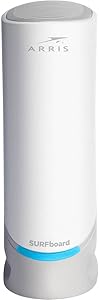 |
Best Overall Gigabit Modem | Standard: DOCSIS 3.1, 32×8 | Max Speed: 2.5 Gbps | Ports: 1× 2.5G + 1× 1G LAN | VIEW LATEST PRICE | Read Our Analysis |
| Motorola MB8611 — DOCSIS 3.1, 2.5 Gbps, AQM | 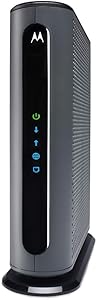 |
Best Value for 1 Gbps | Standard: DOCSIS 3.1, 32×8 | Max Speed: 2.5 Gbps | Port: 1× 2.5G LAN + AQM | VIEW LATEST PRICE | Read Our Analysis |
| Hitron CODA56 — DOCSIS 3.1, 2.5 Gbps, Budget Multi-Gig |  |
Best Budget Multi-Gig | Standard: DOCSIS 3.1 | Max Speed: 2.5 Gbps | Port: 1× 2.5G LAN | VIEW LATEST PRICE | Read Our Analysis |
| ARRIS SURFboard SB8200 — DOCSIS 3.1, Dual 1G Ports |  |
Best for Mid-Range Plans | Standard: DOCSIS 3.1, 32×8 | Max Speed: 2 Gbps (dual-port) | Ports: 2× 1G LAN | VIEW LATEST PRICE | Read Our Analysis |
| NETGEAR CM2050V — DOCSIS 3.1, Xfinity Voice, 2.5 Gbps | 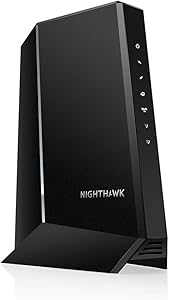 |
Best for Xfinity Voice Plans | Standard: DOCSIS 3.1 + eMTA Voice | Max Speed: 2.5 Gbps | Phone Lines: 2× RJ11 ports | VIEW LATEST PRICE | Read Our Analysis |
-
NETGEAR Nighthawk CM3000 — Best for Next Gen Xfinity Upload Speeds
The only DOCSIS 3.1 modem built for Xfinity’s Next Gen upload tiersView Latest Price✓ Pros- Purpose-built for mid/high-split: 2.5 Gbps down, up to 1 Gbps up where Xfinity supports it
- Three LAN ports (1× 2.5G + 2× 1G) — only modem in this tier with link aggregation support
- Xfinity “Next Gen Speed Tier” designation on official compatible list
- Works with all major US cable providers: Xfinity, Spectrum, Cox
✗ Cons- Noticeably tall/large form factor compared to other standalone modems
- Mid/high-split benefits only realized in upgraded Xfinity node areas — verify your address first
- Not compatible with Xfinity Voice telephony plans
- Admin GUI has browser quirks on desktop — works better from a mobile browser
The CM3000 is purpose-built for one specific problem: DOCSIS 3.1 mid/high-split upstream. Standard cable networks divide spectrum with the old low-split standard — 5–42 MHz upstream — which is why you’ve been getting 35 Mbps up on a 1 Gbps plan. Mid-split expands that upstream window to ~85 MHz, enabling 100–200 Mbps uploads. The CM3000 is specifically engineered to handle those higher upstream frequencies, and Xfinity designates it as a “Next Gen Speed Tier” modem on their approved list. Its three-port design (one 2.5G plus two 1G) is unique in this class — you can run link aggregation by connecting both 1G ports to a router that supports 2× 1G WAN bonding, squeezing up to 2 Gbps out of the LAN side even without a 2.5G router port.
The OFDM/OFDMA channel configuration gives it strong spectral efficiency on Xfinity’s upgraded nodes. Real-world users on Xfinity gigabit plans consistently report 940+ Mbps down after switching from older rental gateways. The admin page is worth bookmarking on your phone — signal levels, SNR, and event logs are all there, equivalent to what Xfinity’s own Scope diagnostic tool shows their techs. For a deeper look at DOCSIS 3.1 modem comparisons, see our best gigabit cable modems roundup.
💬 What Real Users Say“Ditched my Xfinity model for this. Solved so many of my rage inducing issues I had with Xfinity. Definitely recommend. I have had it running non-stop for months now with no problems.” Another user upgraded both properties: “They have been simple to set up, and completely reliable.” (4.4/5, 250+ ratings)
⚠️ Who Should Skip ThisIf your Xfinity node hasn’t been upgraded to mid/high-split yet, the CM3000’s upload advantage doesn’t apply. Check your available speed tiers in your Xfinity account first. Also skip if you have Xfinity Voice.
🎯 My TakeCCIE Insight: Mid/high-split is a plant-level upgrade — it requires Xfinity to physically reconfigure their amplifiers and nodes in your neighborhood. The tell is your Xfinity account: if you see an upload tier above 50 Mbps available for your address, mid-split is live at your node. If not, buy the CM3000 anyway as a forward investment — Xfinity is rolling this out market by market and it will reach most urban subscribers within 12–18 months.
Upgrade Path: The CM3000’s 2.5G port is wasted behind any router with a standard 1G WAN port. Pair it with a Wi-Fi 7 router that has a 2.5G WAN input — that single upgrade unlocks everything the CM3000 can do. See our best wired routers guide for pairing options if you prefer a wired-first setup.
- Standard: DOCSIS 3.1 Mid/High-Split
- Max Download: 2.5 Gbps
- Max Upload: 1 Gbps (mid/high-split markets)
- LAN Ports: 1× 2.5G + 2× 1G Ethernet
- Xfinity Status: Next Gen Speed Tier — Approved
- Voice Support: No
- Warranty: 1 year (NETGEAR)
-
ARRIS SURFboard S33 — Best Overall for Xfinity Gigabit Plans
The most popular Xfinity-approved modem for gigabit plans in 2026View Latest Price✓ Pros- Dual-port design: 2.5G primary + 1G secondary — rare in this class
- Xfinity-recommended; appears on official compatible list across all gigabit speed tiers
- Compact footprint, clean LED indicators, space-saving design
- 32×8 DOCSIS 3.0 fallback for backward compatibility
✗ Cons- Runs warm under sustained load — requires ventilation clearance
- Not mid-split certified for Xfinity — upload speeds capped on Next Gen tiers
- No voice/telephony support
- The S34 offers better upload performance for Next Gen markets at similar pricing
The S33 has been the default recommendation for Xfinity gigabit customers for several years. Its dual-port design (2.5G + 1G) is unusual in the standalone modem space: the second 1G port lets you connect a second wired device directly or run a secondary handoff configuration on supported ISP setups. DOCSIS 3.1 with 32×8 channel bonding gives it solid downstream capacity, and the 2.5 GbE primary port ensures you won’t hit a LAN bottleneck even on Xfinity’s 1.2 Gbps Gigabit Extra plan.
The S33 is not mid-split certified on Xfinity’s network. On a standard gigabit plan, that distinction is irrelevant — you’ll get full advertised speeds. But if your address is in a Next Gen market with enhanced upload speeds, the S33 won’t unlock those higher upstream tiers. Step up to the CM3000 or the ARRIS S34 instead. You can compare top DOCSIS 3.1 options in our best DOCSIS 3.1 modems roundup. For Spectrum subscribers, our best modems for Spectrum guide covers that ecosystem separately.
Thermal behavior is a legitimate consideration. The S33 runs noticeably warm under sustained load. Don’t bury it in a closed cabinet — keep it upright with vertical clearance and the Broadcom chipset inside will run reliably for years.
💬 What Real Users SayAn IT professional with a family of six reported consistent 900+ Mbps on Xfinity gigabit: “I never got anywhere close to the 1Gbps speeds I was paying for with my old modem. With this Arris S33, I get a consistent, all day, everyday, 900+mbps.” Others note activation via the Xfinity app is seamless. (4.5/5, 10,000+ ratings)
⚠️ Who Should Skip ThisIf you’re in a Next Gen market with mid/high-split upload speeds, the S33 won’t maximize those tiers — go with the CM3000 or S34. Also skip if you run Xfinity Voice.
🎯 My TakeCCIE Insight: The S33 uses a Broadcom BCM3390-based design — the same chipset lineage that powers most reliable DOCSIS 3.1 modems. Intel’s Puma 6/7 chipsets (used in older modems like the SB6190) had well-documented latency bugs that made gaming and video conferencing miserable. The S33 avoids that entirely. Latency stays predictable even when Xfinity is doing background provisioning work on your node.
Upgrade Path: For plans at 1 Gbps or above, pair it with a router that has a 2.5G WAN port to avoid capping your wired throughput at 940 Mbps. Compare the ARRIS S33 review and NETGEAR CM2000 review side by side if you’re deciding between top multi-gig options.
- Standard: DOCSIS 3.1, 32×8 fallback
- Max Download: 2.5 Gbps
- LAN Ports: 1× 2.5G + 1× 1G Ethernet
- Xfinity Status: Recommended — All Speed Tiers
- Mid-Split: Not certified for Xfinity Next Gen
- Voice Support: No
- Warranty: 2 years (ARRIS)
-
Motorola MB8611 — Best Value DOCSIS 3.1 Modem for Xfinity 1 Gbps Plans
Solid gigabit workhorse with AQM for lower real-world latencyView Latest Price✓ Pros- Active Queue Management (AQM) built-in — reduces buffer bloat and latency spikes under load
- 2.5 GbE port delivers up to 2,500 Mbps downstream and 800 Mbps upstream on supported plans
- 2-year warranty with US-based Motorola tech support
- Typically priced slightly below the S33 — strong value at the 1 Gbps tier
✗ Cons- Single LAN port only — no second wired device directly off the modem
- Some activation friction with Xfinity reported; may require a brief support call
- Motorola’s newer B12 model replaces the MB8611 — worth comparing pricing
- No voice support
The MB8611’s distinguishing feature is Active Queue Management (AQM) — a traffic-shaping mechanism built into the modem firmware that reduces buffer bloat. Buffer bloat is what causes your ping to spike when someone on your network starts a large download — the modem’s receive buffer fills up, and latency for everything else balloons. AQM actively manages that queue so latency stays low even when the line is saturated. If video conferencing quality or gaming responsiveness matters to you, the MB8611 has a real technical advantage here over modems without AQM.
The 2.5 GbE port delivers downstream speeds just below 2,500 Mbps and upstream up to 800 Mbps when your plan supports it. Backward compatibility with 32×8 DOCSIS 3.0 means it works seamlessly on any node. For a deeper individual look, see our Motorola MB8611 review, and for a direct comparison see our ARRIS S33 vs Motorola MB8611 head-to-head.
💬 What Real Users Say“This is the best cable modem we have had out of 4 we have had. Solid performance, very easy install. Worked perfectly with Xfinity (which is notoriously picky).” (4.4/5, 6,000+ ratings)
⚠️ Who Should Skip ThisIf you need a second LAN port directly on the modem, step up to the S33 or CM3000. Also skip if you’re in a Next Gen market where upload speeds are a priority.
🎯 My TakeCCIE Insight: AQM is underappreciated in consumer modem discussions. In enterprise networking, active queue management via algorithms like FQ-CoDel or PIE is standard practice for traffic that mixes latency-sensitive applications with bulk transfers. Having it built into the modem means it operates before traffic even hits your router’s QoS engine — catching buffer bloat at the most upstream point in your home network.
Upgrade Path: The savings versus the S33 can fund a meaningful router upgrade. Pair it with a Wi-Fi 6E or Wi-Fi 7 router that has a 2.5G WAN port. See our best wired routers guide for pairing options, and our best routers for AT&T Fiber if you’re evaluating a provider switch.
- Standard: DOCSIS 3.1, 32×8 fallback
- Max Download: 2.5 Gbps
- Max Upload: 800 Mbps (plan-dependent)
- LAN Port: 1× 2.5G Ethernet
- AQM: Yes — reduces buffer bloat
- Xfinity Status: Approved — All Speed Tiers
- Warranty: 2 years (Motorola USA)
-
Hitron CODA56 — Best Budget Multi-Gig Modem for Xfinity
Xfinity-recommended 2.5G modem at the lowest price in this classView Latest Price✓ Pros- Xfinity-recommended in official compatible devices PDF — actively recommended, not just approved
- 2.5 GbE port handles Xfinity plans up to 2.33 Gbps; lowest price in the 2.5G tier
- Supports Xfinity’s enhanced upload speeds (up to ~455 Mbps on certified mid-split nodes)
- Includes coaxial and ethernet cable in the box; 7-day/week Hitron tech support
✗ Cons- Single 2.5G LAN port only — no secondary port for a second wired device
- No voice/telephony support
- Less consumer brand recognition than ARRIS or NETGEAR
- Requires a router with 2.5G WAN port to benefit from the full LAN port capability
Hitron has been deploying modems inside ISP infrastructure for over 30 years. The CODA56 earned Xfinity’s “Recommended” designation — the same category as the S33 and CM3000. It supports 2.5 Gbps plans from Xfinity (up to 2.33 Gbps downstream) and unlike the S33, supports Xfinity’s enhanced upload speeds on mid-split nodes — users have reported up to ~455 Mbps upstream on compatible Xfinity plans in upgraded markets.
Critical note: this is the CODA56, not the original CODA. The original Hitron CODA has a 1G Ethernet port and tops out at 1 Gbps — a completely different product. Verify the “56” in the model name before purchasing. The CODA56 is also fully approved for Spectrum — see our best modems for Spectrum guide if you’re comparing ISPs.
💬 What Real Users Say“Quick and easy to setup and it delivers the speed it says it can. The price is right also — other brands wanted as much as $200 more.” A Bay Area Xfinity user confirmed: “Best ever modem install. Downloaded the new Xfinity app… voila. App was searching a few minutes, then downloading new firmware… we were live.” (4.5/5, 3,500+ ratings)
⚠️ Who Should Skip ThisIf you need two LAN ports directly off the modem, a voice/telephony plan, or link aggregation, the single-port CODA56 won’t fit. Also: don’t confuse this with the original Hitron CODA — double-check the “56” when purchasing.
🎯 My TakeCCIE Insight: The CODA56 provisioned cleanly at every Xfinity installation I’ve seen it deployed — clean OFDM channel locks, solid upstream bonding, no spontaneous reboots under sustained load. For a customer who wants a 2.5G modem at the lowest price and can live with one LAN port, this is the most cost-efficient path to Xfinity’s current top tier.
Upgrade Path: Pair this with any Wi-Fi 6E or Wi-Fi 7 router with a 2.5G WAN port to fully exploit the CODA56’s LAN capacity. Also consider a MoCA adapter if you want to extend a wired backhaul over your existing coax without running new Ethernet.
- Standard: DOCSIS 3.1
- Max Download: 2.5 Gbps
- Max Upload: ~455 Mbps (mid-split Xfinity nodes)
- LAN Port: 1× 2.5G Ethernet
- Xfinity Status: Recommended — Approved
- Voice Support: No
- Warranty: 1 year (Hitron)
-
ARRIS SURFboard SB8200 — Best for Mid-Range Xfinity Plans (Up to 1 Gbps)
Battle-tested DOCSIS 3.1 modem for standard gigabit and sub-gig Xfinity plansView Latest Price✓ Pros- Dual 1G Ethernet ports — can support 2 Gbps combined with link aggregation on compatible routers
- Broadcom chipset — no Intel Puma latency issues that plagued older ARRIS models like the SB6190
- Extremely well-proven at scale — 25,000+ Amazon ratings, years of real-world deployment data
- Refurbished units widely available under $80; strong value for sub-gig plans
✗ Cons- No 2.5G LAN port — caps wired throughput at ~940 Mbps regardless of plan speed
- Not suitable for Xfinity plans above 1 Gbps without dual-port aggregation
- DOCSIS 4.0 will eventually require replacement
- Runs warm; white case shows dust more than competitors
The SB8200 spent years as the default recommendation for Xfinity gigabit customers and earned that position. The Broadcom BCM3390 chipset inside is not Intel Puma — which means none of the latency spikes and jitter that made gaming and video conferencing on older ARRIS models a frustrating experience. See our ARRIS SB8200 review for the full individual breakdown, and compare it against the NETGEAR CM1000 vs ARRIS SB8200 for a direct entry-level DOCSIS 3.1 comparison.
The dual 1G port design has a specific use case: if Xfinity provisions a second IP address for your account, you can use both ports simultaneously through a router that supports 802.3ad port bonding, delivering up to 2 Gbps wired. The honest 2026 assessment: the SB8200 is right for anyone on Xfinity’s standard 400–800 Mbps or basic 1 Gbps plan who doesn’t need mid-split uploads. If you’re on a plan above 1 Gbps, step up to a 2.5G modem.
💬 What Real Users Say“The Arris was super easy to set up with my Spectrum service and seems durable… speeds have been back to what I would expect… streaming capability works with multiple devices without issue.” (4.4/5, 25,000+ ratings)
⚠️ Who Should Skip ThisAnyone on Xfinity’s Gigabit Extra (1.2 Gbps), 2 Gig, or Next Gen plans should skip this and go straight to a 2.5G modem. The SB8200’s dual 1G ports will bottleneck those plans regardless of router quality.
🎯 My TakeCCIE Insight: The SB8200 is the modem I’d recommend to a family member on Xfinity’s standard gigabit plan who’s primarily concerned with reliability and doesn’t want to think about it again for five years. Broadcom chipset, ARRIS support track record, and 25,000+ real-world reviews give you extremely high confidence in what you’re getting.
Upgrade Path: The SB8200 pairs with any router — no special WAN port requirement since neither port exceeds 1G. Consider pairing with a quality router from our best routers for cable and fiber internet guide.
- Standard: DOCSIS 3.1, 32×8
- Max Download: 2 Gbps (dual-port combined)
- LAN Ports: 2× 1G Ethernet
- Xfinity Status: Approved — All Tiers up to 1 Gbps
- Best For: Plans up to 1 Gbps
- Voice Support: No
- Warranty: 2 years (ARRIS)
-
NETGEAR CM2050V — Best Modem for Xfinity Voice Subscribers
The only Xfinity-recommended multi-gig modem with two-line telephony supportView Latest Price✓ Pros- Only Xfinity-recommended multi-gig eMTA modem with 2-line voice support
- 2.5 GbE LAN port supports Xfinity’s multi-gig internet plans alongside voice
- Enhanced call features: caller ID, 3-way conferencing, call forwarding on both phone lines
- DOCSIS 3.1 — future-proofed for current Xfinity speed tiers
✗ Cons- Xfinity Voice only — not compatible with other ISP voice bundles
- Higher price point than non-voice modems; activation more involved
- May require a support call to provision internet and voice simultaneously
- Some reports of used units sold as new on Amazon — verify seal before accepting delivery
If you have Xfinity Voice bundled with your internet plan, your modem options are severely limited. A standard DOCSIS 3.1 modem will not work with Xfinity Voice — you need an eMTA (embedded Multimedia Terminal Adapter), which handles both internet provisioning and the SIP/MGCP telephony signaling that Xfinity Voice requires. The CM2050V is the only current Xfinity-recommended eMTA that also supports multi-gig speeds with a 2.5 GbE LAN port.
The two RJ11 ports support up to two active phone lines simultaneously with full call features. The DOCSIS 3.1 backbone means internet performance is on par with the other multi-gig modems in this guide. Activation is slightly more involved — budget 10–15 minutes for a call to Xfinity’s activation line to provision both internet and voice profiles. If you’re weighing whether to keep Xfinity Voice or switch to standalone VoIP, our best wired routers guide covers options for handling RTP voice prioritization on your router instead.
💬 What Real Users Say“Super easy setup with Xfinity. The Xfinity app did it all. All I had to do was connect it, turn it on and scan the label on the box in the app.” (4.2/5, 2,500+ ratings)
⚠️ Who Should Skip ThisIf you don’t have Xfinity Voice, any of the other five modems in this guide will serve you better at lower cost. Also skip if you’re on a non-Xfinity voice plan — this modem is Xfinity Voice certified only.
🎯 My TakeCCIE Insight: The eMTA function in the CM2050V uses a separate provisioning channel from the data service — Xfinity’s PacketCable infrastructure sends a separate config file to the telephony endpoint during activation. This is why a standard DOCSIS modem can’t just “add” voice — it’s architecturally separate. If you’re considering dropping Xfinity Voice and switching to a VoIP service like Ooma or Google Voice, you could replace the CM2050V with any of the simpler modems in this guide and save $50–$100 upfront.
Upgrade Path: Pair the CM2050V with a separate router that can prioritize RTP traffic via QoS. See our best wired routers guide for companion router options.
- Standard: DOCSIS 3.1 + eMTA Voice
- Max Download: 2.5 Gbps
- LAN Port: 1× 2.5G Ethernet
- Phone Lines: 2× RJ11 (Xfinity Voice only)
- Xfinity Status: Recommended — Voice Plans
- Voice Support: Yes — Xfinity Voice only
- Warranty: 1 year (NETGEAR)
Choose This Modem If…
- CM3000 — Your Xfinity account shows a “Next Gen” or enhanced upload speed tier available, or you want the forward investment for when mid/high-split comes to your node
- ARRIS S33 — You’re on Xfinity’s standard Gigabit or Gigabit Extra plan and want the most widely-proven, dual-port modem
- MB8611 — You want to save $20–30 versus the S33, have a single-router setup, and prioritize lower latency for gaming or video calls
- Hitron CODA56 — You want a 2.5G Xfinity-recommended modem at the lowest price point and don’t need a second LAN port
- SB8200 — You’re on a sub-gig or standard 1 Gbps plan and want maximum proven reliability; or you can find a refurbished unit under $80
- CM2050V — You have Xfinity Voice bundled into your plan and can’t switch to VoIP
Full Comparison: Xfinity Modems by Spec
| Model | DOCSIS | Max Down | Max Up | LAN Port(s) | Mid-Split | Voice | Best For |
|---|---|---|---|---|---|---|---|
| NETGEAR CM3000 | 3.1 Mid/High-Split | 2.5 Gbps | 1 Gbps | 1× 2.5G + 2× 1G | ✅ Yes | No | Next Gen upload tiers |
| ARRIS S33 | 3.1 | 2.5 Gbps | Standard | 1× 2.5G + 1× 1G | ❌ Not certified | No | Standard gigabit plans |
| Motorola MB8611 | 3.1 | 2.5 Gbps | 800 Mbps | 1× 2.5G | Partial | No | Best value + AQM |
| Hitron CODA56 | 3.1 | 2.5 Gbps | ~455 Mbps | 1× 2.5G | ✅ Yes | No | Budget multi-gig |
| ARRIS SB8200 | 3.1 | 2 Gbps | Standard | 2× 1G | ❌ No | No | Sub-gig / basic 1 Gbps |
| NETGEAR CM2050V | 3.1 + eMTA | 2.5 Gbps | Standard | 1× 2.5G | No | ✅ Xfinity Voice | Voice bundle subscribers |
Xfinity Network Topology: Where Your Modem Fits
Xfinity HFC Network — Home Installation Overview
  CMTS (Cable Modem Termination System)
  [Xfinity Data Center / Hub]
          |
          | Fiber backbone (DOCSIS upstream)
          |
  Fiber Node (neighborhood)
  [DOCSIS 3.1 / Mid-Split capable if upgraded]
          |
          | Coaxial cable (HFC last mile)
          |
  Home Splitter / Demarcation
          |
    [Coax to modem]
          |
  +--------------+
  |  Your Modem  |  <- DOCSIS 3.1 (this guide)
  |  (CM3000,    |    Terminates DOCSIS signal
  |   S33, etc.) |    Provides Ethernet handoff
  +--------------+
          |
          | Ethernet (2.5G or 1G)
          |
  +--------------+
  |  Your Router |  <- Wi-Fi 6/6E/7 + LAN switching
  +--------------+
          |
    Home devices
    (wired + wireless)
Note: Mid/high-split capability requires BOTH
a mid-split capable modem AND a mid-split
upgraded Xfinity node in your neighborhood.
One without the other = standard upload speeds.
Frequently Asked Questions
Does Xfinity allow you to use your own modem?
Yes. Xfinity permits customer-owned modems on all residential internet plans (excluding DOCSIS 4.0 X-Class, which currently uses Xfinity-provided gateways). The modem must appear on Xfinity’s official compatible devices list. Once provisioned, Xfinity waives the $15/month rental fee automatically.
How do I activate a new modem on Xfinity?
The fastest method is the Xfinity app (iOS or Android). Open the app, go to “Internet” → “Activate Xfinity Equipment,” and scan the MAC address barcode on the modem. The app will de-provision your old modem and provision the new one automatically, usually completing in 3–5 minutes. Browser-based activation at xfinity.com/activate is the fallback. Voice plan (eMTA) modems like the CM2050V may require a brief call to Xfinity’s activation line.
What’s the difference between the ARRIS S33 and S34?
Both are DOCSIS 3.1 modems with a 2.5 GbE + 1 GbE dual-port design. The S34 adds enhanced upstream performance optimized for Xfinity’s Next Gen speed tiers. If you’re on a standard gigabit plan, the S33 and S34 are functionally identical. If your address is in a Next Gen market with 100–200 Mbps upload tiers available, the S34 is the better choice at comparable pricing.
Should I get DOCSIS 3.1 or wait for DOCSIS 4.0?
Buy DOCSIS 3.1 now. DOCSIS 4.0 retail modems are expected on store shelves in mid-to-late 2026. Even in Xfinity’s active DOCSIS 4.0 markets, the service is delivered via Xfinity’s own XB10 gateway — there are currently no retail D4.0 modems available to purchase. A good DOCSIS 3.1 modem will serve every current Xfinity plan for years and pay for itself in under 12 months of rental fee savings.
Will my modem work if Xfinity upgrades my area to DOCSIS 4.0?
Your DOCSIS 3.1 modem will continue working — DOCSIS is backward compatible. You just won’t be able to subscribe to the new X-Class symmetrical speed tiers. When you’re ready to upgrade your plan to X-Class, that’s the time to upgrade your modem as well.
Does the Hitron CODA56 work with Xfinity?
Yes — the CODA56 appears on Xfinity’s official “Recommended” list and activates successfully via the Xfinity app. It also supports Xfinity’s enhanced upload speeds on mid-split nodes. Confirm you’re buying the CODA56 (2.5G port) and not the original CODA (1G port) — they are different products.
What if my Xfinity modem isn’t getting the speeds I’m paying for?
Connect a laptop directly to the modem via Ethernet (no router) and run a speed test. If speeds are still low, check the modem’s admin page (typically at 192.168.100.1) for signal levels: downstream power should be between −7 and +7 dBmV, upstream between 38 and 48 dBmV, and SNR above 30 dB. Numbers outside those ranges point to a coax line or splitter issue. Xfinity techs can recable or replace splitters — this is the most common root cause when gigabit modems underperform. For more on understanding internet connectivity, see our fiber vs cable internet breakdown.
Final Verdict
For most Xfinity subscribers on a gigabit or multi-gig plan, the ARRIS S33 remains the most straightforward buy: Xfinity-recommended, dual-port, compact, and well-proven at scale. If you’re in a Next Gen market with enhanced upload speeds or want to future-proof for mid/high-split rollout, step up to the NETGEAR CM3000 — it’s the only DOCSIS 3.1 modem in the consumer market specifically engineered for those higher upstream frequencies. Budget-conscious buyers who still want 2.5 GbE and Xfinity certification should look at the Hitron CODA56 — it consistently costs less than the alternatives and earned Xfinity’s “Recommended” designation.
If you have Xfinity Voice, stop deliberating — the CM2050V is your only current multi-gig eMTA option on Xfinity’s recommended list. For standard gigabit plans where upload speed isn’t a priority, the SB8200 and MB8611 are both excellent, and refurbished SB8200 units under $80 represent some of the best value in the cable modem market right now. For a broader view across ISPs, see our best gigabit cable modems guide and best DOCSIS 3.1 modems roundup.
Whatever you pick: stop paying Xfinity $15 a month to use their hardware. That’s $180 a year for equipment you don’t own, can’t configure, and will be told to replace the next time their compatibility list changes.
