
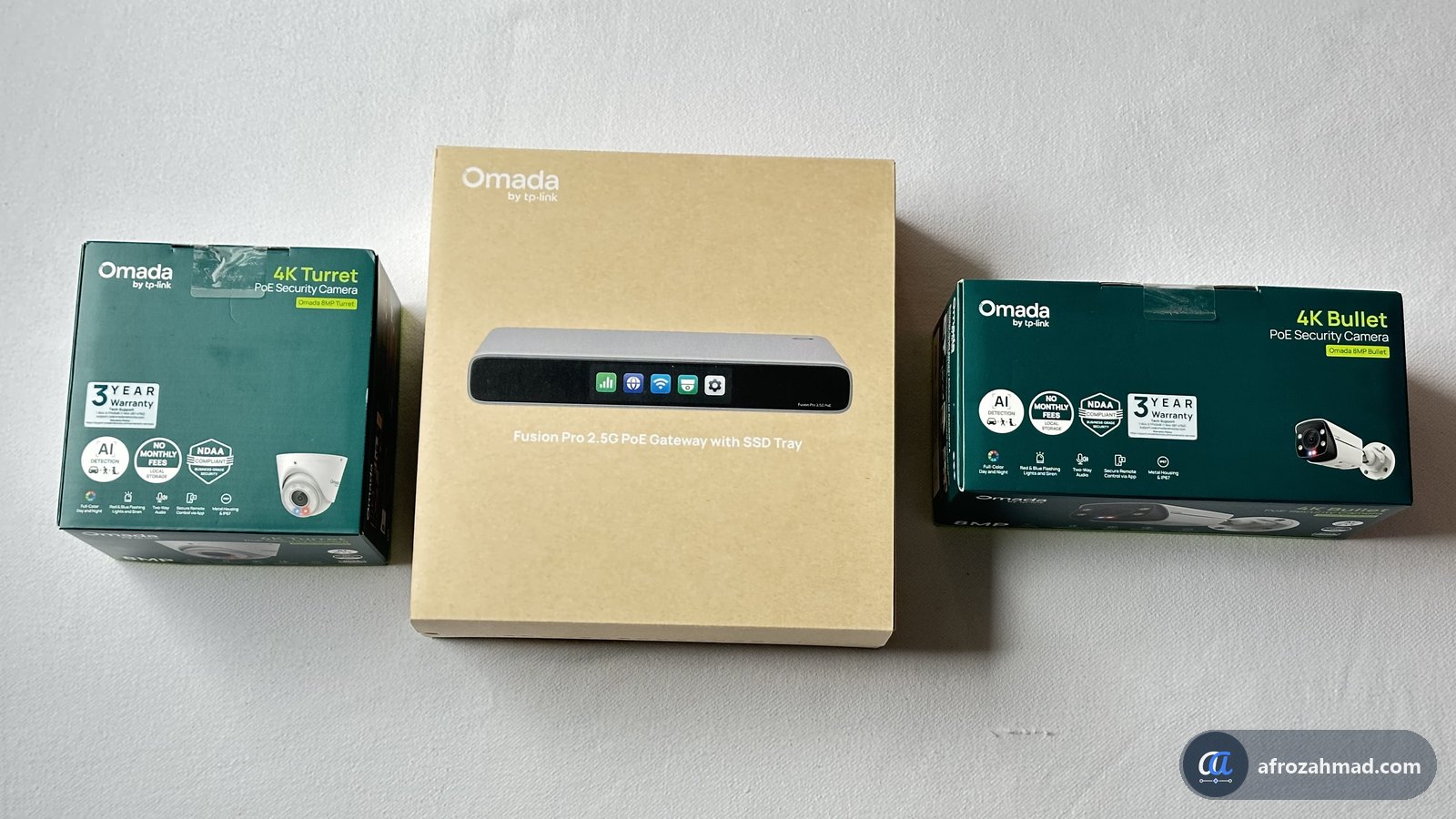
Disclosure: Omada sent this kit (the gateway, an SSD and two cameras) for review at no cost. Links to Omada’s store and Amazon are affiliate links, so I may earn a commission at no extra cost to you. As an Amazon Associate, I earn from qualifying purchases. I asked Omada to check the specs and prices for accuracy. The opinions are mine.
The Omada Fusion Pro 2.5G PoE is a router, an 8-port PoE+ switch and a security camera recorder in one box. It has nine 2.5 Gbps ports, powers cameras and access points over the network cable, and records video to an SSD (sold separately) that slides into its side. Its list price is US$449.99 in the US and CA$699.99 in Canada.
It has no Wi-Fi. For Wi-Fi, plug an Omada access point into one of its PoE ports, or keep your current Wi-Fi router and switch it to access point mode in its settings. This page is my hands-on first look. I am testing speed, security features, PoE power and both cameras now, and I will add each result here as the test finishes.
- 9 × 2.5G ports
- 8 PoE+ ports, 180 W
- SSD recording up to 2 TB
- No licence fees
- No Wi-Fi radio
- Testing in progress
Omada’s launch offers, from Omada’s launch offer page. They are for buyers in the US only, from 11 November 2026:
- Buy the Fusion Pro 2.5G (the 5-port model without PoE) and get $200 off an Omada 8MP NVR kit (T8S4-4T or B8S4-4T) or $150 off a 5MP NVR kit (T5S4-4T or B5S4-4T), one kit per gateway. On the Omada Store and on Amazon, it is limited to the first 100 units each. It does not apply to the PoE model.
- Buy the Fusion Pro 2.5G PoE and get 30% off up to four Omada cameras (5MP, 8MP or 12MP, turret or bullet), until 31 December 2026. On the Omada Store you can mix camera models. On Amazon, all four must be the same model. NVR kits are not included.
How to get them: on the Omada Store, the offers are only for newsletter subscribers, so subscribe on Omada’s launch offer page before you buy. On Amazon, use Omada’s launch bundle pages linked below. The offers cannot be combined with other promotions or discount codes.
Fusion Pro 2.5G PoE at OmadaFusion Pro + NVR kit offerOmada cameras
On Amazon: Fusion Pro 2.5G PoE and Omada cameras or Fusion Pro 2.5G and an Omada NVR kit. Omada asks reviewers to add this note: to receive the promotional bundle price, add your Omada cameras to your cart first. Amazon does not support mix-and-match for Omada cameras.
What four 8MP cameras cost with the PoE launch deal
Omada 8MP Turret or 8MP Bullet at US$99.99 each, with 30% off when bought with the Fusion Pro 2.5G PoE. US prices before tax and shipping.
In numbers: one camera drops from $99.99 to about $69.99. Four cameras drop from $399.96 to about $279.96, a saving of about $120. The exact cents depend on how the store rounds the discount. The deal covers up to four cameras per gateway and ends 31 December 2026.
What is the Omada Fusion Pro 2.5G PoE?
It is a gateway: the box that sits between your internet line and everything else. Omada built three jobs into it. It routes and protects your network. It powers and connects up to eight devices through its PoE+ ports. And it runs Omada’s video system, so cameras record straight to an SSD inside it.
Most setups need three boxes for this: a wired router, a PoE switch and a network video recorder (NVR). Fewer boxes means fewer power bricks, fewer cables and one app to manage it all. Omada aims it at small offices, shops, home offices and creator studios.
Price and availability
| Product | US list price (MSRP) | Notes |
|---|---|---|
| Fusion Pro 2.5G PoE | $449.99 | 9 ports, 8 with PoE+, 3.69-inch screen. In Canada it costs CA$699.99, and it is the only Fusion Pro model sold there. |
| Fusion Pro 2.5G | $299.99 | 5 ports, no PoE, 2.51-inch screen. Not sold in Canada at launch. |
| Omada 8MP Turret | $99.99 | 4K dome-style camera for indoor or outdoor use. |
| Omada 8MP Bullet | $99.99 | 4K bullet camera for outdoor use |
| Omada T8S4-4T system | $799.99 | Four 8MP Turret cameras with a 16-channel NVR and a 4 TB hard drive, for bigger camera setups. |
These are Omada’s list prices at launch. You can compare every model on Omada’s Fusion gateways page. Store prices and the launch deals above can change, so check the final price at checkout. Neither gateway includes an SSD. The SSD tray is included, and you add an NVMe SSD of up to 2 TB.
What comes in the box?
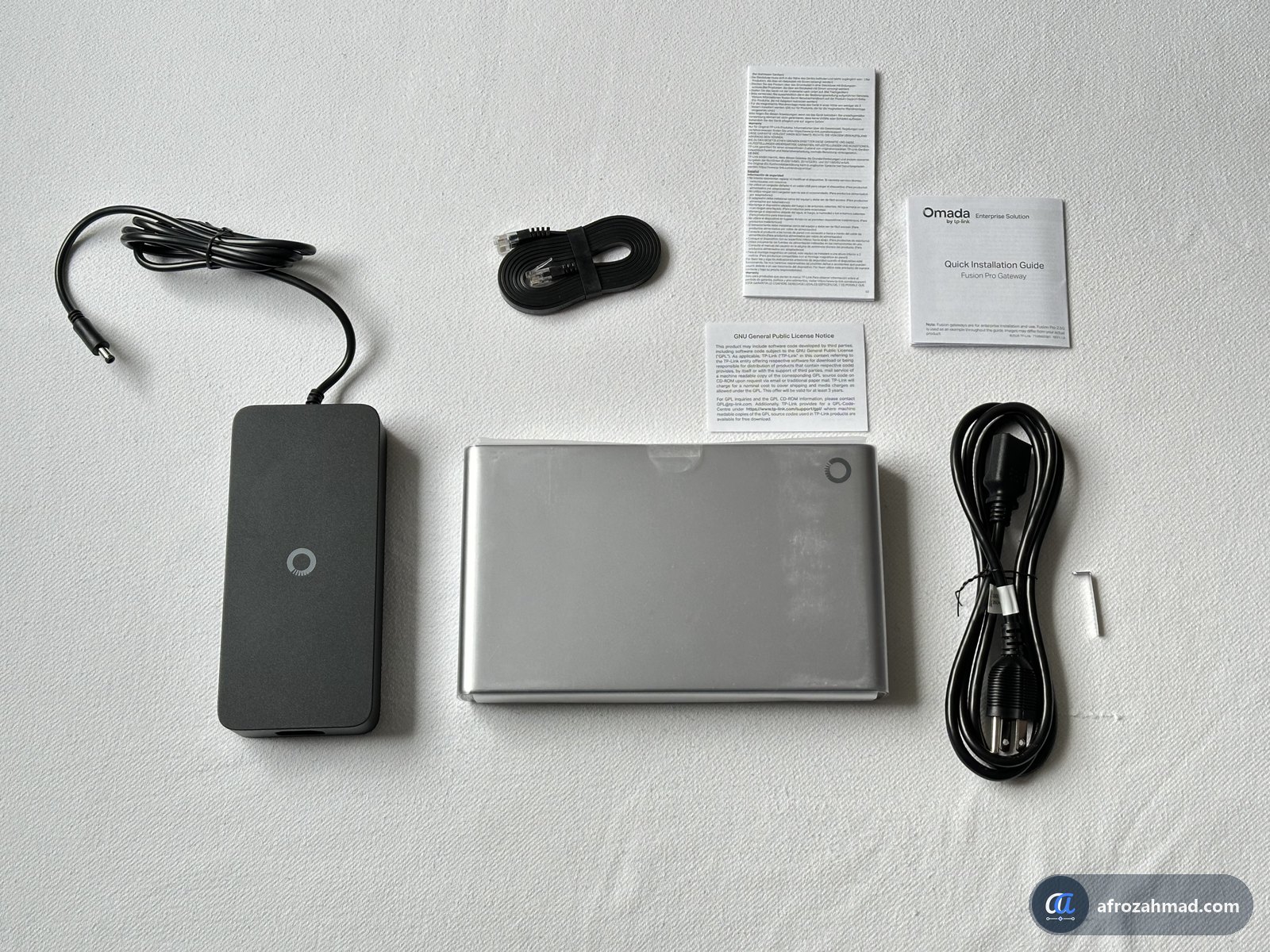
- The Fusion Pro 2.5G PoE gateway.
- An external power brick with a barrel plug, plus a separate three-prong AC cord.
- One short, flat Ethernet cable. You will need more cables for your cameras and other devices. My guide to wiring a house with Ethernet explains which cable to buy (Cat5e or better carries 2.5 Gbps up to 100 metres) and how to run it.
- A small L-key (Allen key) for the SSD tray screw.
- A quick installation guide and safety and warranty leaflets.
The label underneath lists the power input as 54 V at 4.16 A and a total PoE output of 180 W. It also says each PoE port can supply up to 0.56 A at 54 V. That works out to about 30 W per port, which is the PoE+ limit.
Design, ports and touchscreen
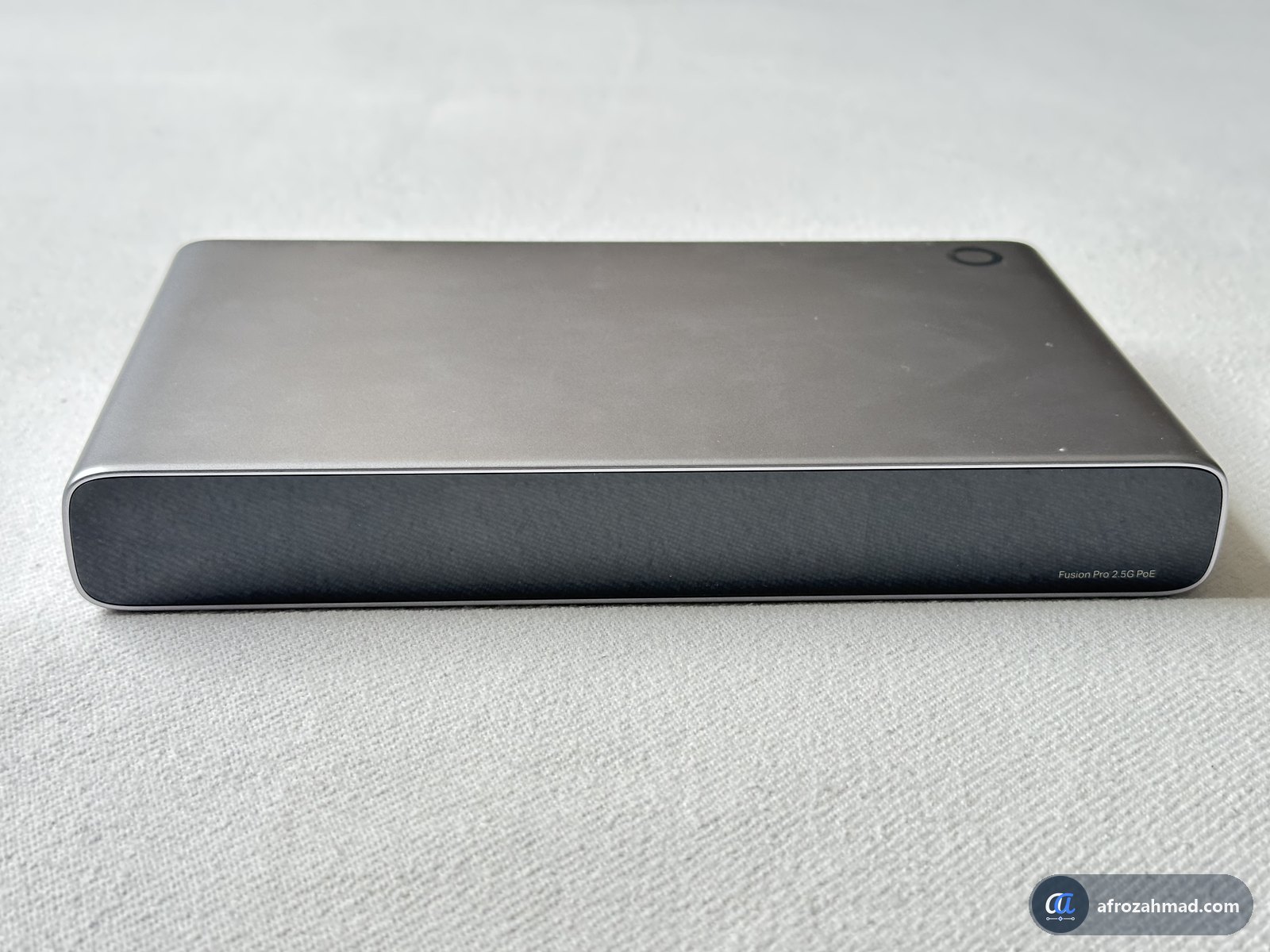
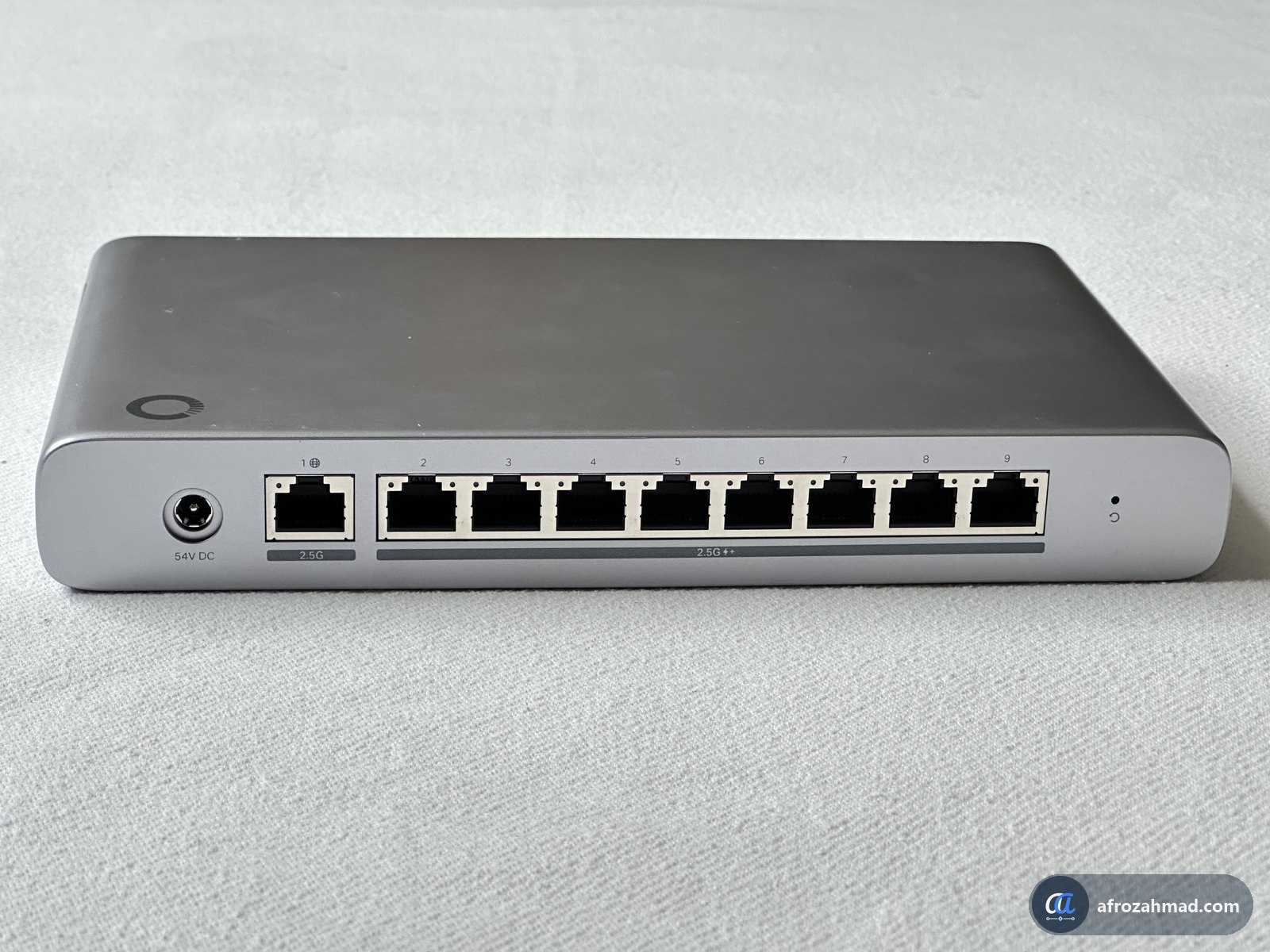
The gateway is a flat, metal desktop box. The front has a 3.69-inch touchscreen. Omada says it shows a live speed test, port status, a health score, fault alerts, and CPU, memory and temperature. Guests can also join your guest Wi-Fi by scanning a QR code shown on the screen.
All ports are on the back. Port 1 is the internet (WAN) port, and it does not supply PoE. Ports 2 to 9 are 2.5 Gbps PoE+ ports. In the Omada app or web controller, you can set some of them as extra WAN ports for a second internet line. There is also a DC power jack and a reset pinhole. It sits on a desk with no extra parts. Wall and rack mounting need accessories that are sold separately.
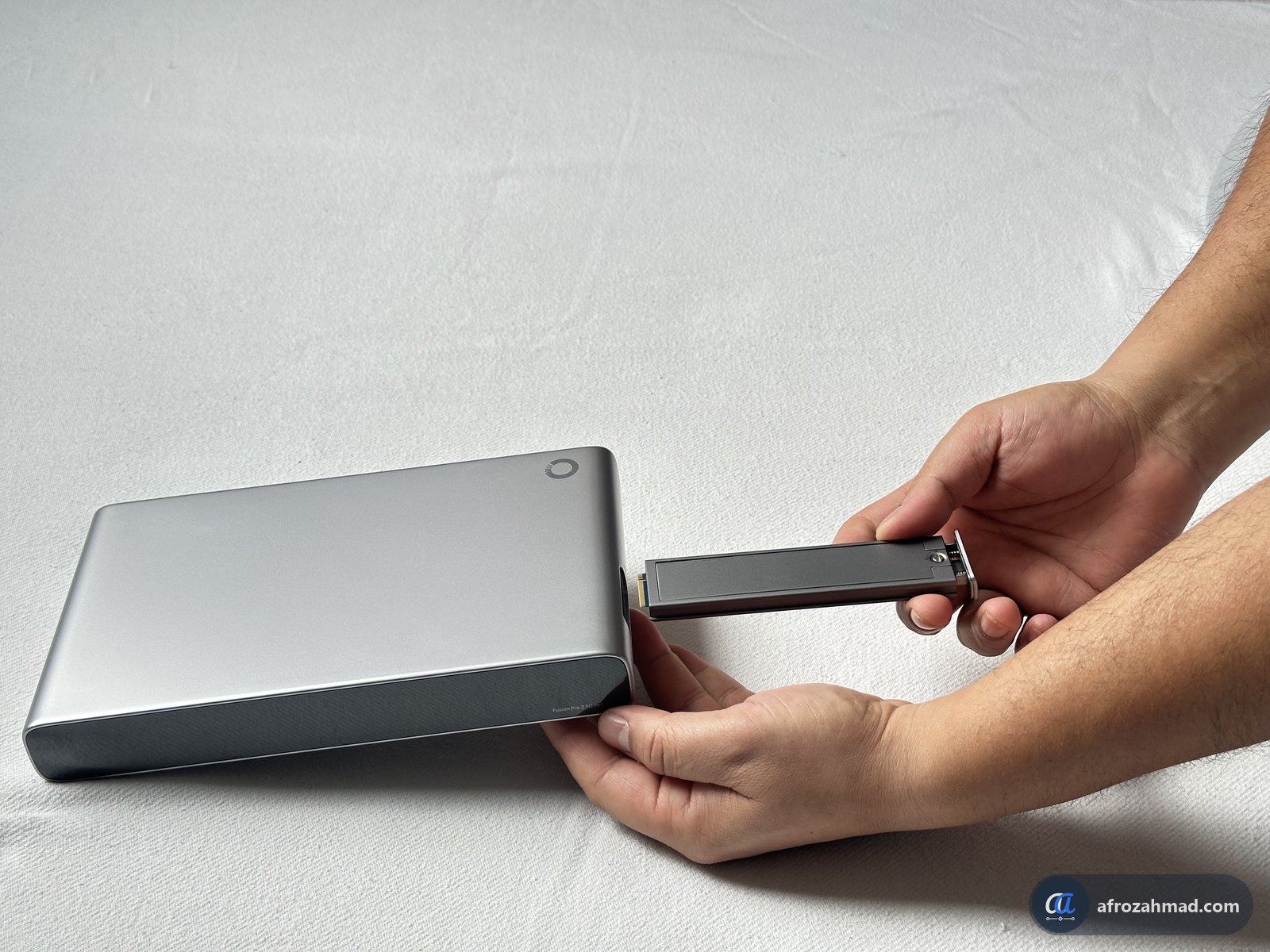
How do you install the SSD?
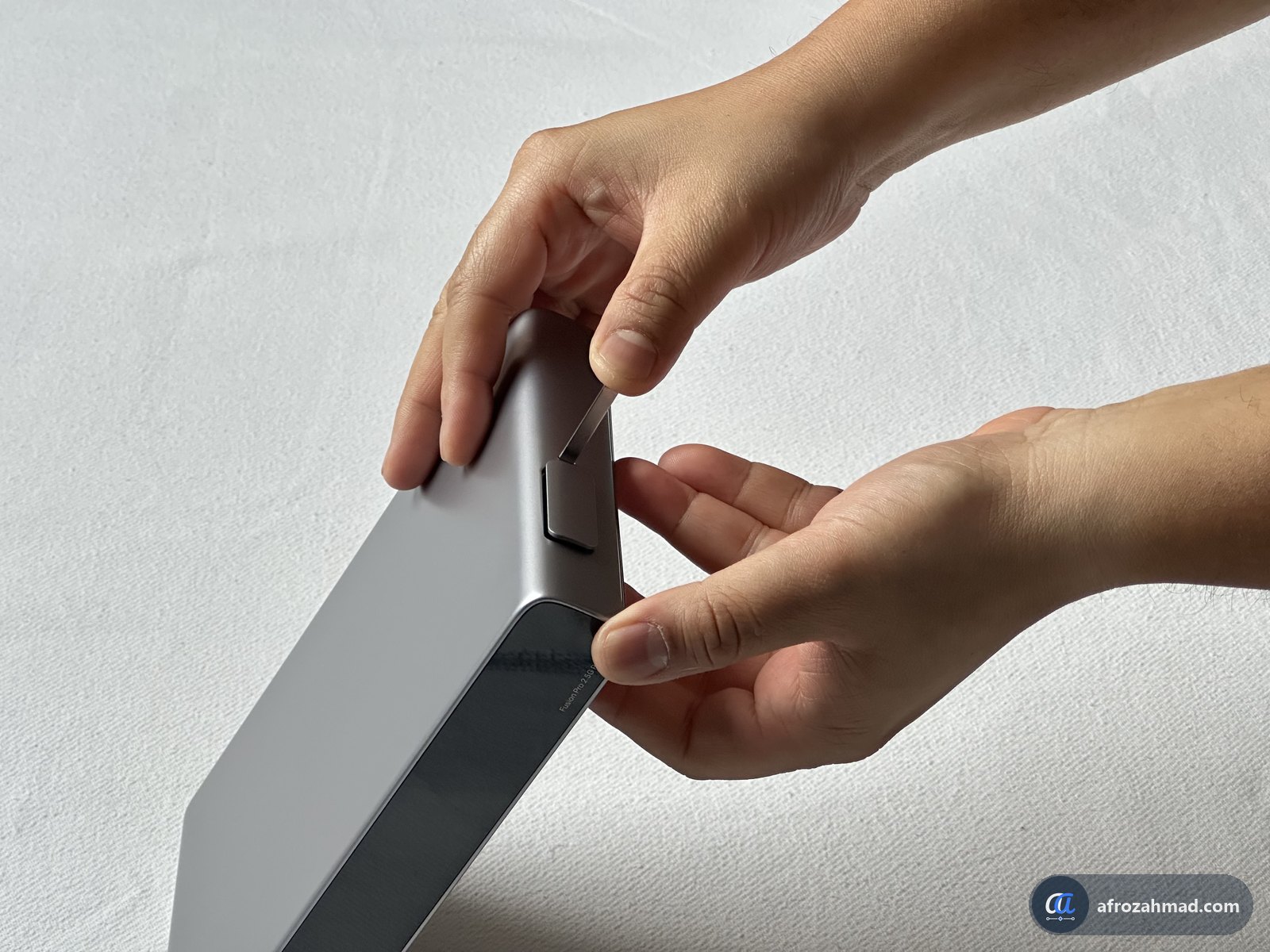
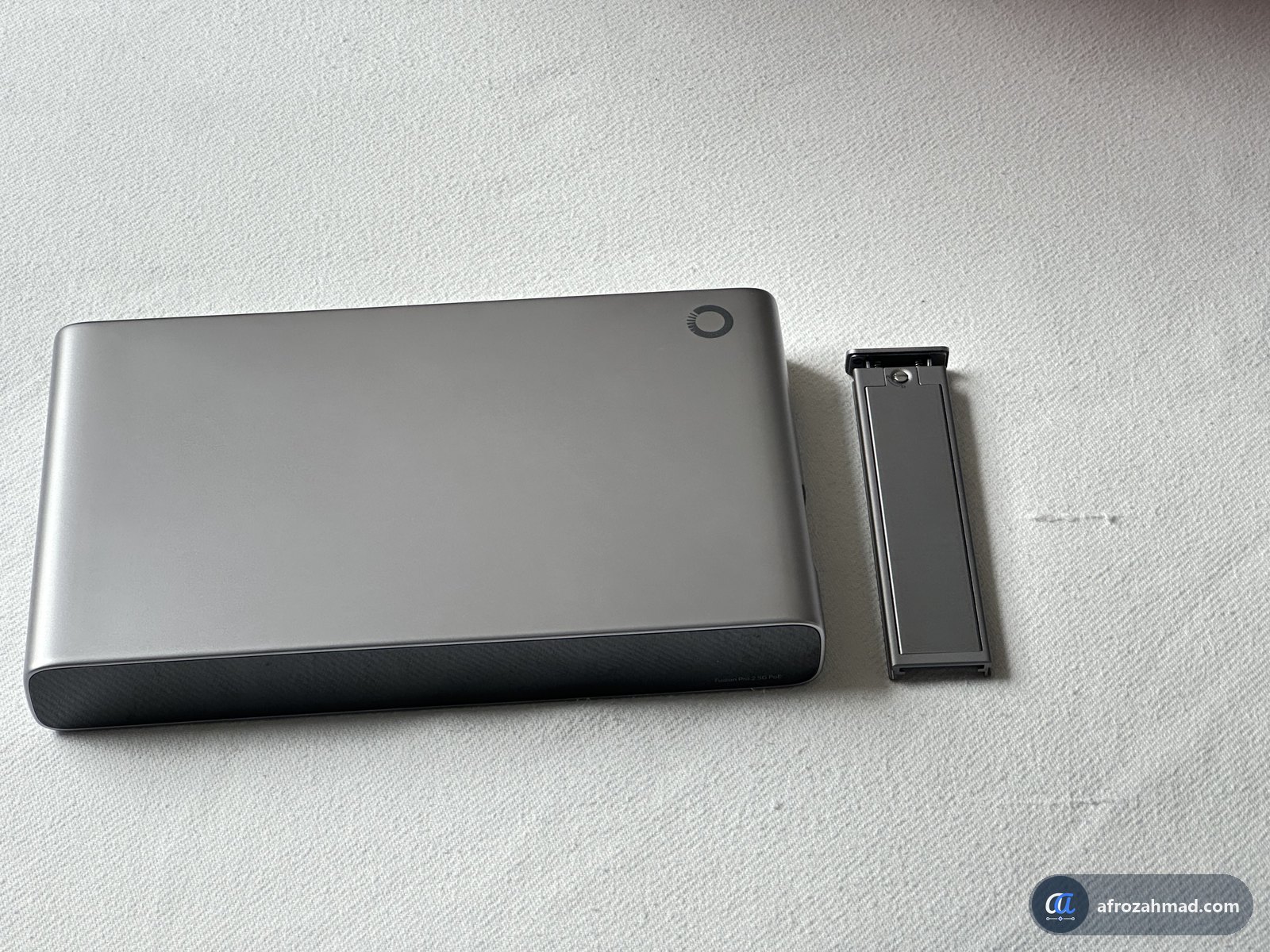
The SSD tray slides into the side of the gateway. Omada sent a Kingston NV3 1 TB NVMe SSD with my kit. Here is how I fitted it:
- Undo the tray screw on the side with the included L-key.
- Pull the tray out and open its lid.
- Seat the M.2 NVMe SSD in the tray and close the lid.
- Slide the tray back into the gateway and tighten the screw.
Key specs
| Spec | Fusion Pro 2.5G PoE |
|---|---|
| Ports | 9 × 2.5 Gbps: 1 WAN, 8 WAN/LAN. |
| PoE | 8 PoE+ ports, 180 W total budget. |
| Processor and memory | Quad-core CPU, 4 GB DDR4 memory |
| Video storage | 1 NVMe SSD, up to 2 TB (SSD sold separately). |
| Cameras on the SSD | Up to 12 at 4K, 14 at 2K or 16 at HD. |
| Cameras with an NVR | Up to 24, with one supported Omada or VIGI NVR. |
| Managed network devices | 30+ Omada devices (access points, switches) and 300+ clients (phones, PCs and other connected devices) |
| Screen | 3.69-inch touchscreen |
| Wi-Fi | None. Add an access point. |
| Licence fees | None for cloud management or video features. |
| Warranty | 5 years (Omada’s US store listing) |
| Recording time | About 7 days, by Omada’s estimate for four 8MP cameras recording nonstop to a 2 TB SSD |
Specs are from Omada’s product page and its review guide. I will add my own measurements next to them as I test.
What does Omada claim, and what am I testing?
The numbers below come from Omada’s own lab tests. They are not my results. I am testing each one on my own network over the coming days, and I will add my results to this table, with how I measured them, as each test finishes.
| Feature | Omada’s claim | My result |
|---|---|---|
| Setup time | Under 10 minutes from box to live network. | Testing now. |
| 2.5G ports | 2.5 Gbps on every port. | Testing now. |
| Threat protection (IPS/IDS) | 2.3 Gbps with IPS on. | Testing now. |
| VPN | WireGuard 1,044 Mbps, IPsec 1,332 Mbps, OpenVPN 393 Mbps. | Testing now. |
| PoE power | 180 W across 8 ports. | Testing now. |
| Internet failover | Automatic switch to a backup internet line. | Testing now. |
| Cameras | 4K, colour night vision, person, vehicle and pet alerts. | Testing now. |
The Omada 8MP Turret and 8MP Bullet cameras
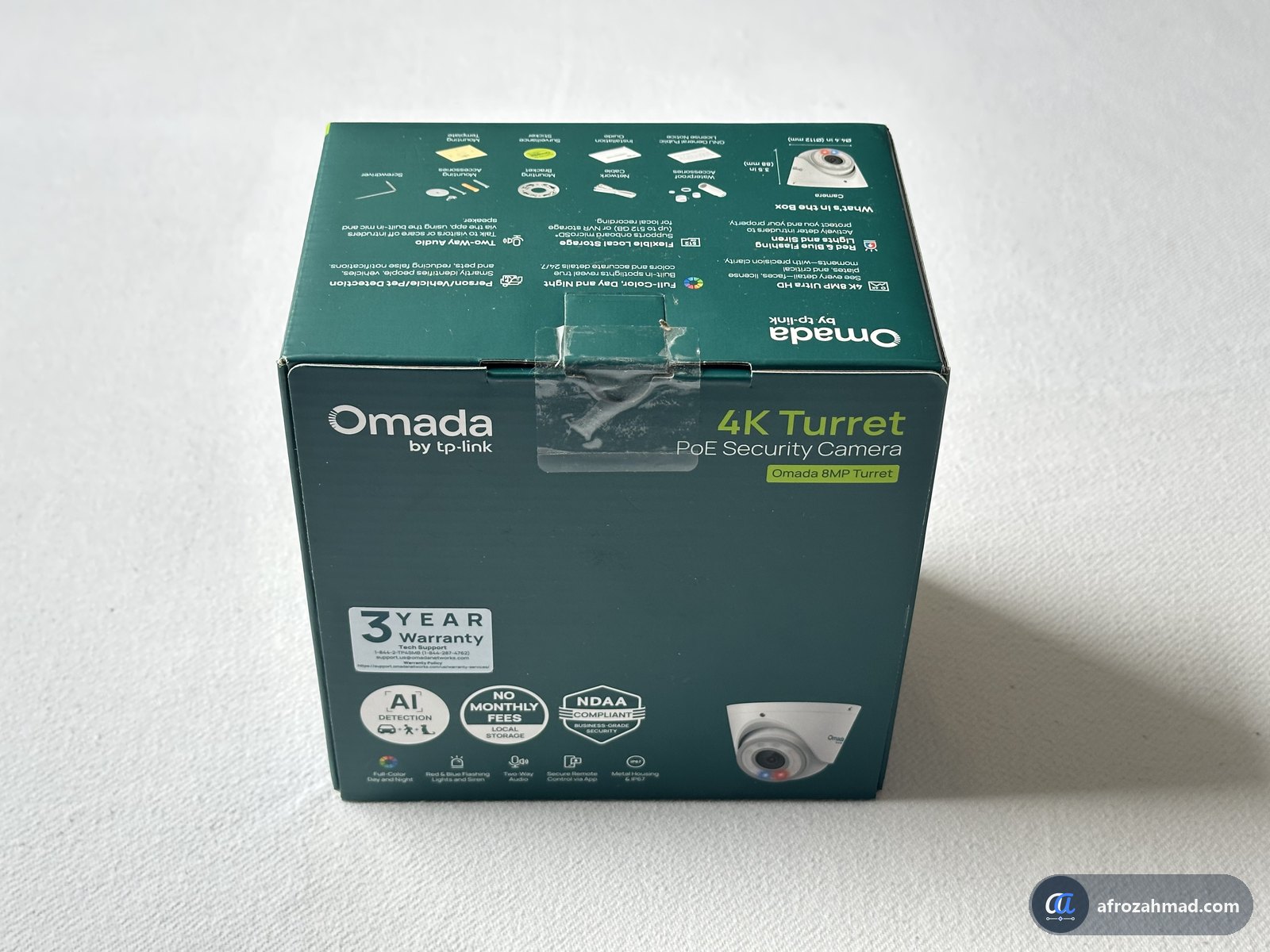
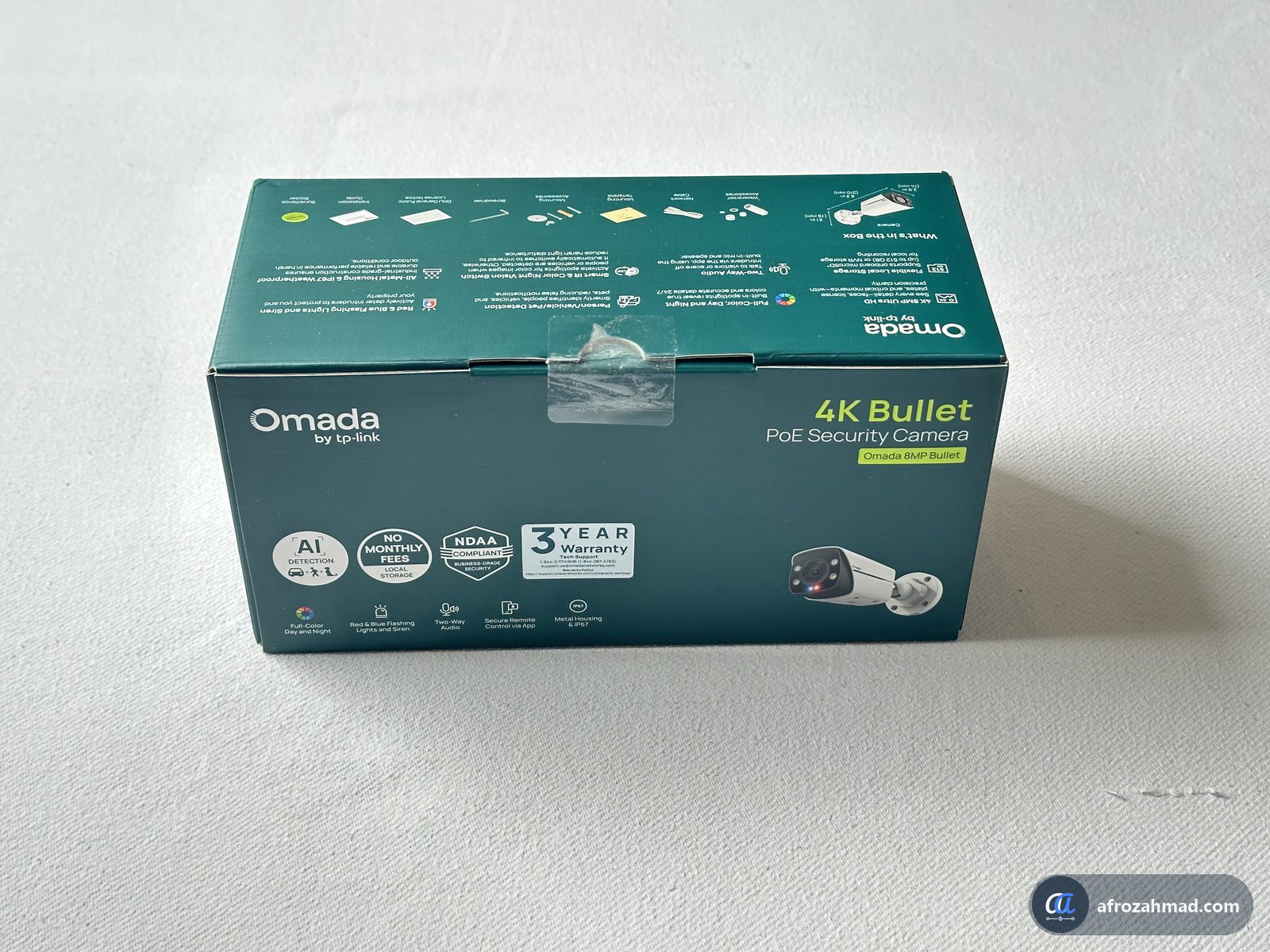
Both cameras record 4K (8 MP) video and run on PoE, so one cable carries power and data from the gateway. Each also has a capped 12 V DC plug on its cable, so you can use a power adapter instead. Omada says both have colour night vision with a white light and infrared up to 98 ft, and detect people, vehicles and pets. Both also have red and blue warning lights, a siren and two-way talk.
| Camera | Best for | Toughness | US price |
|---|---|---|---|
| 8MP Turret | Walls or ceilings, indoors or out, wide coverage. | IP67 weatherproof, IK08 impact rating | $99.99 |
| 8MP Bullet | Walls or poles outdoors, pointed at one area. | IP67 weatherproof, IK10 impact rating | $99.99 |
Each camera box includes mounting screws, wall plugs, a weatherproof cover for the network plug, a short network cable and an L-key. The Turret also comes with a steel mounting plate. You view live video, playback and alerts in the Omada Guard app for iPhone and Android.
Who should consider it, and who should not?
Omada Fusion Pro FAQ
Does the Omada Fusion Pro 2.5G PoE have Wi-Fi?
No. It has no Wi-Fi radio. Add an Omada access point on one of its PoE ports, and the gateway powers and manages it.
Do you pay a subscription for the Fusion Pro?
Omada says there are no licence fees for cloud management, threat protection or video features such as Smart Search. Smart Search needs cameras with AI detection.
How many cameras can the Fusion Pro record?
Omada rates it for up to 12 cameras at 4K, 14 at 2K or 16 at HD on its internal SSD. With one supported Omada or VIGI NVR, it can manage up to 24 cameras.
Does it come with an SSD?
No. The SSD tray is included, but the SSD is sold separately. It takes one M.2 NVMe SSD of up to 2 TB.
Can it manage VIGI cameras?
Yes. Omada’s product page says it manages compatible Omada and VIGI cameras and one NVR. Check the supported-devices list linked on Omada’s Fusion Pro 2.5G PoE product page for your exact camera model.
Is the Fusion Pro sold in Canada?
Yes. Omada told me the Fusion Pro 2.5G PoE is the only model sold in Canada, at CA$699.99. The non-PoE Fusion Pro 2.5G is not sold there. The launch deals above are for the US only.
Terms used on this page
- Gateway
- the box between your internet line and your network. It does the routing and the firewall work.
- PoE+ (Power over Ethernet)
- power and data on one network cable, up to about 30 W per port.
- NVR (network video recorder)
- a box that stores footage from network cameras.
- IPS/IDS
- threat protection that inspects traffic and blocks known attacks.
- NVMe SSD
- a small, fast storage stick (M.2 size) that the Fusion Pro uses to record video.
- Clients
- any device that connects to your network, such as a phone, laptop or TV.
Next steps
- UniFi vs Omada vs MikroTik — how Omada compares with the other two ecosystems.
- Best PoE switches for home lab and small business — if you need more PoE ports later.
- Best budget routers for small business — cheaper options without cameras.
- Best 2.5GbE switches — if you need more 2.5 Gbps wired ports than the Fusion Pro has.
- Managed vs unmanaged switch — which kind of switch to add next to the Fusion Pro.
Standards and primary sources
- Omada, Fusion Pro 2.5G PoE product page — ports, PoE budget, SSD, camera support, Omada and VIGI compatibility.
- Omada, Fusion Pro Series and US quick comparison — the two models side by side.
- Omada, Fusion Pro Review Guide (press material for reviewers, November 2026) — US prices and Omada’s lab results.
- Omada, Security Camera Review Guide (press material for reviewers, November 2026) — 8MP Turret and Bullet specs and US prices.
- Omada Store, Fusion Pro & Surveillance launch offers — offer terms, dates, limits, warranty and recording estimate.
- Omada, email to the author, 9 and 10 November 2026 — Canadian price and availability.
- My own unboxing and the device labels, photographed 9 November 2026 — box contents, ports and power ratings.
Afroz Ahmad, “Omada Fusion Pro 2.5G PoE Review: Hands-On First Look”, afrozahmad.com, first look published 13 November 2026.
https://afrozahmad.com/blog/omada-fusion-pro-2-5g-poe-review/

- Omada Fusion Pro 2.5G PoE Review: Hands-On First Look (Testing in Progress) - November 13, 2026
- NAT Type Strict? How to Fix It on Xbox, PS5 and PC - November 11, 2026
- Rogers Modem Lights: Flashing Orange, Green, White Explained - October 24, 2026